STOP: Each chapter of Programming for Lovers comprises two parts. First, the “core text” presents critical concepts at a high level, avoiding language-specific details. The core text is followed by “code alongs,” where you will apply what you have learned while learning the specifics of the language syntax. We strongly suggest starting with this chapter’s core text (click the button below) to grasp the fundamentals before moving onto code alongs to see the application of these fundamentals. Once you have done so, you are ready to proceed with this code along!
Learning objectives
In the core text, we showed a language-neutral way of representing Rectangle and Circle objects as a collection of fields, or variables that serve as attributes and completely describe the critical features of these objects. Our representations of these shapes are shown below.
type Rectangle
    x1 float
    y1 float
    width float
    height float
    rotation float

type Circle
    x1 float
    y1 float
    radius float
In this code along, we will start exploring how Python implements object-oriented programming using this example of shapes, which will prepare us to extend what we learned and implement a gravity simulator.
Code along summary
Setup
Create a folder called shapes in your python/src/ directory. Create a text file called main.py in the python/src/shapes folder. We will edit main.py in this code along, which should have the following starter code.
def main():
    print("Shapes.")


if __name__ == "__main__":
    main()
Defining shapes
In Python, we define an object type by using the keyword class, followed by the name of the object, followed by a colon. For example, we define a Rectangle object as follows.
class Rectangle:
Fields in Python are called attributes. To establish the attributes of a Rectangle object, we use a special function called __init__() called a constructor. This function takes as input a special variable called self, and returns no outputs. Within the function, we set the default attributes of a Rectangle object. In this case, we will set all the attributes to 0.0.
class Rectangle:
    def __init__(self):
        # set default values for each field
        self.width = 0.0
        self.height = 0.0
        self.x1 = 0.0
        self.y1 = 0.0
        self.rotation = 0.0
Note: There are two underscores before and afterinit.
As every function in Python should have a docstring, so should every class declaration. Let’s add one to our Rectangle class below.
class Rectangle:
    """
    Represents a 2D rectangle with width, height, position, and rotation.

    Attributes:
        width: The rectangle's width (float).
        height: The rectangle's height (float).
        x1: The x-coordinate of the rectangle's origin or corner (float).
        y1: The y-coordinate of the rectangle's origin or corner (float).
        rotation: The rectangle's rotation angle in degrees (float).
    """

    def __init__(self):
        # set default values for each field
        self.width = 0.0
        self.height = 0.0
        self.x1 = 0.0
        self.y1 = 0.0
        self.rotation = 0.0
We will declare a Circle type as well.
class Circle:
    """
    Represents a 2D circle defined by its center and radius.

    Attributes:
        x1: The x-coordinate of the circle's center (float).
        y1: The y-coordinate of the circle's center (float).
        radius: The radius of the circle (float).
    """

    def __init__(self):
        self.x1 = 0.0
        self.y1 = 0.0
        self.radius = 0.0
Note: Good Python practice is to place any class definitions after imports and before function calls in a Python file.
Creating instances of objects
Once we have declared an object type, we can create an instance of this object, or a variable whose type has the object type. For example, we can create a new Rectangle variable called r using the notation r = Rectangle(). Let’s create a Rectangle and a Circle object below.
def main():
    print("Shapes.")

    my_circle = Circle()
    r = Rectangle()
Now that we have declared these two variables, we can update their attributes however we like. For example, let’s set some attributes of the Circle and Rectangle that we declared.
def main():
    print("Shapes.")

    my_circle = Circle()
    r = Rectangle()

    my_circle.x1 = 1.0
    my_circle.y1 = 3.0
    my_circle.radius = 2.0
    r.width = 3.0
    r.height = 5.0
Defining objects with parameterized constructors
Rather than declaring a shape and then later setting its fields, it would be cleaner to just set these fields when we declare the shape. To do so, we will use a parameterized constructor. We update our Rectangle and Circle object declarations below to allow the user to input their own values when declaring a shape variable; if we do not declare specific values for the shape attributes, they are all set to default values of 0.0. We also will add type hints to each parameter within the constructor to indicate the type of each attribute.
class Rectangle:
    """
    Represents a 2D rectangle with width, height, position, and rotation.

    Attributes:
        width (float): The rectangle's width.
        height (float): The rectangle's height.
        x1 (float): The x-coordinate of the rectangle's origin or corner.
        y1 (float): The y-coordinate of the rectangle's origin or corner.
        rotation (float): The rectangle's rotation angle in degrees.
    """

    def __init__(self, width: float = 0.0, height: float = 0.0,
                 x1: float = 0.0, y1: float = 0.0, rotation: float = 0.0) -> None:
        self.width = width
        self.height = height
        self.x1 = x1
        self.y1 = y1
        self.rotation = rotation


class Circle:
    """
    Represents a 2D circle defined by its center and radius.

    Attributes:
        x1 (float): The x-coordinate of the circle's center.
        y1 (float): The y-coordinate of the circle's center.
        radius (float): The radius of the circle.
    """

    def __init__(self, x1: float = 0.0, y1: float = 0.0, radius: float = 0.0) -> None:
        self.x1 = x1
        self.y1 = y1
        self.radius = radius
We can even add parameter checks so that a user cannot cause problems by creating an object with invalid attribute values.
class Rectangle:
    """
    Represents a 2D rectangle with width, height, position, and rotation.

    Attributes:
        width (float): The rectangle's width. Must be non-negative.
        height (float): The rectangle's height. Must be non-negative.
        x1 (float): The x-coordinate of the rectangle's origin or corner.
        y1 (float): The y-coordinate of the rectangle's origin or corner.
        rotation (float): The rectangle's rotation angle in degrees.
    """

    def __init__(self, width: float = 0.0, height: float = 0.0,
                 x1: float = 0.0, y1: float = 0.0, rotation: float = 0.0) -> None:
        if width < 0.0:
            raise ValueError("width must be non-negative")
        if height < 0.0:
            raise ValueError("height must be non-negative")

        self.width = width
        self.height = height
        self.x1 = x1
        self.y1 = y1
        self.rotation = rotation


class Circle:
    """
    Represents a 2D circle defined by its center and radius.

    Attributes:
        x1 (float): The x-coordinate of the circle's center.
        y1 (float): The y-coordinate of the circle's center.
        radius (float): The radius of the circle. Must be non-negative.
    """

    def __init__(self, x1: float = 0.0, y1: float = 0.0, radius: float = 0.0) -> None:
        if radius < 0.0:
            raise ValueError("radius must be non-negative")

        self.x1 = x1
        self.y1 = y1
        self.radius = radius
Let’s now redeclare my_circle and r to pass in the parameters we would like at declaration. The first values that we pass into the object declarations will be assigned to the first variables in the constructor; for example, when declaring the Rectangle below, we only pass in two attributes into the declaration, and so the two fields of the Rectangle object that will be set are its width and height.
def main():
    print("Shapes.")

    r = Rectangle(3.0, 5.0)          # width=3.0, height=5.0; others default to 0.0
    my_circle = Circle(1.0, 3.0, 2.0)  # x1=1.0, y1=3.0, radius=2.0
Printing an object
Let’s now print our two objects so that we can verify that we have set the attributes of each one appropriately.
def main():
    print("Shapes.")

    r = Rectangle(3.0, 5.0)          # width=3.0, height=5.0; others default to 0.0
    my_circle = Circle(1.0, 3.0, 2.0)  # x1=1.0, y1=3.0, radius=2.0

    print(r)
    print(my_circle)
STOP: In a new terminal window, navigate into our directory usingcd python/src/shapes. Then run your code by executingpython3 main.py(macOS/Linux) orpython main.py(Python).
Although we might expect to obtain information about the objects’ attributes, instead we obtain perplexing results from printing each object. On our computer, we obtain the following.
<__main__.Rectangle object at 0x7f4c57c62c90>
<__main__.Circle object at 0x7f4c3e621a90>
In a later chapter, we will explain what output like 0x7f4c57c62c90 means. For now, we will show how to obtain a more descriptive print() statement.
When we define an object class, alongside a constructor, best Python practice is to provide a special function called __repr__ that takes an object of the type as input and returns a string representation of the object that we can use for printing and debugging. Below, we use f-strings to implement __repr__ functions for the Rectangle and Circle classes.
class Rectangle:
    """
    Represents a 2D rectangle with width, height, position, and rotation.

    Attributes:
        width (float): The rectangle's width. Must be non-negative.
        height (float): The rectangle's height. Must be non-negative.
        x1 (float): The x-coordinate of the rectangle's origin or corner.
        y1 (float): The y-coordinate of the rectangle's origin or corner.
        rotation (float): The rectangle's rotation angle in degrees.
    """

    def __init__(self, width: float = 0.0, height: float = 0.0,
                 x1: float = 0.0, y1: float = 0.0, rotation: float = 0.0) -> None:
        if width < 0.0:
            raise ValueError("width must be non-negative")
        if height < 0.0:
            raise ValueError("height must be non-negative")

        self.width = width
        self.height = height
        self.x1 = x1
        self.y1 = y1
        self.rotation = rotation

    def __repr__(self) -> str:
        return (f"Rectangle(width={self.width}, height={self.height}, "
                f"x1={self.x1}, y1={self.y1}, rotation={self.rotation})")

class Circle:
    """
    Represents a 2D circle defined by its center and radius.

    Attributes:
        x1 (float): The x-coordinate of the circle's center.
        y1 (float): The y-coordinate of the circle's center.
        radius (float): The radius of the circle. Must be non-negative.
    """

    def __init__(self, x1: float = 0.0, y1: float = 0.0, radius: float = 0.0) -> None:
        if radius < 0.0:
            raise ValueError("radius must be non-negative")

        self.x1 = x1
        self.y1 = y1
        self.radius = radius

    def __repr__(self) -> str:
        return f"Circle(x1={self.x1}, y1={self.y1}, radius={self.radius})"
Now that we have written __repr__, we can update main() to use this function when we print each object.
def main():
    print("Shapes.")

    r = Rectangle(3.0, 5.0)          # width=3.0, height=5.0; others default to 0.0
    my_circle = Circle(1.0, 3.0, 2.0)  # x1=1.0, y1=3.0, radius=2.0

    print(repr(r))
    print(repr(my_circle))
When we run our code, we now obtain the following much more descriptive output.
Rectangle(width=3.0, height=5.0, x1=0.0, y1=0.0, rotation=0.0)
Circle(x1=1.0, y1=3.0, radius=2.0)
Because __repr__ is Python’s standard representation of a class instance, Python provides the nice feature that __repr__ is automatically called behind the scenes when we pass an object into print(). As a result, our original code, reproduced below, will provide the same result when run.
def main():
    print("Shapes.")

    r = Rectangle(3.0, 5.0)          # width=3.0, height=5.0; others default to 0.0
    my_circle = Circle(1.0, 3.0, 2.0)  # x1=1.0, y1=3.0, radius=2.0

    print(r)
    print(my_circle)
Changing fields
After we have declared an object, we can still set or update its attributes directly. For example, we will change the width and height of our rectangle as well as set the x1 and y1 attributes below. Printing r will now show the fields updated.
def main():
    print("Shapes.")

    r = Rectangle(3.0, 5.0)          # width=3.0, height=5.0; others default to 0.0
    my_circle = Circle(1.0, 3.0, 2.0)  # x1=1.0, y1=3.0, radius=2.0

    r.width = 2.0
    r.height = 4.5
    r.x1 = -1.45
    r.y1 = 2.3
    # we will leave the rotation as 0.0

    print(r)
    print(my_circle)
Passing shapes as inputs to functions
Now that we have created objects, we would like to use them as inputs and outputs of functions. For example, we saw in the core text that we can infer the area of both our shapes from their attributes; let us therefore write two area() functions, taking each of our shapes as input, and returning their areas.
def area(r: Rectangle) -> float:
    """
    Compute the area of a rectangle.

    Args:
        r (Rectangle): The rectangle whose area to compute.
            Must have `width` and `height` attributes.

    Returns:
        float: The area of the rectangle, calculated as width × height.
    """
    return r.width * r.height


def area(c: Circle) -> float:
    """
    Compute the area of a circle.

    Args:
        c (Circle): The circle whose area to compute.
            Must have a `radius` attribute.

    Returns:
        float: The area of the circle, calculated as 3.0 × radius².
    """
    return 3.0 * (c.radius ** 2)
Unfortunately, Python will not allow us to call two functions having the same name (the second such function replaces the first), and so instead, we will need to provide differing names for our functions.
def area_rectangle(r: Rectangle) -> float:
    """
    Compute the area of a rectangle.

    Args:
        r (Rectangle): The rectangle whose area to compute.
            Must have `width` and `height` attributes.

    Returns:
        float: The area of the rectangle, calculated as width × height.
    """
    return r.width * r.height


def area_circle(c: Circle) -> float:
    """
    Compute the area of a circle.

    Args:
        c (Circle): The circle whose area to compute.
            Must have a `radius` attribute.

    Returns:
        float: The area of the circle, calculated as 3.0 × radius².
    """
    return 3.0 * (c.radius ** 2)
We can now call these functions within main() to determine the area of the two shapes we created. Running the code below prints 9.0 and 12.0, as desired.
def main():
    print("Shapes.")

    r = Rectangle(3.0, 5.0)          # width=3.0, height=5.0; others default to 0.0
    my_circle = Circle(1.0, 3.0, 2.0)  # x1=1.0, y1=3.0, radius=2.0

    r.width = 2.0
    r.height = 4.5
    r.x1 = -1.45
    r.y1 = 2.3
    # we will leave the rotation as 0.0

    print(r)
    print(my_circle)

    print("Areas:")
    print(area_rectangle(r))
    print(area_circle(my_circle))
Experienced programmers are likely hammering their fists on the table, not because we have the wrong value of π, but rather because we are missing a much easier way to write two area() functions that will avoid the issue of naming two functions the same. We will see a better way of writing the above functions in the next chapter.
Exercise: Write two Python functionsperimeter_rectangle()andperimeter_circle()that take as input a Rectangle and Circle object, respectively, and return the perimeter of each shape.
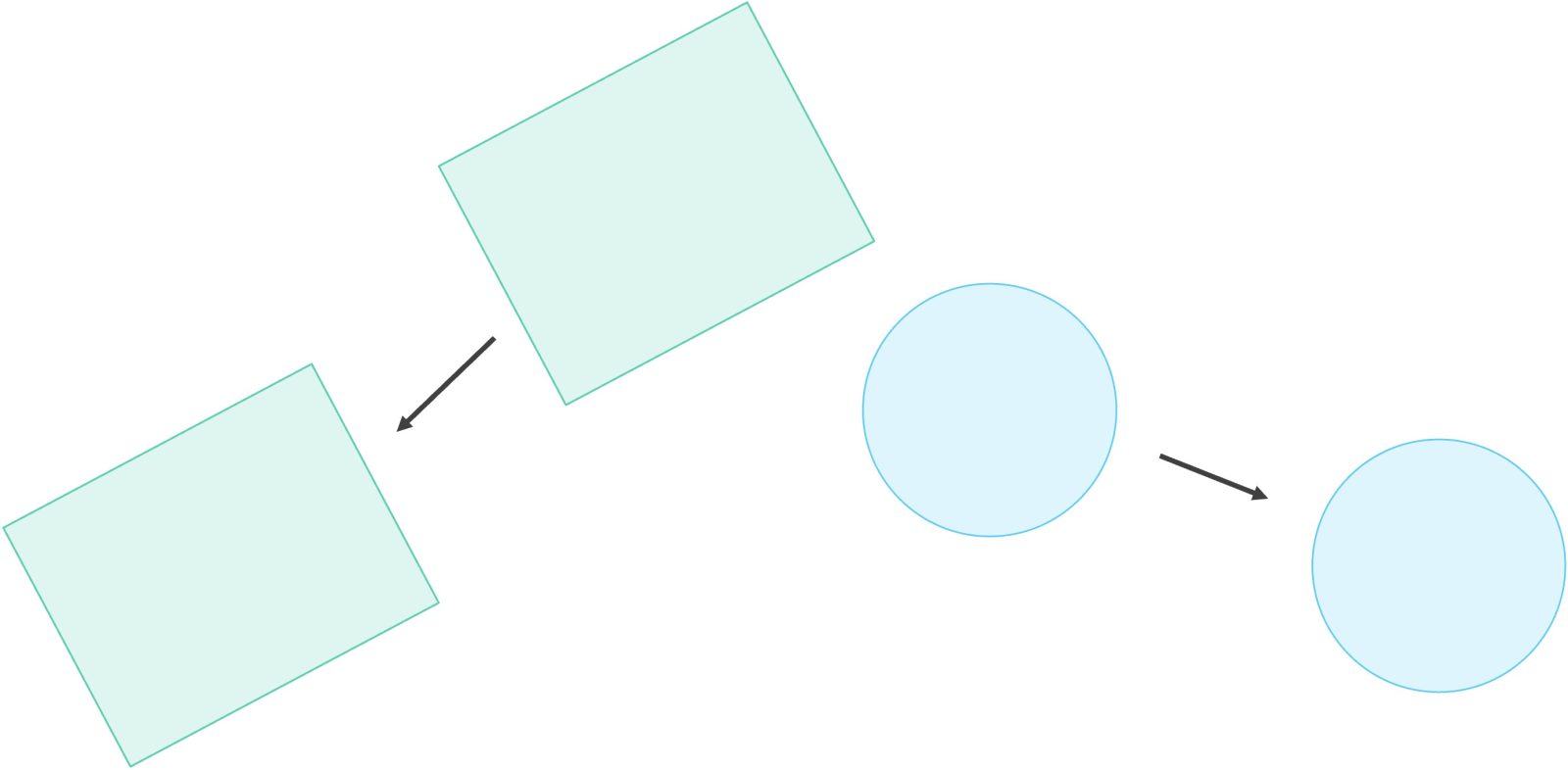
Translating shapes indicates that objects are pass by reference
Next, we will write functions to translate our Rectangle and Circle objects, as shown below. In both cases, we can translate a shape by changing the shape’s x1 and y1 coordinates.
def translate_rectangle(r: Rectangle, a: float, b: float) -> None:
    """
    Translate a rectangle by shifting its coordinates in place.

    This function mutates the given rectangle by adjusting its
    `x1` and `y1` attributes directly.

    Args:
        r (Rectangle): The rectangle to translate.
            Must have `x1` and `y1` attributes representing its position.
        a (float): The amount to shift along the x-axis.
        b (float): The amount to shift along the y-axis.

    Returns:
        None
    """
    r.x1 += a
    r.y1 += b


def translate_circle(c: Circle, a: float, b: float) -> None:
    """
    Translate a circle by shifting its center coordinates in place.

    This function mutates the given circle by adjusting its
    `x1` and `y1` attributes directly.

    Args:
        c (Circle): The circle to translate.
            Must have `x1` and `y1` attributes representing its center.
        a (float): The amount to shift along the x-axis.
        b (float): The amount to shift along the y-axis.

    Returns:
        None
    """
    c.x1 += a
    c.y1 += b
We will now add some code to main() that calls the translation function and then prints our Rectangle and Circle objects after doing so. The following code shows that the objects both indeed move; the rectangle moves from (-1.45, 2.3) to (0.55, 6.3), and the circle moves from (1.0, 3.0) to (0.0, -4.0). That is, objects are pass by reference.
def main():
    print("Shapes.")

    r = Rectangle(3.0, 5.0)            # width=3.0, height=5.0; defaults x1=y1=0.0
    my_circle = Circle(1.0, 3.0, 2.0)  # x1=1.0, y1=3.0, radius=2.0

    r.width = 2.0
    r.height = 4.5
    r.x1 = -1.45
    r.y1 = 2.3
    # we will leave the rotation as 0.0

    print(r)
    print(my_circle)

    print("Areas:")
    print(area_rectangle(r))
    print(area_circle(my_circle))

    # Translate both shapes
    translate_rectangle(r, 2.0, 4.0)   # move rectangle right by 2, up by 4
    translate_circle(my_circle, -1.0, -7.0)  # move circle left by 1, down by 7

    print("Translated shapes:")
    print(r)
    print(my_circle)
Unfortunately, how we have written these functions is still not ideal. We would like to name both functions translate(), and our functions mix object and integer parameters as input. In the next chapter, we will see a better way of working with functions involving objects.
Class and instance attributes
Python also provides support for a special kind of attribute called a class attribute that applies to every member of a class. To define a class attribute, place it at the first indentation within the class definition, and before the constructor. Below, we define a string attribute of the Rectangle object.
class Rectangle:
    """
    Represents a 2D rectangle with width, height, position, and rotation.

    Attributes:
        width (float): The rectangle's width. Must be non-negative.
        height (float): The rectangle's height. Must be non-negative.
        x1 (float): The x-coordinate of the rectangle's origin or corner.
        y1 (float): The y-coordinate of the rectangle's origin or corner.
        rotation (float): The rectangle's rotation angle in degrees.
    """

    description: str = "boxy"

    def __init__(self, width: float = 0.0, height: float = 0.0,
                 x1: float = 0.0, y1: float = 0.0, rotation: float = 0.0) -> None:
        if width < 0.0:
            raise ValueError("width must be non-negative")
        if height < 0.0:
            raise ValueError("height must be non-negative")

        self.width = width
        self.height = height
        self.x1 = x1
        self.y1 = y1
        self.rotation = rotation

    def __repr__(self) -> str:
        return (f"Rectangle(width={self.width}, height={self.height}, "
                f"x1={self.x1}, y1={self.y1}, rotation={self.rotation})")
Let’s add a description field to our Circle object too.
class Circle:
    """
    Represents a 2D circle defined by its center and radius.

    Attributes:
        x1 (float): The x-coordinate of the circle's center.
        y1 (float): The y-coordinate of the circle's center.
        radius (float): The radius of the circle. Must be non-negative.
    """

    description: str = "round"

    def __init__(self, x1: float = 0.0, y1: float = 0.0, radius: float = 0.0) -> None:
        if radius < 0.0:
            raise ValueError("radius must be non-negative")

        self.x1 = x1
        self.y1 = y1
        self.radius = radius

    def __repr__(self) -> str:
        return f"Circle(x1={self.x1}, y1={self.y1}, radius={self.radius})"
A class attribute can be accessed in one of two ways. First, if we have an instance of the class, then we can access it in the same way that we access any other attribute. For example, given our Rectangle object r, we can access its description with r.description, as shown below.
def main():
    print("Shapes.")

    r = Rectangle(3.0, 5.0)            # width=3.0, height=5.0; defaults x1=y1=0.0
    my_circle = Circle(1.0, 3.0, 2.0)  # x1=1.0, y1=3.0, radius=2.0

    # code omitted for clarity

    print("Our rectangle is", r.description)
Second, we can access a class attribute by accessing it with respect to the name of the class. For example, we can access the description attribute of the Circle class by calling Circle.description, as shown below.
def main():
    print("Shapes.")

    r = Rectangle(3.0, 5.0)            # width=3.0, height=5.0; defaults x1=y1=0.0
    my_circle = Circle(1.0, 3.0, 2.0)  # x1=1.0, y1=3.0, radius=2.0

    # code omitted for clarity

    print("Our rectangle is", r.description)
    print("Every circle is", Circle.description)
One might wonder what happens when we change a class instance by accessing it via a variable. For example, let us change the description of my_circle.
def main():
    print("Shapes.")

    r = Rectangle(3.0, 5.0)            # width=3.0, height=5.0; defaults x1=y1=0.0
    my_circle = Circle(1.0, 3.0, 2.0)  # x1=1.0, y1=3.0, radius=2.0

    # code omitted for clarity

    print("Our rectangle is", r.description)
    print("Every circle is", Circle.description)

    my_circle.description = "orb-like"
    print("Our circle is now", my_circle.description)
If we print Circle.description, then we will see that it has not changed. That is, my_circle has had its description attribute overwritten only locally, without affecting the attribute of the Circle class or of any other Circle object.
def main():
    print("Shapes.")

    r = Rectangle(3.0, 5.0)            # width=3.0, height=5.0; defaults x1=y1=0.0
    my_circle = Circle(1.0, 3.0, 2.0)  # x1=1.0, y1=3.0, radius=2.0

    # code omitted for clarity

    print("Our rectangle is", r.description)
    print("Every circle is", Circle.description)

    my_circle.description = "orb-like"
    print("Our circle is now", my_circle.description)

    print("Every other circle is still", Circle.description)
Dataclasses
As a warmup for the gravity simulator, let’s see how @dataclass — a Python decorator for data-centric classes — can simplify the code we write. Recall that for Rectangle and Circle, we had to write __init__ and __repr__ by hand. The @dataclass decorator generates both automatically, and it is ideally suited to classes that primarily store data rather than define complex behaviors — exactly the kind we need for the gravity simulator.
To use it, we import dataclass and field from Python’s standard library.
from dataclasses import dataclass, field
The gravity simulator needs to track positions and velocities in two dimensions. We represent these as an OrderedPair with x and y coordinates.
@dataclass
class OrderedPair:
    x: float = 0.0
    y: float = 0.0
Because of the @dataclass decorator, Python generates __init__ and __repr__ for us automatically. To verify, we update def main() to create an OrderedPair and print it.
def main():
    p = OrderedPair(3.0, 4.0)
    print(p)
Running this code prints OrderedPair(x=3.0, y=4.0). The @dataclass decorator generated an __init__ that accepts positional arguments and a __repr__ that labels each field by name — and we didn’t have to write either one.
Each celestial body in the simulator has a name, mass, position, velocity, and radius. Following the same pattern, we might try writing a Body dataclass as follows.
@dataclass
class Body:
    name: str = ""
    mass: float = 0.0
    position: OrderedPair = OrderedPair()
    velocity: OrderedPair = OrderedPair()
    acceleration: OrderedPair = OrderedPair()
    radius: float = 0.0
This looks reasonable, but if we try to use it — say, by creating a Body in main() — Python raises a ValueError.
def main():
    b1 = Body()
The problem is that OrderedPair() in the class definition is a mutable object. If Python allowed it as a default value, every Body we create would share the exact same OrderedPair object as its default position. In a gravity simulator where every body moves independently, this would be a disaster. Python protects us from this mistake by raising an error.
The fix is to tell Python to call OrderedPair() freshly for each new instance. We do this with field(default_factory=OrderedPair), which is why we also imported field earlier.
@dataclass
class Body:
    name: str = ""
    mass: float = 0.0
    position: OrderedPair = field(default_factory=OrderedPair)
    velocity: OrderedPair = field(default_factory=OrderedPair)
    acceleration: OrderedPair = field(default_factory=OrderedPair)
    radius: float = 0.0
Now each Body gets its own independent position, velocity, and acceleration, and our code runs without error.
Because @dataclass generates __init__ for us, we can initialize a Body by passing values for any of its fields by name, leaving the rest at their defaults. For example, we could declare the sun as follows, which sets its name, mass and radius attributes (we can set them in any order) and leaves position, velocity, and acceleration as freshly created zero OrderedPair instances. We update def main() to try this and print the result, which will print nicely because @dataclass also generates __repr__ for us.
def main():
    sun = Body(name="Sun", mass=1.989e30, radius=696340.0)
    print(sun)
This prints the following.
Body(name='Sun', mass=1.989e+30, position=OrderedPair(x=0.0, y=0.0), velocity=OrderedPair(x=0.0, y=0.0), acceleration=OrderedPair(x=0.0, y=0.0), radius=696340.0).
Note that the nested OrderedPair objects are printed clearly too, and all without writing a single line of the dreaded __init__ or __repr__.
Looking ahead
Now that we have introduced the basics of object-oriented programming in Python and seen how dataclasses can organize our data, we are ready to extend what we have learned to build a gravity simulator, which will be the subject of our work in the remainder of this chapter’s code alongs.