Code along video
Learning objectives
In this code along, we will write our very first parallel program in Python. We will ask how many cores our computer has, and then we will return to Gauss’s problem of summing the first n positive integers, splitting the list in half and handing each half to its own process. Along the way, we will meet the three tools from Python’s multiprocessing module that every parallel program in this chapter relies upon: Process objects that do our work, a Queue that collects their results, and the start() and join() methods that launch our workers and wait for them to finish.
Code along summary
Setup
Create a new directory python/src/parallel and add a new file called main.py there containing the following code. This is all of the starter code that we need.
def main():
    print("Parallel programming!")

if __name__ == "__main__":
    main()
How many cores does my computer have?
Everything that we do in this lesson requires just one module, called multiprocessing, which is built into Python. It has a reputation for being slow and a bit clunky, and we will see why later in the chapter, but it is the standard way of running Python code on more than one core. Add the following line to the top of main.py.
import multiprocessing
Our first question is a natural one: how many computers does our computer have inside it? The better term is core. For a long time, a computer was sold with a single processor. Around the 2000s, as it became harder to keep making a single processor faster and cheaper to make processors smaller, manufacturers started packing several cores into the same machine as standard practice. The cpu_count() function from multiprocessing tells us how many cores we have. Add the following line to main().
def main():
    print("Parallel programming!")

    print("Num cores available:", multiprocessing.cpu_count())
Navigate into python/src/parallel in a terminal, and run python3 main.py (or python main.py on Windows). The computer that Phillip uses in the video has 10 cores; the machine that we used to test this page has 8.
Parallel programming!
Num cores available: 8
STOP: Run this code on your own computer. How many cores do you have? Numbers like 8, 10, 12, 14, and 16 are common for a modern laptop.
This number tells us that our computer is already parallel. When we have a web browser, a music player, and a code editor open at once, the operating system spreads that work out over the available cores without us having to think about it. Our goal in this chapter is to do the same thing deliberately within a single program.
Summing a list the old-fashioned way
We will start with a very simple example: summing the values in a list, split over two workers. Note that we are using the word process here rather than “processor”. A process is a worker that runs some code; we get to choose how many processes to create, regardless of how many cores our machine has.
Let’s return to the problem that a young Gauss is said to have solved in his head, summing the first 100 positive integers. Add the following function to main.py. It is just a demo, so it takes no input and returns nothing. For now, it builds the list [1, 2, ..., n] and sums it serially with Python’s built-in sum() function.
def sum_example_two_procs() -> None:
    # let's split the work of summing the first n positive integers over two processes.
    n = 100
    data = list(range(1, n+1))  # [1, ..., n]
    print(sum(data))
Then call this function at the end of main().
def main():
    print("Parallel programming!")

    print("Num cores available:", multiprocessing.cpu_count())

    sum_example_two_procs()
When we run our code, we see the magic number 5050.
Parallel programming!
Num cores available: 8
5050
Splitting the list in two
Instead of calling sum(data) on the entire list, we will split the list into two halves of approximately equal size and give each half to its own worker. First, we find the midpoint of the list. This is a great place to use integer division (//), which rounds down if needed; if data had 101 elements, then mid would be 50.
We then make a list called data_slices containing two sublists: the prefix data[:mid] and the suffix data[mid:]. Recall that a slice does not include the element at its second index, so data[:mid] stops just before index mid, and data[mid:] starts at index mid. Every element lands in exactly one of the two halves. Replace the line print(sum(data)) with the following lines.
# split the work over two processes
mid = len(data) // 2

# divide our data into 2 halves of equal size
data_slices = [data[:mid], data[mid:]]
We could pass data[:mid] and data[mid:] directly to our workers without declaring data_slices, but storing the slices in a list will make it easy to generalize to more than two workers later.
A queue to collect results
Once we send our two workers off with their halves of the list, each one will compute a sum. How do we get those sums back? We will create a special kind of container called a queue. You can think of a queue as a list, but one with some extra safety built in so that several processes can safely add to it at the same time. An ordinary Python list will not work here. Fortunately, multiprocessing provides a Queue class (note the capital Q), so we can create a new, empty queue with one line.
# create a "queue" to collect results of the 2 processes that we will run
result_queue = multiprocessing.Queue()  # Queue object
The plan is that each worker will place its answer into result_queue when it is done. Our function will then grab two values from the queue and add them together.
Creating the worker processes
We have used the idea of handing off work before. A subroutine lets us defer the dirty details of a task to another function, and a recursive function hands a smaller version of the problem off to another call of itself. Parallel programming takes this idea of a minion one step further: our minions now do their work at the same time as we do.
In multiprocessing, a worker is a Process object, and creating one always requires two inputs.
target: the name of the function that the worker will run.args: the arguments that get passed into that function, given as a tuple.
Our worker function will be called partial_sum(). What does each worker need to know? It needs its half of the list, of course. It also needs the queue, since that is where it will put its answer when it is finished. Add the following lines to sum_example_two_procs() to create two workers, p0 and p1, which differ only in which slice of the data they receive.
# create the minion "processes"/workers
# two inputs: 1. function name (called "target"), 2. arguments ("args") that get passed into the function, as a TUPLE
p0 = multiprocessing.Process(target=partial_sum, args = (data_slices[0], result_queue))
p1 = multiprocessing.Process(target=partial_sum, args = (data_slices[1], result_queue))
Note: It is easy to forget thatargsmust be a tuple, so remember the parentheses around the arguments. If a worker function took only one argumentx, you would need to writeargs = (x,)with a trailing comma, because(x)is justxin parentheses.
Why use a queue at all, instead of having partial_sum() return its sum like every function that we have written so far? Returning a value is an inherently serial idea. Up to this point in the course, programming has been sequential: given enough time, you could trace a program line by line, jumping into each function as it is called and returning to where you left off when it finishes. When we launch a worker, we do not want to sit and wait for it to return. We want to carry on with our own work and maybe launch another worker. So we lose the ability to know exactly when each worker finishes, and the queue is how we will get some of that control back: when a value appears in the queue, we know that the worker who put it there is done.
Writing the worker function
Python will complain that partial_sum() does not exist yet, so let’s write it. It takes a list of integers along with the queue, whose type is multiprocessing.Queue. It returns nothing! In this style of parallel programming, a worker does not return its answer; it places its answer into the queue. Add the following function to main.py.
def partial_sum(data_slice: list[int], result_queue: multiprocessing.Queue) -> None:
    """
    Takes as input a list of integers and a queue and places the sum of the list's
    elements into the queue.
    Note that it doesn't return anything.
    """
    val = sum(data_slice)  # this is serial!
    # place the value into the queue
    result_queue.put(val)
Inside the worker, nothing is parallel. The division of labor has already happened, so the worker just sums its own slice serially, exactly as we would have before. The only difference is the last line: instead of return val, we call the queue’s put() method, which places val into the queue. Because the same queue object is passed to both processes, we will be able to see the values that the workers put into it back in sum_example_two_procs().
Starting the processes
So far, we have only told our workers what to do; we have not told them to begin. Add the following lines to sum_example_two_procs() to start both processes.
# start the processes
p0.start()
p1.start()

# meanwhile, my code continues
Here is the most important thing to understand in this lesson. In a serial program, one line executes, and then the next line executes. When we call p0.start(), however, the worker begins summing its half of the list, and while it works, the next line runs and starts p1. If the workers had a lot to do, any code after these two lines would run before either worker was done. Congratulations: you have written your first parallel program!
To see this for yourself, try temporarily adding a line print("hi") right after p1.start(). Our code prints hi without waiting for the workers, which are summing in the background. (In the video, Phillip starts typing such a line and deletes it before running his code; once you have seen it work, remove yours too.)
STOP: Suppose that we run this program on an old computer with only one core. Will it still run? If so, will it behave like a serial program, finishing all ofp0‘s work before startingp1?
The program does run on a single core, but it does not quietly turn into a serial program that finishes all of p0‘s work, then all of p1‘s work, and only then moves on. To see why, think about a question that Phillip asks his students at Carnegie Mellon: “How many classes are you taking right now?” A student might say five. But how can they be sitting in this class if they are taking five classes right now? Of course, they mean that five courses are in progress at the same time, not that they are literally attending five lectures at this moment.
This idea has a name. Concurrency means having multiple tasks in progress at the same time and managing them in some way. Filling a row of cups by pouring a little water into each one in turn is concurrent, whether we have one pitcher or twelve. Someone spinning ten plates with one hand is concurrent, since all ten plates are in progress even though the hand touches only one plate at any moment. And a computer with one core can keep twenty applications open, because the operating system moves from task to task so quickly that we never notice. That is exactly what happens to our two processes on a one-core machine.
Parallelism, which we met in the previous lesson, means literally doing multiple things at once, or simultaneously: two pitchers pouring at the same moment, two hands spinning plates, or applications divided over several cores. These two ideas overlap. Our program is always concurrent, because two tasks are in progress at the same time, and when the computer has more than one core to give it, it is parallel as well. You can have concurrency without parallelism (one worker juggling many tasks), and you can even have parallelism without concurrency, although that case is subtler, and we will not need it here.
Waiting for workers with join()
How do we know when our workers are finished? Each Process has a join() method that gives us back some control. When we call p0.join(), the code in our function will not continue past that line until p0 has finished. This behavior is called blocking. Add the following lines, which block until both workers have finished.
# How do I know that the processes are finished? Where is my control?
p0.join()
# the code will now not continue here until p0 is finished
p1.join()  # this blocks too (if p1 wasn't already finished)

# if we ever reach this point in the function, both are finished.
Calling join() does not stop the parallelism, because both workers have already started. It only says that we will not move on until they are done. There are two cases. If p0 finishes first, then p0.join() stops blocking as soon as p0 is done, and p1.join() then waits for p1. If p1 finishes first, then p0.join() waits for p0, and when we reach p1.join(), there is nothing left to wait for, so it returns immediately. Blocking only happens when there is something to wait for. Either way, the two lines together guarantee that we cannot get past them until both workers are finished. This is a source of a lot of frustration as we move to parallel programming: we have to remember both to start our workers and to coordinate them finishing.
Collecting the results from the queue
If we make it past the calls to join(), then both workers are done, and their answers are sitting in the queue. We remove a value from a queue with its get() method. Calling it twice gives us both sums, which we add and print. Since this is just a demo, we print the answer instead of returning it.
# The results? In the queue
val_a = result_queue.get()  # which worker gave me this? The first one to finish
val_b = result_queue.get()

print("Sum of list elements is:", val_a + val_b)
Here is our completed function, with the print("hi") line removed.
def sum_example_two_procs() -> None:
    # let's split the work of summing the first n positive integers over two processes.
    n = 100
    data = list(range(1, n+1))  # [1, ..., n]

    # split the work over two processes
    mid = len(data) // 2

    # divide our data into 2 halves of equal size
    data_slices = [data[:mid], data[mid:]]

    # create a "queue" to collect results of the 2 processes that we will run
    result_queue = multiprocessing.Queue()  # Queue object

    # create the minion "processes"/workers
    # two inputs: 1. function name (called "target"), 2. arguments ("args") that get passed into the function, as a TUPLE
    p0 = multiprocessing.Process(target=partial_sum, args = (data_slices[0], result_queue))
    p1 = multiprocessing.Process(target=partial_sum, args = (data_slices[1], result_queue))

    # the queue is pass by reference, so we will be able to see the values inside this function that are put into the queue

    # start the processes
    p0.start()
    p1.start()

    # meanwhile, my code continues

    # concurrency: having multiple tasks in progress at the same time
    # parallelism: literally doing multiple things at once with multiple workers (simultaneously)

    # How do I know that the processes are finished? Where is my control?
    p0.join()
    # the code will now not continue here until p0 is finished
    p1.join()  # this blocks too (if p1 wasn't already finished)

    # if we ever reach this point in the function, both are finished.

    # The results? In the queue
    val_a = result_queue.get()  # which worker gave me this? The first one to finish
    val_b = result_queue.get()

    print("Sum of list elements is:", val_a + val_b)
When we run python3 main.py, we obtain the correct answer.
Parallel programming!
Num cores available: 8
Sum of list elements is: 5050
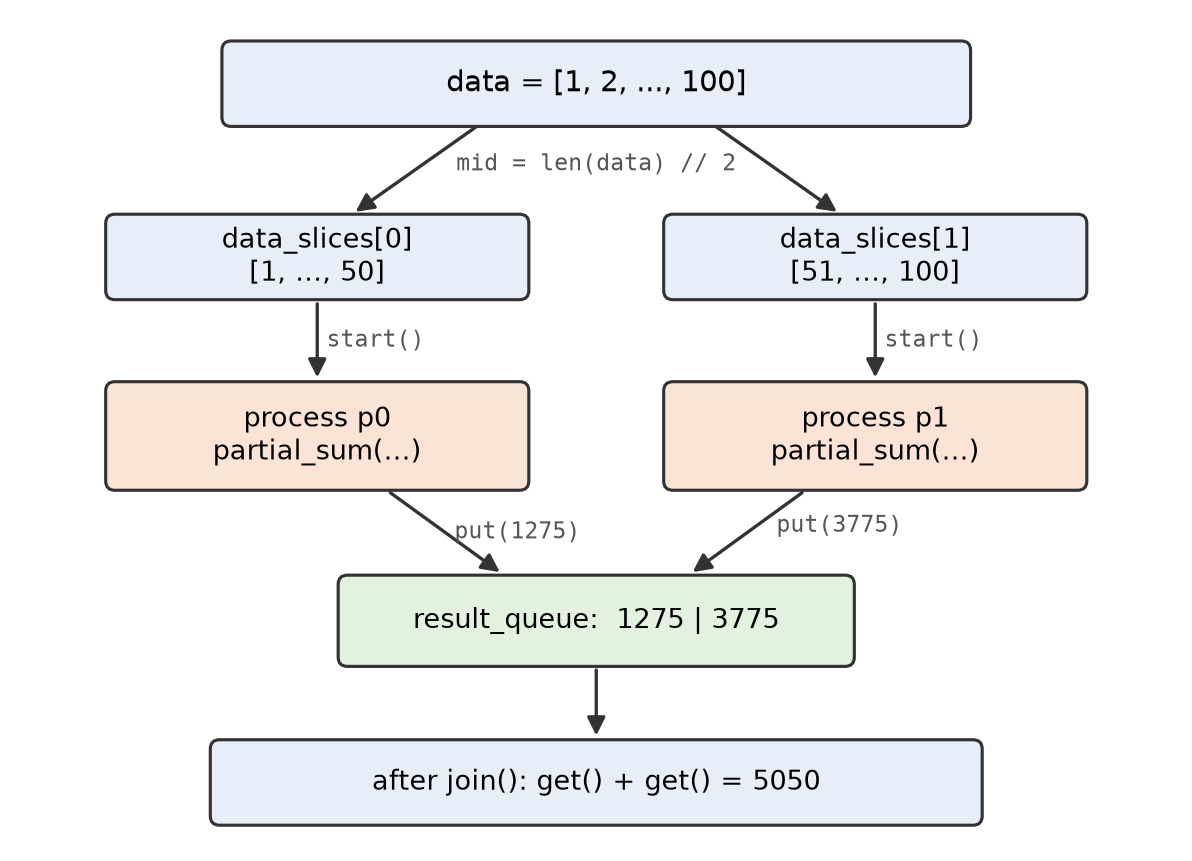
sum_example_two_procs() divides the work. Each process sums its own slice and puts the result into the shared queue; after joining both processes, we get the two values back out and add them.STOP: Which worker’s sum is stored inval_a: the sum fromp0, or the sum fromp1?
It is tempting to say p0, since we call p0.join() first. But val_a holds the value from whichever worker finished first. A slice might take longer to sum because it is bigger, or simply because of what else the computer is doing at that moment, so p1 could easily finish before p0. Values come out of a queue in the order in which they were put in, just as the first person to join a line at the train station is the first to board. In this example, we only need the total, so the order does not matter. If it did, we could put a label on each value along with the sum, like putting a red sticker on one person in line and a blue sticker on the other, so that we could tell them apart when they leave the queue.
Why if __name__ == “__main__” matters here
We have been ending every Python program with the lines if __name__ == "__main__": and main() for a long time. With multiprocessing, these lines are no longer a formality. On macOS and Windows (and on Linux, starting with Python 3.14), Python starts each new process by launching a fresh Python interpreter that imports main.py so that it can find partial_sum(). When main.py is imported this way, __name__ is not equal to "__main__", so the worker does not call main() again; it just runs its target function.
If we deleted the if statement and called main() directly at the bottom of the file, then every new worker would run main(), which would try to create two more workers, and so on. Python catches this problem and stops with an error that includes the following message.
RuntimeError:
        An attempt has been made to start a new process before the
        current process has finished its bootstrapping phase.

        This probably means that you are not using fork to start your
        child processes and you have forgotten to use the proper idiom
        in the main module:

            if __name__ == '__main__':
                freeze_support()
                ...
Note: Phillip does not discuss this point in the video, because his starter code already contains theif __name__ == "__main__":line. On Linux, Python versions before 3.14 started processes differently, by copying the running program, so older Linux setups may not raise this error; starting with Python 3.14, Linux also launches fresh workers by default. Keep the line in every program that usesmultiprocessing, regardless of your operating system.
Exercise: labeled results and three workers
Exercise: Write a functionlabeled_partial_sum()with signaturedef labeled_partial_sum(label: int, data_slice: list[int], result_queue: multiprocessing.Queue) -> None:that puts the tuple(label, sum(data_slice))into the queue. Then write a functionsum_example_three_procs()that splits the first 100 positive integers into three slices of approximately equal size, starts three processes runninglabeled_partial_sum()with labels 0, 1, and 2, joins them, and then prints each label and sum in the order in which they come out of the queue, followed by the total. Run your code several times. Does the order of the labels ever change?
Looking ahead
We have written our first parallel program, but it only knows how to use two processes, and we had to copy and paste code to create each one. Your computer probably has many more cores than that. In the next code along, we will generalize our demo into a function sum_multi_procs() that divides the work of summing a list over any number of processes, taking care of the leftover elements when the list does not divide evenly. We will then time it against an ordinary serial sum to see whether all of this effort actually makes our code faster.