Code along video
Learning objectives
In this code along, we begin our descent from Python toward the machine. We will meet the two main components of a computer, the CPU and RAM, see where Python falls on the spectrum of programming languages, and learn to represent numbers in binary (base 2) and hexadecimal (base 16), which are the languages that the computer itself speaks.
Code along summary
This lesson is conceptual, and so we will not need to write any code to follow along.
A computer is an electrical machine
Our livestream opened with a picture of a huge bank of memory cards. This kind of memory is called RAM (random access memory), and the more of it that a computer has, the more applications it can run at once. Every application needs to store data as it runs. An email app stores incoming messages and contacts; a game stores its dragons and wizards and their attributes. If we have a machine with multiple cores, then we also need plenty of memory available to the programs running on those cores, so that cores and memory go hand in hand.
Underneath it all, a computer is just an electrical machine. If we zoom far enough into the RAM, or into the computer’s central processing unit (CPU), we find many millions or billions of transistors, which are tiny electrical switches (or amplifiers). It is helpful to think of each transistor as being on or off, although it is more accurate to think of it as being in a high or low state. A chip, which is called an integrated circuit in old-school language, consists of a huge number of these transistors linked together.
Because every transistor is in a high or a low state, everything in a computer is ultimately represented using two values, which we write as 1 and 0. You have probably heard the trope that everything in a computer is ones and zeros, but it may not be clear what that has to do with the Python code that we have been writing.
Today’s question
Consider the following mystery function. It takes two integers as input, returns nothing, and prints something at the end. All it does is set some variables, run a while loop, and perform a little bit of arithmetic.
def mystery(r2: int, r3: int) -> None:
    r1 = 1
    r6 = 0
    while r3 != 0:
        r6 += r2
        r3 -= r1
    print(r6)
This function looks like it was written in a very bizarre way, with variable names like r1 and r6. We will hang on to that observation for now, since there is a reason for these names that we will discover in this chapter. Our big question for the chapter is: how do we translate code like this into the electrical instructions of ones and zeros that a computer can understand?
STOP: What do you think thatmystery()does? We will not spoil the answer just yet; by the end of this chapter, we will understand this function on the level of ones and zeros.
Frequent words in three languages
Way back at the beginning of this course, we solved the following problem, in which a k-mer is a substring of length k.
Frequent Words Problem
Input: A string text and an integer k.
Output: All most frequent k-mers in text.
This is not a hard problem if you have made it this far in the course. We slide a window of length k along the text, use a dictionary to keep track of how often each k-mer occurs, find the maximum value in the dictionary, and then collect all the k-mers achieving that maximum (there may be a tie).
There are a lot of programming languages, and they all have different strengths and weaknesses. Let us see how a solution to this problem looks in three of them. First, here is a solution in a language called C0 (“C naught”), a version of the C language with a little extra functionality that is used in a course taken by first-year undergraduates in Carnegie Mellon’s School of Computer Science. That course does not really teach the language; students are expected to become comfortable programming in it on their own. C in general is a very fast language with a lot of strengths, but you might look at this code and think that you would not be the most comfortable taking a course in it.
int frequent_words(string text, int k, string[] result) {
  int n = string_length(text);
  if (k <= 0 || k > n) return 0;

  string[] kmers = alloc_array(string, n - k + 1);
  int[] counts = alloc_array(int, n - k + 1);
  int m = 0;

  for (int i = 0; i <= n - k; i++) {
    string kmer = string_sub(text, i, k);
    int idx = -1;
    for (int j = 0; j < m; j++) {
      if (string_equal(kmers[j], kmer)) { idx = j; break; }
    }
    if (idx == -1) { kmers[m] = kmer; counts[m] = 1; m++; }
    else counts[idx]++;
  }

  int maxc = 0;
  for (int i = 0; i < m; i++) if (counts[i] > maxc) maxc = counts[i];

  int r = 0;
  for (int i = 0; i < m; i++) {
    if (counts[i] == maxc) {
      result[r] = kmers[i];
      r++;
    }
  }
  return r;}
Next, here is an implementation in Go, a language with great support for parallel and distributed programming. Like being at the eye doctor, if we asked you whether you prefer lens number one (C0) or lens number two (Go), you probably would not need to have ever programmed before to pick number two. There is something about it that looks a little more natural.
func FrequentWords(text string, k int) ([]string, int) {
	n := len(text)
	if k <= 0 || k > n {
		return []string{}, 0
	}
	counts := make(map[string]int, n-k+1)
	for i := 0; i <= n-k; i++ {
		kmer := text[i : i+k]
		counts[kmer]++
	}
	maxCount := 0
	for _, c := range counts {
		if c > maxCount {
			maxCount = c
		}
	}
	var result []string
	for kmer, c := range counts {
		if c == maxCount {
			result = append(result, kmer)
		}
	}
	sort.Strings(result) // deterministic order
	return result, maxCount
}
Finally, here is the Python implementation. If we flip the lenses again and ask whether you prefer Go or Python, you would probably again pick number two.
def frequent_words(text: str, k: int) -> list[str]:
    if k <= 0 or k > len(text):
        return []

    counts: dict[str, int] = {}
    for i in range(len(text) - k + 1):
        kmer = text[i:i + k]
        counts[kmer] = counts.get(kmer, 0) + 1

    max_count = max(counts.values())
    result: list[str] = []
    for kmer, c in counts.items():
        if c == max_count:
            result.append(kmer)
    return sorted(result)
STOP: What do you notice about these three implementations of the same algorithm?
The Python code uses fewer lines, and it also looks quite a bit closer to human language than the other two. C0 looks alien, whereas Python may look familiar even if you have never written a line of code in your life. This is why very few programming courses for beginners are taught in C. Some introductory courses use a language like Go (in fact, Programming for Lovers used Go as its model language for a long time), but many people want to come to programming through a language like Python. Looking familiar is frankly not the best reason to pick a language, but it is a big reason why so many people have chosen Python as their first one.
Programming languages fall on a spectrum
As we have seen in this course, the downside of Python is that even though it resembles human language, it can be slow. In general, programming languages fall on a spectrum.
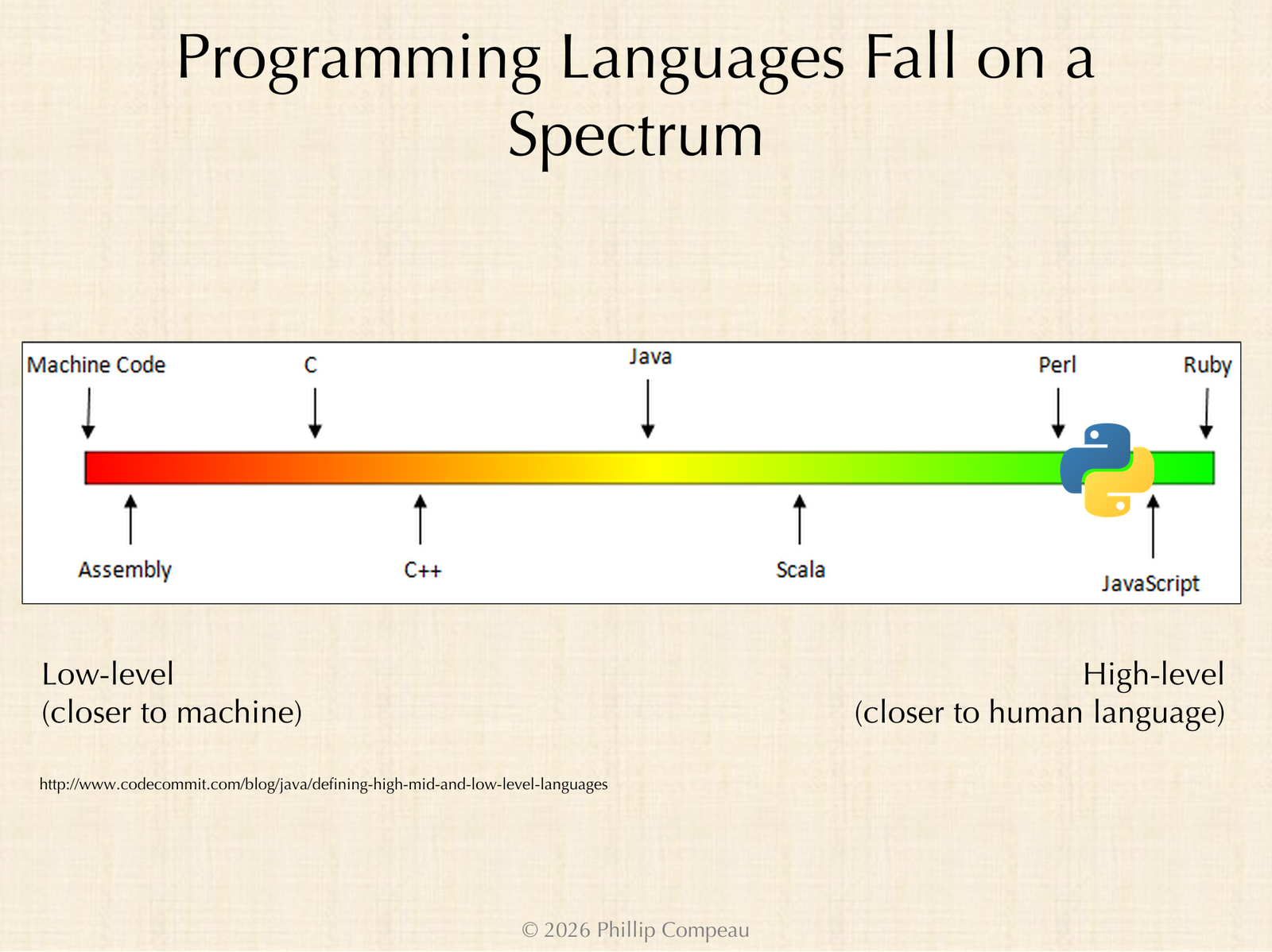
At the far left of this spectrum are low-level languages, which are closer to the machine and give us more control over what happens inside it. As we move to the right, we encounter high-level languages, which are (or appear to be) closer to human language and come with a lot of bells and whistles. Python is a great example: it often gives us six different ways of doing the same thing, whereas a language like C might give us zero ways and assume that we will implement the idea on our own. The downside of having so many one-size-fits-all solutions built into a language is that things can slow down.
In the middle of the spectrum are mid-level languages. Go falls in the middle, near Java, providing a little more control over the machine than Python while being more comfortable to work with than C.
A conceptual architecture of a computer
We have been mentioning the CPU and RAM without saying precisely what we mean by them. The following figure shows a classic conceptual architecture of a computer.
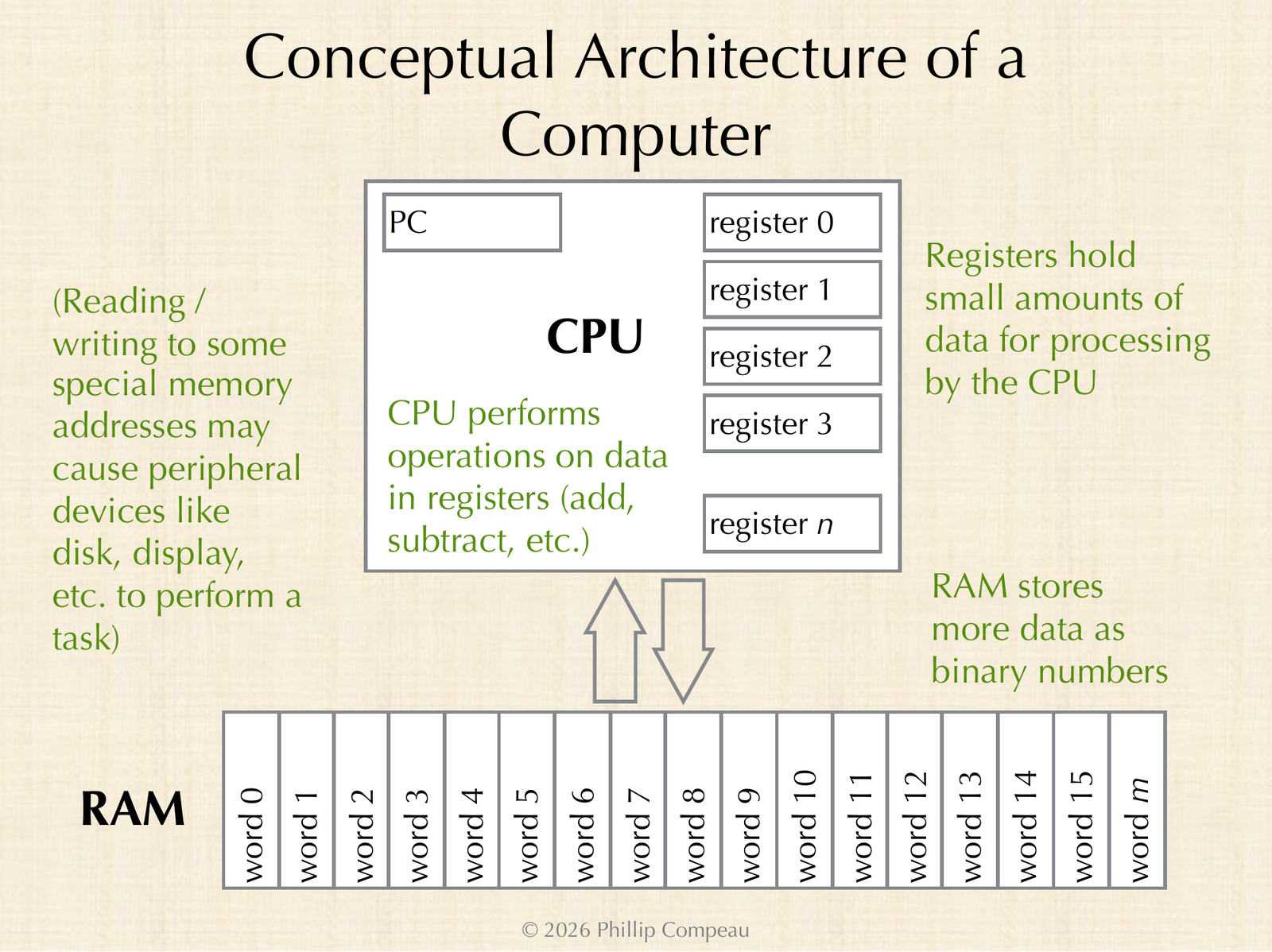
Think of RAM as a very large storage facility, in which each bay holds a finite amount of storage. Each of these bays, which we call a word and identify by its address, corresponds to a collection of transistors, each of which is high or low. We represent these two states with the binary digits (or bits) 1 and 0, so that RAM stores our data as strings of binary numbers. The more RAM we have, the more data our applications can access, and the more they can do.
The CPU contains a much smaller collection of storage locations that are internal to it, called registers. Whereas a computer may have billions of addresses of RAM, it may have only 16, 32, or 64 registers. The CPU pulls data from RAM into registers, performs fast operations on those registers (like addition and subtraction), and then writes results back to RAM. For complicated electrical engineering reasons, this design is the most efficient: we have a huge storage facility, but at any moment we keep a small number of things close at hand, and if we run out of space, we push data back to RAM.
There is a little more to it, because some special memory addresses are reserved for other purposes. Reading from or writing to these addresses may cause a peripheral device like the display or the hard drive to perform some task.
In both the registers and RAM, the data stored at each location is a string of ones and zeros. So if we want to do something as simple as adding two numbers, those numbers are represented in binary, which means that we need to become comfortable with numbers in base 2.
Representing numbers in binary
This is an area of computer science in which a strong mathematical foundation is necessary. You are very comfortable thinking of a certain number as 4256, but the number itself is a more abstract concept than this representation. When we write 4256 in base 10 (also called decimal), we mean that we have four thousands, two hundreds, five tens, and six ones. Each position of the number corresponds to a power of 10.
| Power of 10 | Place value | Digit of 4256 | Contribution |
|---|---|---|---|
| 103 | 1000 | 4 | 4000 |
| 102 | 100 | 2 | 200 |
| 101 | 10 | 5 | 50 |
| 100 | 1 | 6 | 6 |
We do not have to split the number into powers of 10, however. In base 2 (binary), the only digits allowed are 0 and 1, and each position corresponds to a power of 2. The largest power of 2 that fits into 4256 is 212 = 4096 (recall that 210 = 1024). This leaves 4256 − 4096 = 160, and the largest power of 2 fitting into 160 is 27 = 128. That leaves 32, which is 25. Since 4096 + 128 + 32 = 4256, we need a 1 in the positions for 212, 27, and 25, and a 0 everywhere else.
| Power of 2 | Place value | Binary digit | Contribution |
|---|---|---|---|
| 212 | 4096 | 1 | 4096 |
| 211 | 2048 | 0 | 0 |
| 210 | 1024 | 0 | 0 |
| 29 | 512 | 0 | 0 |
| 28 | 256 | 0 | 0 |
| 27 | 128 | 1 | 128 |
| 26 | 64 | 0 | 0 |
| 25 | 32 | 1 | 32 |
| 24 | 16 | 0 | 0 |
| 23 | 8 | 0 | 0 |
| 22 | 4 | 0 | 0 |
| 21 | 2 | 0 | 0 |
| 20 | 1 | 0 | 0 |
Reading the binary digits from the top of the table to the bottom, we obtain the binary representation of 4256.
4256 = 1000010100000 (base 2)
     = 1 * 2^12 + 1 * 2^7 + 1 * 2^5
     = 4096 + 128 + 32
The point is that we can represent a number in base 10, or we can represent the same number in base 2. For any number that we choose, we can always find its base 2 representation, which is how the number is stored inside the computer.
Hexadecimal notation
Even though everything inside a computer is a sequence of ones and zeros, writing everything in binary would be tedious. So when we talk about stored data, we often use base 16, which is called hexadecimal (or hex for short). We will soon see why hexadecimal is such a natural choice.
Base 10 has ten digits, 0 through 9. Base 16 needs sixteen digits, so after 0 through 9 we use A to represent 10, B for 11, C for 12, D for 13, E for 14, and F for 15.
| Hexadecimal digit | 0 | 1 | 2 | 3 | 4 | 5 | 6 | 7 | 8 | 9 | A | B | C | D | E | F |
|---|---|---|---|---|---|---|---|---|---|---|---|---|---|---|---|---|
| Base 10 value | 0 | 1 | 2 | 3 | 4 | 5 | 6 | 7 | 8 | 9 | 10 | 11 | 12 | 13 | 14 | 15 |
In base 16, each position of a number corresponds to a power of 16. The rightmost digit is still the ones place, but the next digit is the 16s place, the next is the 162 = 256s place, and the next is the 163 = 4096s place. Our number 4256 is equal to one 4096 plus ten 16s, and so in hexadecimal it is written 10A0.
| Power of 16 | Place value | Hex digit of 10A0 | Contribution |
|---|---|---|---|
| 163 | 4096 | 1 | 4096 |
| 162 | 256 | 0 | 0 |
| 161 | 16 | A (10) | 160 |
| 160 | 1 | 0 | 0 |
We can pick any base we like, and we can represent any number we like in that base.
Exercise: Convert the hexadecimal numberA7Dto base 10, and then convert it to binary. Remember thatD(which is 13) occupies the ones place, 7 occupies the 16s place, andA(which is 10) occupies the 256s place.
STOP: As you work on the previous exercise, ask yourself: which of the two conversions ofA7Dwas easier, converting it to base 10 or converting it to binary?
Looking ahead
At the end of this video, the chat converted A7D to 2685 in base 10, and nearly everyone voted that converting to base 10 was easier than converting to binary. In the next lesson, we will start by working through both conversions and see why the answer to the poll is the opposite: converting from hexadecimal to binary is far easier than converting to base 10, which is exactly why hexadecimal is such a convenient shorthand for binary.