Code along video
Learning objectives
In the previous code along, we wrote the main program and the TrivialGCD function in X-Toy, assuming that two subroutines would exist. In this code along, we write those subroutines: Min2, which takes the minimum of two integers, and IsDivisor, which checks whether one integer divides another using only subtraction. Then we run the complete program, step through it in Visual X-TOY, test it on the same inputs that we used for our GCD practice exercises, and count how many steps it takes.
Code along summary
Setup
We continue in trivial_gcd.toy from the previous code along, which contains main (starting at 10) and TrivialGCD (starting at 20).
The Min2 subroutine
Our two subroutines are going to be much shorter, since they do something much simpler. Now that we have written TrivialGCD, it is downhill from here. Let us write Min2 first. We already made some notes about it when we called it: its inputs are R[1] (which is a) and R[2] (which is b), its output is R[4], and its return address is R[7]. Its one temp variable is R[3].
It is important to note that R[3] is safe to use. In TrivialGCD, R[3] is set only by IsDivisor, after Min2 has already done its job. If R[3] stored some really important value at the time that we called Min2, overwriting it would be very bad, but it does not, and so using it as a temp variable is completely fine. This is exactly the kind of thing that we need to be aware of when we write code at this level.
The idea of the function is that if a is greater than b, then a - <code data-enlighter-language="bash" class="EnlighterJSRAW"> is greater than zero, so we can use jump positive. At address g</code>50, 2312 sets R[3] equal to a - <code data-enlighter-language="bash" class="EnlighterJSRAW">. Then g</code>D354 checks whether that difference is positive, and if so, jumps to address 54. (Technically this address is ?? until we write the rest of the function, but the function is so short that we can tell you now.)
If we do not jump, then a - <code data-enlighter-language="bash" class="EnlighterJSRAW"> is not positive, so g</code>a is less than or equal to b, and a is the minimum. So 1410 sets the output R[4] equal to a (once again using R[0] to copy a register), and E700 returns by going back to wherever we left our bookmark in R[7]. If we did jump to address 54, then a is greater than b, so b is the minimum: 1420 sets the output to b, and E700 returns.
function Min2
// Inputs: R1 = a, R2 = b
// Output: R4 = min(a, b)
// Return: R7
// Temp variables: R3
// Idea: if a > b, then a - b > 0, so we can use jump positive
50: 2312   R[3] <- R[1] - R[2]           // R3 = a - b
51: D354   if (R[3] > 0) goto 54         // if a - b = R3 > 0, jump

// if I'm here, a - b <= 0, so a <= b, and a is the min
52: 1410   R[4] <- R[1]                  // output = a
53: E700   goto R[7]                     // return

// if I'm here, a - b > 0, so a > b, and b is the min
54: 1420   R[4] <- R[2]                  // output = b
55: E700   goto R[7]                     // return
Division is repeated subtraction
Next is IsDivisor. When we call it, it takes two integers in R[1] and R[2]. The first is p, and the second is whatever number we are checking whether p divides (a the first time, and b the second); let us call that number x. The function returns its answer in R[3], which is 1 if p is a divisor of x, and 0 otherwise, and its return address is R[7]. Think of R[3] as a light switch: on if p divides x, and off if it does not.
STOP: Given only the operations that X-Toy offers (add and subtract, but no division or remainder), how can we determine whetherpis a divisor ofx?
In a modern language, we would check whether the remainder of x divided by p is zero. But a remainder is what happens when we perform a division, and X-Toy has no division. So what is division, really? Earlier in the chapter, we saw that multiplication is repeated addition; in the same way, division is repeated subtraction. To check whether 7 is a divisor of 42, we compute 42 – 7 = 35, then 35 – 7 = 28, then 21, and so on. If we eventually hit zero, then 7 is a divisor of 42. If we ever skip over zero and land on a negative number, then it is not. So we keep subtracting p from x until we hit zero (and return 1) or a negative number (and return 0). We cannot check for negativity directly, but we can check the opposite, positivity.
The IsDivisor subroutine
Before we write the loop, the mathematicians call us back, just as they did at the very beginning of the course, to point out the special cases. First, zero is not a divisor of any number, not even itself. So at address 40, if R[1] (which is p) is zero, we will jump to a “no” part of the code that turns the light off and returns 0; we do not know yet where that will be. Next, 7300 sets R[3] to zero as a default value: if we never change it, the light stays off. Second, every integer is a divisor of zero, so at address 42, if R[2] (which is x) is zero, we jump to a “yes” part, wherever that will be.
Now for the main loop. At address 43, 2321 sets R[3] equal to x - p. If R[3] is zero, we jump to the “yes” part, so the two XX placeholders are the same address. If we are at address 45, then R[3] is either positive or negative, and we first check whether it is positive, jumping to yet another location ZZ if so. Here is where we stand.
function IsDivisor
// Input: R1 = p, R2 = x
// Output: R3 = 1 if p is a divisor of x, else R3 = 0
// Return: R7
40: C1??   if (R[1] == 0) goto ??        // p = 0: go to "no" and return 0
41: 7300   R[3] <- 0000                  // R3 is off by default
42: C2XX   if (R[2] == 0) goto XX        // x = 0: jump to "yes"

// main loop: keep subtracting p from x
43: 2321   R[3] <- R[2] - R[1]           // R3 = x - p
44: C3XX   if (R[3] == 0) goto XX        // jump to "yes" if R3 = 0
45: D3ZZ   if (R[3] > 0) goto ZZ         // R3 > 0: keep looping
STOP: If we make it to address46without jumping, what do we know aboutR[3]?
At address 46, we checked whether R[3] is zero and whether it is positive, so it must be negative. We subtracted p from x and skipped over zero, so p is not a divisor, and we have reached the “no” part of the code. We set R[3] to zero with 7300. We already did this as a default, so this is one extra line of code, but it at least helps us rest easy. Then E700 returns. This also tells us where to jump when p is zero: address 40 becomes C146.
It is tempting to put the “yes” part next, but we are not finished with the loop: we still need to handle the case that R[3] is positive. At address 48, 1230 sets R[2] equal to R[3], that is, it replaces x with x - p. Then we jump back to address 43 to subtract again, using our R[0] trick: C043 means “goto 43”. So the ZZ at address 45 is 48.
The final case is the “yes” part of the code, which lives at address 4A, so both XX placeholders become 4A. There, we turn the light on with 7301 and return with E700. Here is the finished subroutine.
function IsDivisor
// Input: R1 = p, R2 = x
// Output: R3 = 1 if p is a divisor of x, else R3 = 0
// Return: R7
40: C146   if (R[1] == 0) goto 46        // p = 0: go to "no" and return 0
41: 7300   R[3] <- 0000                  // R3 is off by default
42: C24A   if (R[2] == 0) goto 4A        // x = 0: everybody divides 0, jump to "yes"

// main loop: keep subtracting p from x
43: 2321   R[3] <- R[2] - R[1]           // R3 = x - p
44: C34A   if (R[3] == 0) goto 4A        // jump to "yes" if R3 = 0
45: D348   if (R[3] > 0) goto 48         // R3 > 0: keep looping

// R3 < 0, so p is not a divisor: the "no" part
46: 7300   R[3] <- 0000                  // light is off
47: E700   goto R[7]                     // return

// R3 = x - p > 0: keep looping
48: 1230   R[2] <- R[3]                  // R2 = x - p
49: C043   goto 43                       // jump back to 43, loop

// the "yes" part
4A: 7301   R[3] <- 0001                  // light on
4B: E700   goto R[7]                     // return
And lo and behold, we have our code: main starts at 10, TrivialGCD starts at 20 and runs past 2F to 33, IsDivisor starts at 40, and Min2 starts at 50. Some addresses are left blank; we could use them to store values, and that is fine.
Note: If you are comparing against the P4LCodeBase copy oftrivial_gcd.toy, it differs from the video in two small ways. Its address40isC147, which skips the line that clearsR[3](harmless here, sinceTrivialGCDnever passesp= 0), and its address31isD825(“ifR[8]> 0, goto 25″), which also always jumps becauseR[8]is 1. Both versions give the same answers in the same number of steps.
Stepping through trivial GCD
We have written the code, so let us run it. In the Stdin panel, we enter the two inputs 0001 and 0009, and we change the refresh rate to 1 so that we can watch every step. The GCD of 1 and 9 should be 1. As we step, 81FF and 82FF read 1 and 9 into R[1] and R[2], and we can see them get stored at memory addresses 01 and 02. Then the call FF20 sends us to address 20, where R[6] is set to 1, and F750 calls Min2, which returns the minimum, 1, in R[4]. Then we go to address 40 and compute IsDivisor, return, check, and carry on.
We could step through literally everything in our code and watch how the registers change. You will get about as good an understanding of what is going on underneath the hood of a computer as you will ever have if you step through this program and watch its flow. When we let it run, we can see R[2] keep going down as IsDivisor subtracts, and eventually the program prints 0001.
Maybe the program just returns 1 all the time? That would be bad, so let us try 6 and 9 (0006 and 0009). Notice that R[1] and R[2] get overwritten as we go, so they do not permanently store a and b; those live at M[01] and M[02], which is exactly why we stored them there. After a flurry of calls to IsDivisor, the program prints 0003.
The symphony of lights
Let us give the program something a little more complicated: the numbers 24 and 16, which come from the test data in our GCD practice exercises. The GCD of 24 and 16 is 8. In hexadecimal, 24 is 0018 and 16 is 0010, so those are our inputs.
If we start giving the program really big numbers, we will not want to watch this process. But it is mesmerizing to watch all of these functions get called and all of this cycling happen repeatedly. One of the nice things about Visual X-TOY is that it literally shows each instruction as a sequence of lights that are on and off. At the start of the chapter, we represented the computer as a bunch of switches; everything happening deep inside the computer is transistors flipping between ones and zeros, and here is an illustration of that process.
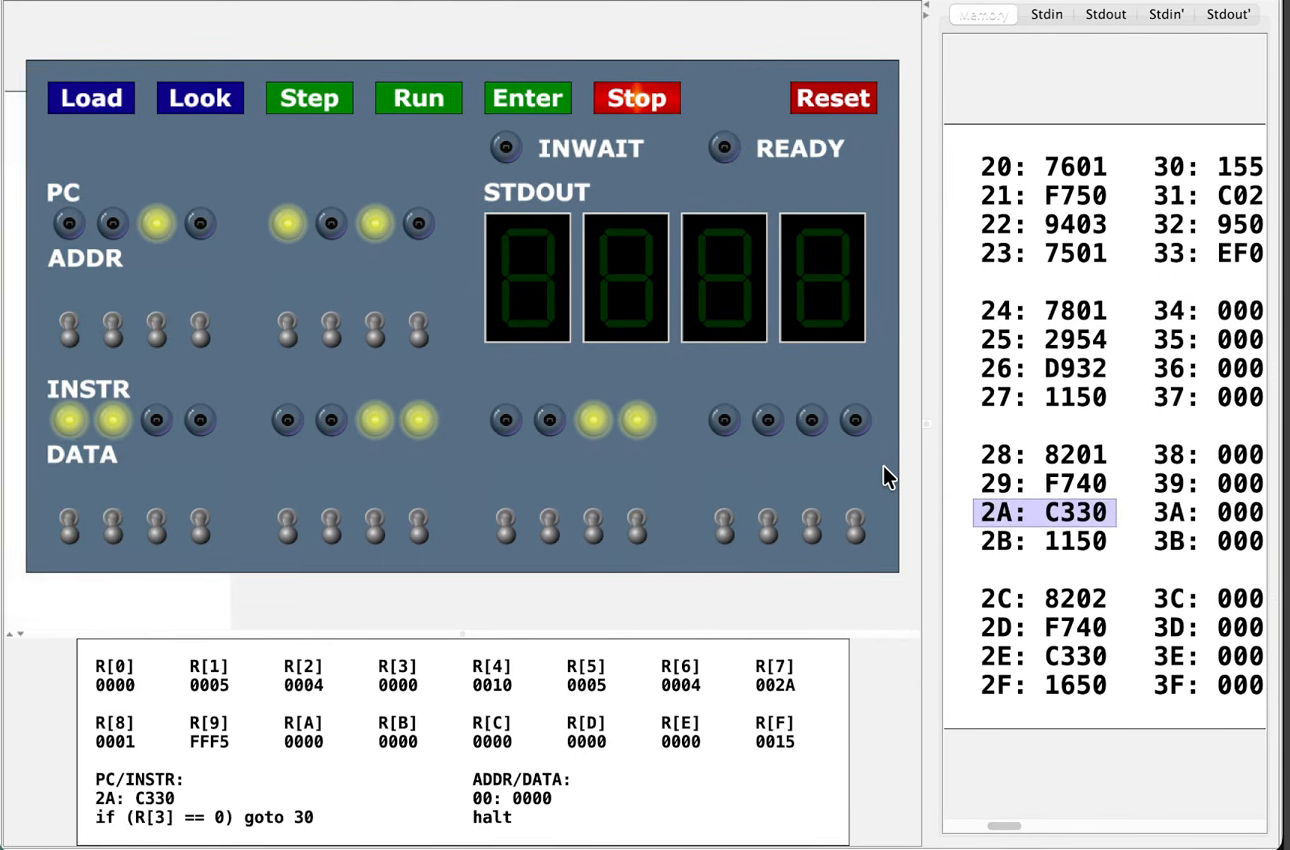
2A, just after a call to IsDivisor has returned to R[7] = 002A.We can watch R[1] tick upward as we try larger and larger values of p. At the end of the day, the program prints 0008, which is indeed the GCD of 24 and 16.
0008
Counting steps
Visual X-TOY can also run quickly. In its settings, we set the refresh rate to 10,000 steps per refresh and the target clock period to about a millisecond. Running the program on 24 and 16 again now finishes almost instantly, and the panel below the editor reports that it took 868 steps, that is, 868 instructions executed.
Now we can try larger inputs. Another test from our practice exercises is 378 and 273, which are 017A and 0111 in hexadecimal. This run takes noticeably longer: 18,933 steps to print 0015, which the base converter tells us is 21. We know from the practice exercises that the GCD of 378 and 273 is 21, so everything seems to be working.
0015
More importantly, we can track the number of steps taken. With the clock period set to zero, let us ramp things up: 03E8 is 1,000 and 07D0 is 2,000, whose GCD is 1,000. The program prints 03E8 after 74,781 steps. Keep that number in mind.
| Inputs (hex) | Inputs (decimal) | Output | Steps |
|---|---|---|---|
0018, 0010 | 24, 16 | 0008 (8) | 868 |
017A, 0111 | 378, 273 | 0015 (21) | 18,933 |
03E8, 07D0 | 1,000, 2,000 | 03E8 (1,000) | 74,781 |
We would of course love to test this on many more inputs, but we have passed all of the tests from our practice exercises. We have written a GCD algorithm in assembly language, which is pretty cool.
Note: Like the trivial GCD pseudocode itself, this program assumes that both inputs are positive. If one input is zero, thenMin2returns 0, the loop never runs, and the program prints0001, even though the GCD of 0 and 9 is 9.
Check your work
Now that trivial_gcd.toy is complete, submit the whole program to the autograded Trivial GCD exercise in Chapter 7’s Check Your Work on the Programming for Lovers platform. The autograder reads two hex words a and b from standard input and expects your program to print exactly one value, their GCD, and to halt at address 16, so keep main at 10 to 16, TrivialGCD at 20, IsDivisor at 40, and Min2 at 50, exactly as we wrote them. The program on this page passes every test.
Looking ahead
Trivial GCD works, but 74,781 steps feels like a lot for a GCD of two four-digit numbers. When we first met the ancient Greek algorithms at the start of the course, we saw that Euclid’s approach was a huge improvement in Python. In the next code along, we will find out whether the same is true in assembly language.