Code along video
Learning objectives
In the previous code along, we ran trivial GCD in Visual X-TOY and saw that it needs tens of thousands of steps on four-digit inputs. In this code along, we return to the very start of the course and implement Euclid’s algorithm for computing a GCD in X-Toy. We will see that Euclid’s approach is not only dramatically faster at the level of ones and zeros, but also beautifully simple: a single function, with no subroutines, that fits in fourteen lines.
Code along summary
Setup
Create a new file in Visual X-TOY called euclid_gcd.toy. We will copy over main from trivial_gcd.toy, which we wrote in the previous two code alongs.
Euclid’s algorithm, revisited
When we looked at ancient Greek algorithms for mathematical functions at the very start of Programming for Lovers, Euclid’s approach seemingly did not provide any particular improvement, and yet when we implemented it in a programming language, we saw a huge improvement. The question now is whether it will be an improvement at the level of assembly language too.
Euclid’s algorithm says that if one of the values is zero, return the other one. Otherwise, it is just a little while loop: while the two values are not equal, compute t = a - <code data-enlighter-language="bash" class="EnlighterJSRAW">. If g</code>t is positive, then a is bigger than b, and we replace a with a - <code data-enlighter-language="bash" class="EnlighterJSRAW">. Otherwise, g</code>b is bigger than a, and we replace b with b - a (which is -t). When a and b finally become equal to each other, we return either one.
EuclidGCD(a, b)
    if a == 0 --> return b
    if b == 0 --> return a
    while a != b
        t = a - b
        if t > 0 // a > b
            a = t = a - b
        else (t < 0 and b > a)
            b = -t = b - a
    return a (or b)
It might not be clear immediately why this is faster. This was the genius of Euclid: millennia before the invention of any computer, he recognized that this approach has to be faster. We are going to see this in action, literally at the level of ones and zeros.
Reusing main
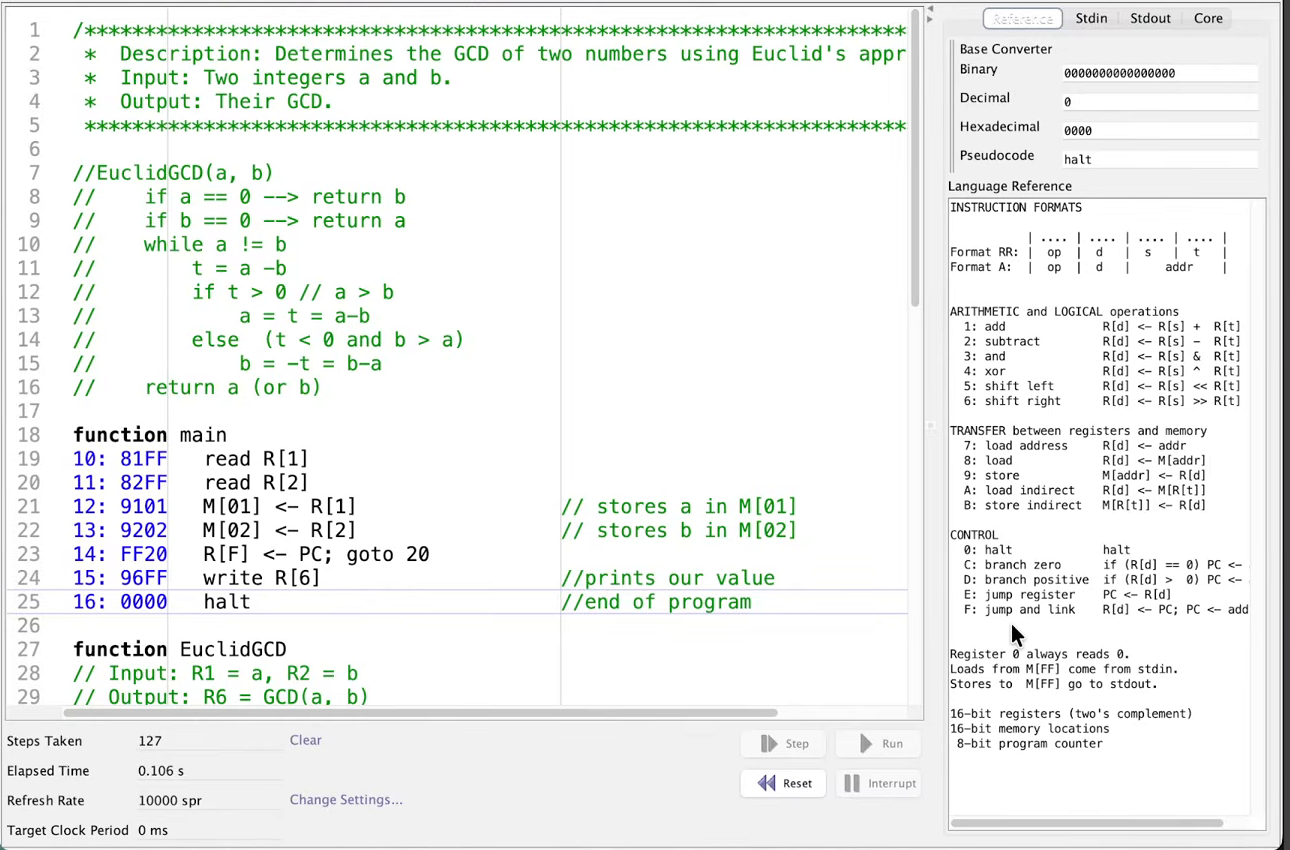
If you watched our trivial GCD implementation, you might be thinking that it took long enough: we needed over an hour to write it. Not only will this algorithm be faster, it will be beautifully simple. Our main function does exactly the same thing that it did before, so we copy it over unchanged: read a and b into R[1] and R[2], store them in M[01] and M[02] for bookkeeping, call the function at address 20 with the return address in R[F], print R[6], and halt.
function main
10: 81FF   read R[1]
11: 82FF   read R[2]
12: 9101   M[01] <- R[1]                 // stores a in M[01]
13: 9202   M[02] <- R[2]                 // stores b in M[02]
14: FF20   R[F] <- PC; goto 20           // call EuclidGCD(a, b)
15: 96FF   write R[6]                    // prints our value
16: 0000   halt                          // end of program
The EuclidGCD function also starts at address 20, takes a in R[1] and b in R[2], places the GCD in R[6], and returns to R[F]. The temp variables are funny, because we barely need to care about them: this function is not going to call any subroutines at all.
Writing EuclidGCD
The function first checks whether either input is zero, and if so, returns the other. At address 20, C12C jumps to address 2C if R[1] (which is a) is zero; this will be the “return b” part of the code. (We could write ?? here, but we will just tell you where it goes.) Similarly, C22A jumps to the “return a” part at address 2A if b is zero.
Farther down in the code, we write these two return blocks. The “return b” block at 2C sets R[6] equal to R[2], using our trick of adding R[0]: 1620. Then EF00 returns, since the return address is R[F]. The “return a” block at 2A is the same, except that 1610 sets the GCD equal to a. (When typing it in the video, we first wrote 1616 by mistake; it should be 1610.)
If we make it to address 22, we are in the normal part of the code, where we perform the loop. Is a equal to b? We check this with 2312, which sets R[3] equal to a - <code data-enlighter-language="bash" class="EnlighterJSRAW">, and then g</code>C32A jumps if a - <code data-enlighter-language="bash" class="EnlighterJSRAW"> is zero, in which case we are done. Here is more of the beauty of this algorithm: if g</code>a and b are equal, it does not matter whether we jump to 2A or 2C, since either returns the correct answer. We go to 2A, since it is closer.
If we make it to address 24, a and b are not equal, and we need to check which is bigger, which feels like something we have been doing the whole time. D328 jumps to address 28 if R[3] is positive, that is, if a is bigger than b.
If we are at address 25, then a is not equal to b, and a is not greater than b, so a is less than b. We update b by subtracting a from it, which takes two steps: 2321 sets R[3] equal to b - a, and 1230 copies that value into R[2]. Then C022 jumps back to the start of the loop at 22 to check again whether a equals b.
Address 28 is where we land when a is bigger than b. Since R[3] already holds a - <code data-enlighter-language="bash" class="EnlighterJSRAW">, g</code>1130 sets a equal to it, and C022 loops again. And amazingly, that is it. That is the entire code.
function EuclidGCD
// Input: R1 = a, R2 = b
// Output: R6 = GCD(a, b)
// Return: RF
// Temp variables: R3 (no subroutines!)
20: C12C   if (R[1] == 0) goto 2C        // go to "return b" part
21: C22A   if (R[2] == 0) goto 2A        // go to "return a" part

// normal part of code
22: 2312   R[3] <- R[1] - R[2]           // R3 = a - b
23: C32A   if (R[3] == 0) goto 2A        // a = b: return a
24: D328   if (R[3] > 0) goto 28         // a - b > 0, so a > b

// a != b and a is not > b, so a < b: set b = b - a
25: 2321   R[3] <- R[2] - R[1]           // R3 = b - a
26: 1230   R[2] <- R[3]                  // update b = b - a
27: C022   goto 22                       // loop again

// the part of the code where a > b
28: 1130   R[1] <- R[3]                  // a = R3 = a - b
29: C022   goto 22                       // loop again

// return a block
2A: 1610   R[6] <- R[1]                  // GCD = a
2B: EF00   goto R[F]                     // return

// return b block
2C: 1620   R[6] <- R[2]                  // GCD = b
2D: EF00   goto R[F]                     // return
STOP: Compare this function toTrivialGCDand its two subroutines. Which registers doesEuclidGCDmodify, and why does it never need a bookmark register other thanR[F]?
Running Euclid’s algorithm
Of course, we should run it. Since this function stays inside one function and performs a bunch of repeated subtractions, there is not as much to watch, but we can still step through it. With the inputs 0001 and 000F, it quickly prints 0001. With 0006 and 0009, it returns 0003 before we can even get to the end of a sentence.
Let us return to our example from before, 0018 (24) and 0010 (16). After we reset, we can see the two values 0018 and 0010 sitting in R[1] and R[2], and as we step, the program keeps subtracting the smaller one from the bigger one until they become equal, and then it returns 0008. It is remarkably fast.
We only care about fast algorithms as the size of the input grows, so let us try something bigger, our example of 017A (378) and 0111 (273). We watch this one function perform its subtractions, and we can see how quickly R[1] and R[2] become equal; eventually, they are both 0015, and we return 21.
0015
Comparing step counts
Let us compare the number of steps. We set the refresh rate to 10,000 and the target clock period to 0 milliseconds. On 017A and 0111, trivial GCD used 18,933 steps. Euclid’s algorithm uses 46 steps.
Maybe that is a trick, so let us try the other inputs from before, 03E8 (1,000) and 07D0 (2,000), on which trivial GCD took 74,781 steps. Euclid’s algorithm takes 19 steps. Of course, in this case, we are not doing much: subtracting 1,000 from 2,000 gives 1,000, so the two values become equal right away.
Maybe these examples are tricky, so let us change one of the numbers so that the two inputs are not especially close to each other. We keep 07D0 (2,000) and replace 03E8 with 051A (1,306). Now Euclid’s algorithm takes 127 steps and prints 0002. On this same pair of inputs, trivial GCD needs 110,895 steps.
Note: In the video, the 127 steps for07D0and051Aare compared with 74,781, which is the trivial GCD count for the previous pair (1,000 and 2,000). Comparing the two algorithms on the same inputs, trivial GCD takes 110,895 steps on 2,000 and 1,306, and Euclid’s algorithm takes 127.
07D0 and 051A: 127 steps taken.| Inputs (hex) | Inputs (decimal) | GCD | Trivial GCD steps | Euclid’s GCD steps |
|---|---|---|---|---|
0018, 0010 | 24, 16 | 8 | 868 | 24 |
017A, 0111 | 378, 273 | 21 | 18,933 | 46 |
03E8, 07D0 | 1,000, 2,000 | 1,000 | 74,781 | 19 |
07D0, 051A | 2,000, 1,306 | 2 | 110,895 | 127 |
So we see once again the power of appreciating algorithms, and that some algorithms are faster, more efficient, and more beautiful than others. Euclid’s algorithm uses less code in Python, and it uses less code in our make-believe assembly language. It is faster in Python, and it is faster in our make-believe assembly language. It does not matter which language we work with: the principle that a beautiful algorithm is faster applies in either case. That brings the course back to where it started.
Check your work
Submit euclid_gcd.toy to the autograded Euclid GCD exercise in Chapter 7’s Check Your Work on the Programming for Lovers platform. As with trivial GCD, the autograder reads a and b from standard input and expects exactly one printed value and a halt at address 16, with EuclidGCD at 20. Its tests include inputs in which one of the two numbers is zero, which is exactly why our function begins with the checks at 20 and 21. The program on this page passes every test.
Looking ahead
We have now written real algorithms in assembly language, and we have seen that programming exists at many levels, all of which come down to ones and zeros. That raises a question that we will explore in the next code along: if a computer is just flipping lights on and off, what are the limits of what it can do?