Code along video
Learning objectives
In the previous lesson, we left you with a challenge: convert the hexadecimal number A7D to base 10 and to base 2, and decide which conversion is easier. In this lesson, we will see that converting between hexadecimal and binary requires no arithmetic at all, because every hexadecimal digit corresponds to exactly four binary digits. This fact makes hexadecimal the perfect shorthand for binary, and we will see that we have already encountered it in RGB colors and in the memory addresses that Python prints for objects. We will close by asking why we use base 10 in the first place, and by solving a puzzle about multiplication in different bases.
Code along summary
Setup
This is a concept lesson, and the only code that we will run is a tiny Python program in the middle of the lesson. If you would like to follow along on your own machine, create a new directory python/src/memory_address and add a new main.py file there. (The video uses the Programming for Lovers sandbox, which works just as well.)
def main():
    print("Hi!")


if __name__ == "__main__":
    main()
Converting hexadecimal to base 10
Let’s start with the conversion to base 10. In base 16, the digit A stands for 10 and D stands for 13, and each position corresponds to a power of 16. Therefore, A7D is equal to 10 · 162 + 7 · 161 + 13 · 160.
| Hex digit | Value | Place value | Contribution |
|---|---|---|---|
A | 10 | 162 = 256 | 2,560 |
7 | 7 | 161 = 16 | 112 |
D | 13 | 160 = 1 | 13 |
| Total | 2,685 |
A7D to base 10.So A7D is 2,685 in base 10. That conversion required some multiplication and addition. As we will now see, the conversion to binary is much simpler than it might first appear.
Why converting hexadecimal to binary is easy
Let’s return to the expression 10 · 162 + 7 · 161 + 13 · 160. Every power here has 16 as its base, and 16 is just 24. So 162 is 28, 161 is 24, and 160 is 20, which means that we can rewrite A7D as 10 · 28 + 7 · 24 + 13 · 20. We have represented our number as a sum of products of powers of two, and every exponent is a multiple of four.
Next, we write each of the three digit values in base 2, using the place values eight, four, two, and one. Ten is 8 + 2, which is 1010; seven is 4 + 2 + 1, which is 0111; and thirteen is 8 + 4 + 1, which is 1101.
Now for the critical insight. You probably had a math teacher who drilled into you that when you multiply a number by 108, you add eight zeros to the end of it. The same rule holds in base 2: multiplying a number by 2k shifts all of its binary digits over by k places, so we add k zeros to the end. Multiplying 1010 by 28 appends eight zeros, multiplying 0111 by 24 appends four zeros, and multiplying 1101 by 20 = 1 leaves it unchanged. We then add the three results, and addition proceeds in the same way in any base.
        1101
    01110000
101000000000
------------
101001111101
Because the blocks do not overlap, there is never more than a single 1 in any column, so we never carry. Every digit simply drops down, and we are left with the base 2 representation 101001111101.
That seems quite fancy, but we are really only doing one thing. We take each hexadecimal digit, write its four-bit binary representation, and concatenate the blocks: A is 1010, 7 is 0111, and D is 1101. There is no arithmetic to do at all, as long as we remember the four-bit pattern for each hexadecimal digit, shown in the table below.
| Hex digit | Base 10 | Binary | Hex digit | Base 10 | Binary |
|---|---|---|---|---|---|
0 | 0 | 0000 | 8 | 8 | 1000 |
1 | 1 | 0001 | 9 | 9 | 1001 |
2 | 2 | 0010 | A | 10 | 1010 |
3 | 3 | 0011 | B | 11 | 1011 |
4 | 4 | 0100 | C | 12 | 1100 |
5 | 5 | 0101 | D | 13 | 1101 |
6 | 6 | 0110 | E | 14 | 1110 |
7 | 7 | 0111 | F | 15 | 1111 |
| Hex digit | A | 7 | D |
|---|---|---|---|
| Four bits | 1010 | 0111 | 1101 |
A7D to binary one digit at a time. Concatenating the blocks gives 101001111101.This works so naturally because 16 is a power of two. Converting in the opposite direction is just as easy. If you hand us 101001111101, we divide it into blocks of four bits, starting from the right: 1101 is 8 + 4 + 1 = 13, which is D; 0111 is 4 + 2 + 1 = 7; and 1010 is 8 + 2 = 10, which is A. We have reconstructed A7D. (If the number of bits is not a multiple of four, we pad the leftmost block with zeros.)
In other words, hexadecimal is binary with a quarter as many digits. Working with a long string of ones and zeros is tedious, but our brains are comfortable working with more than two digits; we work with ten every day, and base 16 just adds six extra symbols. Everything that happens inside a computer happens in binary, but when we humans want to read what the computer is doing, we will use hexadecimal as a compact stand-in for binary.
We have seen hexadecimal before: RGB colors
Hexadecimal has already appeared in this course when we worked with colors. A color written as six hexadecimal digits divides into three pairs: the first two digits give the amount of red, the next two give the amount of green, and the final two give the amount of blue. For example, 00FF00 has no red and no blue, and the maximum amount of green.
Why is FF the maximum? It is 15 · 16 + 15 = 255. This is why each channel of an RGB color has been an integer between 0 and 255: each color receives two hexadecimal digits, which is eight bits, and the largest value that eight bits can hold is FF = 11111111 = 255.
We have seen hexadecimal before: memory addresses
We have also brushed up against hexadecimal when printing objects. To see this, let’s define a simple Circle class the way we did when we first introduced user-defined classes in Python, before we moved to dataclasses. Our class has an __init__ function that sets the circle’s radius, and that’s all. In main(), we create a circle with radius 5 and print it. Update main.py as follows.
class Circle:
    def __init__(self, radius):
        self.radius = radius

def main():
    c = Circle(5)
    print(c)


if __name__ == "__main__":
    main()
Because Circle is not a dataclass and we have not written a __repr__ function for it, Python has no natural way of representing a circle as a string. When we run this code, here is what was printed in the video.
<__main__.Circle object at 0x7f08071a1150>
Note: The address that you see will be different from the one above. It changes every time that you run the program, and its number of digits may differ from one computer to another. (On the computer we used to test this page,python3 main.pyprinted<__main__.Circle object at 0x104724ad0>.)
This output tells us that we have a Circle object, but nothing about its attributes; for example, it does not tell us that the radius is 5. Instead, it tells us where the circle lives. The 0x prefix is a signal to a human reader that everything following it should be read as a hexadecimal number, and the number after 0x is a memory address: the label of the physical location in RAM where this circle is stored.
You can think of RAM as a storage facility whose bays are all numbered, so that we can always find what we have stored. Everything that a program uses gets assigned to some location, whether it is an integer, a string, or a much fancier object.
When we ran the program a second time, we obtained the address 7f91dadd4810, which has twelve hexadecimal digits.
Exercise: How many different addresses are there if they are represented by twelve-digit hexadecimal numbers?
Each of the twelve digits has 16 possible values, and the digits are independent of each other, so we multiply these possibilities together, obtaining 1612 addresses. Because 16 is 24, this is also equal to 248. If we would like to place this number on a scale that we can conceptualize, we can convert it to base 10: 248 = 281,474,976,710,656, or about 281 trillion. (In the video, we round this to “250 trillion”. That rounder figure comes from the units that computers use: 248 bytes is exactly 256 tebibytes, where a tebibyte is 240 bytes.)
Note: Most computers have something like 64 or 128 gigabytes of RAM, and the prefix “giga” means billion, not trillion. The computer running our code does not have 250 terabytes of RAM! The address that Python prints is a virtual address. It is presented to us as a hypothetical location, and the operating system maps it to a real location elsewhere in memory. The reasons for this design are complicated and far beyond what we need here.
Why do we use base 10?
We have now seen that we can work in base 2 or base 16 just as well as in base 10. This raises a natural question.
STOP: What makes base 10 better than other bases? Why not base 8? Or base 11?
As viewers in the livestream chat pointed out, most of us have ten fingers (and ten toes). There is nothing mathematically special about ten, but because we have ten fingers, we agreed long ago that it would be a good base for encoding our numbers.
This connection is baked into our language. Merriam-Webster’s first definition of digit covers the numerals 0 through 9, but definition 1b is more general: “one of the elements that combine to form numbers in a system other than the decimal system”, which is the sense in which we have been using the word. Another definition is a unit of length based on the breadth of a finger, and yet another is one of the fingers or toes themselves. Fingers and toes are inextricable in English from the way that we represent numbers.
The multiplication algorithm works in any base
Everything works mathematically in any base that we might choose. Consider the multiplication algorithm that you likely learned a long time ago, in which we multiply one number by each digit of the other, add a zero to the end each time we move to the next digit, and then add up the results with carrying. If you have ever tried to write down precisely how this algorithm works (perhaps when teaching it to a young child), you know that it is not so easy to explain. It is hardcoded into our basic education, often by rote memorization, so we are comfortable with it. Yet if we had learned all of mathematics in a base other than 10, we would have learned the same algorithm, and it would still work.
The figure below shows the multiplication algorithm applied four times.
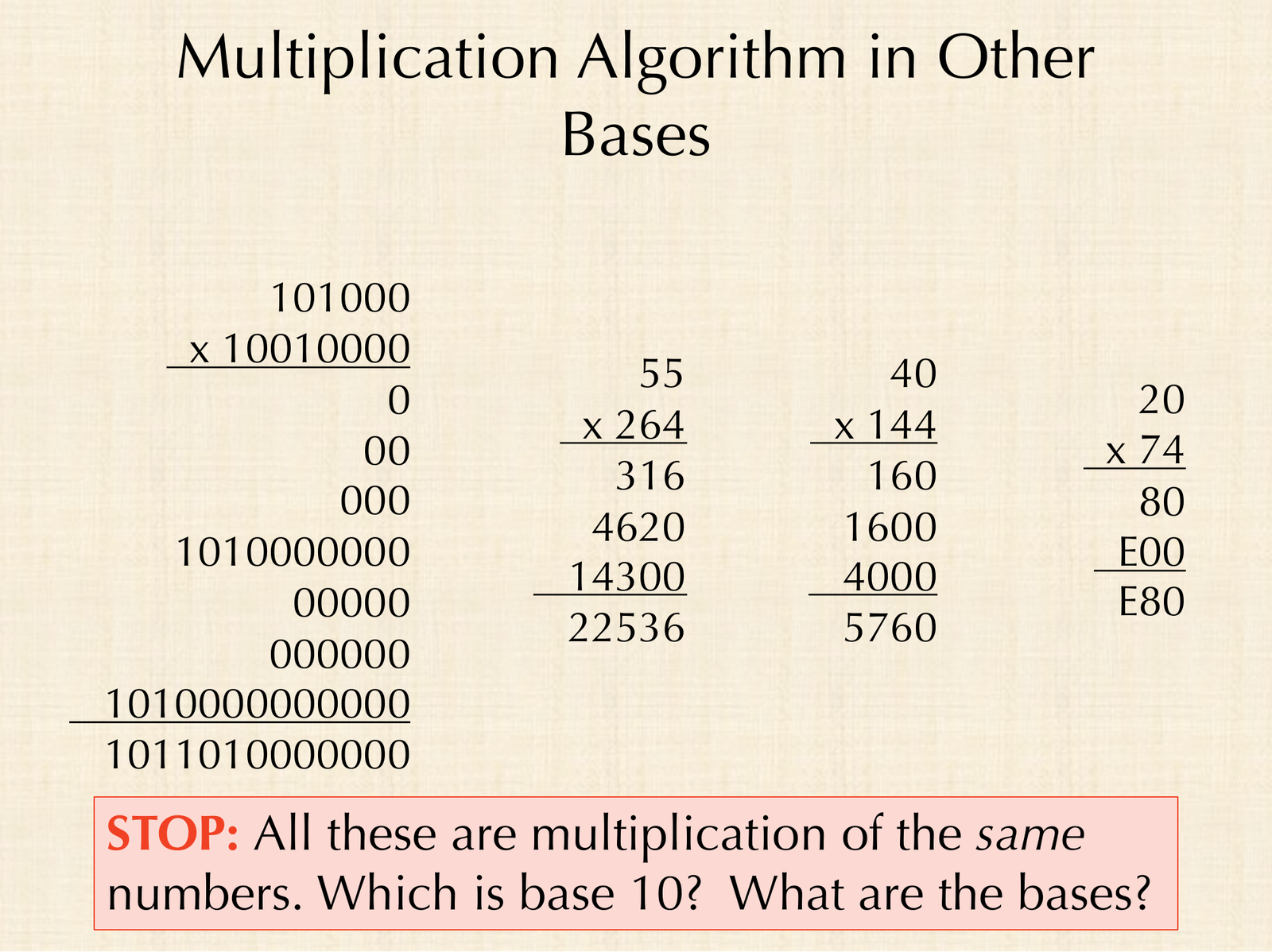
STOP: All four of these computations multiply the same two numbers. Which one is in base 10? What are the bases of the other three?
Your eye probably gravitated toward the third computation, the same way your eye may have gravitated toward the Python version of an algorithm earlier in this chapter. That one is base 10: 4 · 40 is 160, 4 · 40 is 160 again with one zero on the end, and 1 · 40 is 40 with two zeros on the end; adding these gives 40 · 144 = 5,760.
The first computation is base 2: 101000 is 40, and 10010000 is 144. The algorithm proceeds in the same way: multiplying by each 0 contributes zeros, multiplying by the 1 in the fifth position contributes 101000 followed by four zeros, and so on. When we add everything up, carrying where needed, we obtain 1011010000000, which is 5,760.
The second computation is the strangest to look at. It seems impossible that four times 55 could end in 316! One viewer guessed base 8, but we can rule that out: in base 10, 4 · 5 is 20, which in base 8 is 2 · 8 + 4, or 24. That would make the last digit of the first row a 4, not a 6. Trying different bases is a bit like solving a puzzle; this computation is in base 7. Indeed, 55 in base 7 is 5 · 7 + 5 = 40, 264 is 2 · 49 + 6 · 7 + 4 = 144, and 22536 is 2 · 2401 + 2 · 343 + 5 · 49 + 3 · 7 + 6 = 5,760.
Finally, the computation on the right uses E as a digit with value 14, so its base must be at least 15, and the arithmetic itself is valid in any such base. Given that it multiplies 40 by 144, it is base 20, the base used by the Maya: 20 is 2 · 20 = 40, 74 is 7 · 20 + 4 = 144, and E80 is 14 · 400 + 8 · 20 = 5,760.
| Base | First factor | Second factor | Product |
|---|---|---|---|
| 2 | 101000 | 10010000 | 1011010000000 |
| 7 | 55 | 264 | 22536 |
| 10 | 40 | 144 | 5760 |
| 20 | 20 | 74 | E80 |
Remnants of other bases
There is nothing inherently special about base 10, and even though we write numbers in base 10, other bases persist in how we think. Time is a strange combination of base 12 and base 60. In the Gettysburg Address, Abraham Lincoln said “four score and seven years ago”, where a score means 20, so four score and seven is 87. In French, the word for 80 is quatre-vingts, or “four twenties”.
Imperial units of volume are even built on base 2: two cups in a pint, two pints in a quart, and four quarts in a gallon. And just as a liter of water weighs a kilogram, “a pint’s a pound the world around”: a pint of water weighs about a pound, a quart about two pounds, and a gallon about eight pounds.
Base 2 and base 16 are especially convenient because that is how we have built computers. When we descend to the level of the machine, we had better be comfortable with base 2, and we can use base 16 as a proxy for it.
Looking ahead
Now that we can read hexadecimal and translate it to and from binary in our heads, we are ready to descend to the level of the machine. In the next lesson, we will brainstorm the basic operations that a computer needs to support and meet X-Toy, an imaginary machine similar to today’s microprocessors, whose instructions and memory are all written as four-digit hexadecimal words.