Code along video
Learning objectives
X-Toy has no instruction for multiplication. In this code along, we will multiply two numbers anyway, by remembering that multiplication is repeated addition and writing a loop out of jumps. We will then meet X-Toy’s sixteenth and final operation, jump and link, and use it to turn our loop into a function that a main program can call and return from. Along the way, we will see what it literally means for a function to return. We close by asking why anyone would still care about assembly language today.
Code along summary
Setup
We continue in Visual X-TOY from the previous code along; there is nothing new to install.
Multiplication is repeated addition
We have now seen a lot of operations. We can even multiply by a power of two with a single built-in instruction, a left shift. But what if we want to multiply by three, or by 42? Or what if we have two numbers that were given as input, and we want to write a function that multiplies them together?
STOP: Say that we have two numbers stored in registersR[2]andR[3]. How can we multiply them using only addition and subtraction?
The answer is something that we all learned in elementary school: multiplication is repeated addition. To compute 3 times 5, we can add 5 to itself three times, or add 3 to itself five times. We can express this idea even in a Python function that is not allowed to use multiplication. The function below names its variables after the registers that we will use: r2 and r3 hold the two numbers, r1 holds the constant 1, and r6 will hold the answer.
def mul(r2: int, r3: int) -> None:
    r1 = 1
    r6 = 0
    while r3 != 0:
        r6 += r2
        r3 -= r1
    print(r6)
Say that r2 is 3 and r3 is 5. Each time through the loop, we add r2 into the running total r6 and subtract one from r3. After one pass, r3 is 4 and r6 is 3; after two passes, r3 is 3 and r6 is 6. We keep going until r3 reaches zero, at which point r6 holds 15. This was the mystery function from the start of the chapter, when we asked how on earth a Python function could be represented as a string of ones and zeros. We are now going to find out.
Writing a multiplication loop in X-Toy
We will implement this function in X-Toy, but instead of starting at address 10, we will place it starting at address 30. The first two lines set up our constants: 7101 sets R[1] equal to 1 (the amount that we subtract each time), and 7600 sets R[6], our running sum, equal to zero.
We are going to need two more instructions at addresses 32 and 33, but we do not yet know all of their digits, so we hold their places. Address 32 will load something into R[5], and address 33 is our loop test: the branch zero instruction C3XX will jump somewhere if R[3] is equal to zero. We will fill in where once we know it.
When R[3] is not yet zero, we are inside the loop, and the Python function tells us the two steps to take. First, 1662 sets R[6] equal to itself plus R[2]. Second, we subtract, which is opcode 2: 2331 sets R[3] equal to R[3] minus R[1]. Since R[1] is always 1, this decreases R[3] by one every time we add R[2] into the sum. Here is where the program stands.
30: 7101   R[1] <- 0001
31: 7600   R[6] <- 0000
32: 75XX
33: C3XX
34: 1662   R[6] <- R[6] + R[2]           # when R[3] is not yet zero (inside our for loop)
35: 2331   R[3] <- R[3] - R[1]           # end of for loop
Address 35 is the end of the loop body. From here, we need to jump back up to address 33 so that we can perform the test again, because we want to keep looping until R[3] is equal to zero. The instruction for this is jump register, opcode E. But E does not jump to an address written in the instruction; it jumps to the value stored in a register, and everything after the register digit is ignored. So we will write E500 to jump to the value of R[5], and now we know what address 32 should be: 7533 sets R[5] equal to 0033, so that “goto R[5]” takes us back to the top of the loop.
Once all of the looping is over, the product is in R[6], so at address 37 we write 96FF to print R[6] to standard output, and at address 38 we halt with 0000. There was only one thing missing: at the start of the loop, when R[3] is equal to zero, we want to jump over the loop to address 37. So the test at address 33 becomes C337. Here is the whole loop.
30: 7101   R[1] <- 0001
31: 7600   R[6] <- 0000
32: 7533   R[5] <- 0033
33: C337   if (R[3] == 0) goto 37
34: 1662   R[6] <- R[6] + R[2]           # when R[3] is not yet zero (inside our for loop)
35: 2331   R[3] <- R[3] - R[1]           # end of for loop
36: E500   goto R[5]
37: 96FF   write R[6]
38: 0000   halt
This is a completely different way of thinking about programming, but it represents exactly the same idea as the Python function. It takes two numbers in R[2] and R[3], multiplies them together by repeated addition, writes the result into R[6], prints it to the console, and halts. The while loop has become a test at the top (C337), a body (1662 and 2331), and a jump back to the test (E500).
Note: This loop expects its two inputs to already be sitting inR[2]andR[3], so we will not run it on its own. In the next two sections, we will give it a main program that reads those two numbers from standard input, and then we will step through it.
Jump and link: how a function returns
We would like this code to be a function called multiply that takes as input R[2] and R[3] and stores their product in R[6]. We have returned again and again in this course to the idea that a function is a building block, or module, that is reusable in many different contexts. But if it is reusable, then it must be possible for whoever needs it to call it. What does calling a function even mean at this level?
Let us take stock. We have covered all of the arithmetic and logic instructions (add, subtract, and, xor, shift left, and shift right), the loads and stores that move data between registers and memory, halt, the branches that check whether a register is zero or positive, and jumping to an address stored in a register. That is fifteen opcodes. The one that we have not seen is opcode F, called jump and link, and it is the instruction that will give us functions.
Think about what happens when we run main() in Python. We execute lines of code until we reach a line that calls a function. When we call that function, we want to remember where we were, so that when the function finishes, we can come right back to that line and continue executing. This is a simple idea, but a powerful one. Jump and link jumps to an address, but it also leaves a bookmark in a register that remembers where we were.
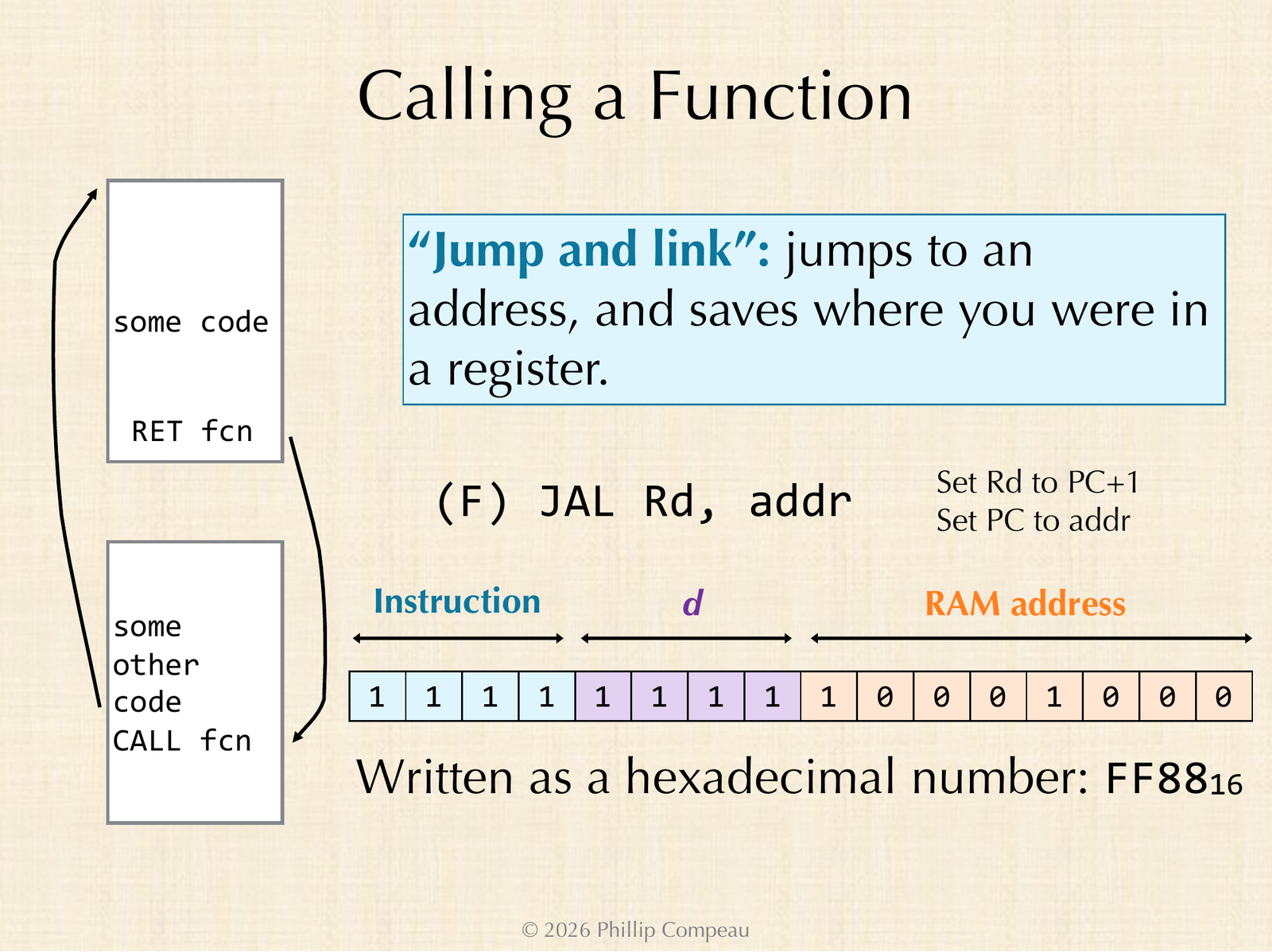
F) jumps to an address and saves where we were in a register. The word FF88 jumps to address 88 and stores the return address in R[F].| Bits 15 to 12 | Bits 11 to 8 | Bits 7 to 0 |
|---|---|---|
1111 = F (jump and link) | 1111 = R[F] (d) | 1000 1000 = 88 (RAM address) |
FF88: set R[F] to the address of the next instruction, then set the program counter to 88.Jump and link has the same format as load address: an opcode, a destination register d, and an 8-bit address. It sets the program counter to the address, so the next instruction to execute is the first line of the function. Before it does that, it stores the bookmark in R[d]: the address of the instruction right after the call. Visual X-TOY’s pseudocode writes this as R[F] <- PC; goto 88, because by the time an instruction executes, the program counter has already advanced past it; this is the “PC + 1” on the slide.
Now we have a concrete meaning for what it means for a function to return. We usually think of returning a value, and that is still true, but a function also literally returns to a place in the code: the line where it was called. The bookmark in R[d] is what makes this possible. To return, the function just jumps to the address stored in that register with jump register, opcode E.
Writing a multiplication function
Let us turn our loop into a function. Visual X-TOY highlights the keyword function when we use it to label a block of code, so we label the code at address 30 as function multiply and add comments describing its inputs (R[2] and R[3]), its output (R[6]), and its return address.
Everything about the loop stays the same: R[1] is 1, R[6] is 0, R[5] is 0033, and we loop until R[3] becomes zero. The problem is the halt at the end. If our function ever reached a 0000, the whole program would stop, but we want to go back to wherever the function was called. So we need one more piece of information: the return address. A good convention is to keep the return address in the last register, R[F]. The final line of the function becomes EF00, “goto R[F]“. (We could write EFAB, since the last two hex digits are ignored, but EF00 is nicer to read.) Our first draft of the function still printed the result before returning.
function multiply
# takes as input: R[2] and R[3]
# Return address: R[F]
# stores product of these numbers into R[6]
# writes the result to the console (stdout)
30: 7101   R[1] <- 0001
31: 7600   R[6] <- 0000
32: 7533   R[5] <- 0033
33: C337   if (R[3] == 0) goto 37
34: 1662   R[6] <- R[6] + R[2]           # when R[3] is not yet zero (inside our for loop)
35: 2331   R[3] <- R[3] - R[1]           # end of for loop
36: E500   goto R[5]
37: 96FF   write R[6]
38: EF00   goto R[F]                     # this tells me where to return to
This piece of code is now self-contained. As long as R[2] and R[3] hold the numbers we want to multiply and R[F] holds a return address, R[6] will hold the product when the function is done, and control goes back to wherever R[F] points.
Next, we write the main part of the program, starting at address 10, which we call program MultiplyTwoNumbers. We first set R[2] equal to 5 and R[3] equal to 3 with load address instructions. But we can make the program stronger by reading the two numbers from standard input instead: 82FF reads a word into R[2], and 83FF reads a word into R[3].
Then we call the function. The opcode is F for jump and link; the next hex digit is the register that stores our bookmark, which is F because the function returns to R[F]; and the last two hex digits are where to jump, 30. So the call is FF30, and Visual X-TOY’s comment reads R[F] <- PC; goto 30. Since the call sits at address 12, R[F] will store 13, the address of the line right after it.
Finally, we make one more improvement. We would rather not muddy the concept of returning a value (placing the product in R[6]) with writing to the console. So we delete the 96FF line from the function, which moves EF00 up to address 37, and we print the result back in main at address 13, right where the function returns, before halting at address 14. Here is the finished program, which we save as multiplication.toy.
program MultiplyTwoNumbers
10: 82FF   read R[2]
11: 83FF   read R[3]
12: FF30   R[F] <- PC; goto 30           # R[F] will store 13
13: 96FF   write R[6]
14: 0000   halt

function multiply
# takes as input: R[2] and R[3]
# Return address: R[F]
# stores product of these numbers into R[6]
30: 7101   R[1] <- 0001
31: 7600   R[6] <- 0000
32: 7533   R[5] <- 0033
33: C337   if (R[3] == 0) goto 37
34: 1662   R[6] <- R[6] + R[2]           # when R[3] is not yet zero (inside our for loop)
35: 2331   R[3] <- R[3] - R[1]           # end of for loop
36: E500   goto R[5]
37: EF00   goto R[F]                     # this tells me where to return to
Stepping through a function call
Let us run the program with the inputs 0005 and 0003 in the standard input panel. The product of 5 and 3 is 15, which is 000F in hexadecimal, so that is what we should see printed. We could run the program quickly, but let us step through it slowly instead, since that is the fun way.
The first two steps read 5 and 3 into R[2] and R[3]. Now the fun begins. When we step FF30, R[F] is updated to 0013, our bookmark, and the program counter flies over to address 30. Inside the function, R[1] is set to 1 and R[6] is set to 0. (Zeroing R[6] may look unnecessary, but R[6] could have held a value already.) Then 7533 stores 0033 into R[5], and the loop begins.
![Visual X-TOY stepping through MultiplyTwoNumbers: the program counter is at 33, R[2] = 0005, R[3] = 0003, R[5] = 0033, and R[F] = 0013](https://programmingforlovers.com/wp-content/uploads/ch7-xtoy-return-address-rf.png)
R[1] to 0001 and R[5] to 0033, and R[F] holds the bookmark 0013.| Pass | C337: is R[3] zero? | 1662: R[6] becomes | 2331: R[3] becomes | Next |
|---|---|---|---|---|
| 1 | No (0003), go on to 34 | 0000 + 0005 = 0005 | 0002 | E500 jumps to 33 |
| 2 | No (0002) | 0005 + 0005 = 000A | 0001 | E500 jumps to 33 |
| 3 | No (0001) | 000A + 0005 = 000F | 0000 | E500 jumps to 33 |
| 4 | Yes, jump to 37 | EF00 jumps to R[F] = 13 |
R[2] = 5 and R[3] = 3.On the fourth test, R[3] is zero, so our repeated addition is finished and we jump to address 37. That line says to jump to R[F], which holds 13, exactly where we wanted to return to. Back in main, 96FF prints R[6], and then the program halts at 0000.
000F
This is not a fancy program, and yet it does the foundational work that we have been relying on since the start of the course: main reads two numbers from the user, calls a function to multiply them, the function places the product in R[6] and returns, and main prints the result. If we reset and press Run instead, the program finishes quickly, because the delay between steps is small; that delay is a parameter that we can change. Being able to count the steps a program takes will be useful when it comes to timing programs.
We then tried larger inputs, 0067 and 00AB (103 and 171 in decimal). Now the loop has many more subtractions to perform, since R[3] starts at 171: each time through the loop, R[2] is added into R[6] and one is subtracted from R[3]. After a while, the program prints the following.
44CD
STOP: What number is44CDin decimal? Is it the product of 103 and 171?
Visual X-TOY’s base converter tells us that 44CD is 17,613, and indeed 103 times 171 is 17,613. Our program multiplies any two input numbers that we like, as long as the product fits.
Note: “As long as the product fits” is doing some work in that sentence. Registers are 16-bit two’s complement numbers, so the largest product we can represent is 32,767; for example, the inputs00C8and0200(200 times 512) print9000, which overflows into a negative number. A zero factor is no problem: ifR[3]is zero, the loop never runs and we print0000, and ifR[2]is zero, we add zero each time. A negative second factor is stranger. IfR[3]isFFFE(that is, -2), subtracting one never reaches zero until the value wraps all the way around through8000, which takes 65,534 passes through the loop. Because the additions overflow in the same way, the program does eventually print the correct two’s complement answer (3 times -2 printsFFFA, or -6), but only after a very long wait.
This program is simple, and behind the scenes each of its instructions is just a binary string of ones and zeros, but we were able to call a function. Real assembly language instruction sets are not much more complicated than this. They have more built-in instructions, since X-Toy limits us to 16 to show us what is possible with only 16 operations, but they share the same spirit.
Why assembly language still matters
Assembly language is simple, but it is powerful. These days, our machines have so much RAM that we rarely need to dig into the details, and this is part of why we have seen the rise of languages like Python that are inefficient: computers have gotten faster and memory has gotten cheaper. Part of what makes a higher level language like Python slower is that the whole symphony of conversions from our code down to the machine is done automatically, without our having to pay attention to it.
A lower level language like C gives us much more control and brings us closer to the machine, which is why C tends to be faster for the same task. The dark secret is that Python itself runs a lot of C behind the scenes, and libraries like NumPy are essentially a nice presentation of code implemented in a low-level language, because it is faster. If we really want the fastest code imaginable, we could learn to be assembly language programmers. That may seem ludicrous today, but at one point in time, it very much was not.
Video games offer some notable examples from an era when memory was at a premium. Chris Sawyer wrote essentially all of RollerCoaster Tycoon in the late 1990s in x86 assembly language; because he had control at the level of the registers, everything in a memory-constrained game could be hyper-optimized. On the music side, David Wise wrote the score for the Donkey Kong Country games of the mid-1990s at this same low level, working directly in hexadecimal. That is how he packed so many layers into music for a game with only 4 megabytes of storage, running on a Super Nintendo with only 128 kilobytes of RAM. A very constrained memory environment allowed for great creativity, if you could get your hands dirty.
Things are quite different today, and yet appreciating these foundations is still vital to having a complete understanding of how computing works.
Looking ahead
Now that we know how loops and functions work in X-Toy, what should we build with it? Something real. We will return to where the course began, with the ancient Greek algorithms. The next livestream implements the trivial GCD algorithm and Euclid’s algorithm in X-Toy, and then the sieve of Eratosthenes. Those code alongs are not written up as lessons yet, so this is the last lesson of Chapter 7 for now.