Code along video
Learning objectives
So far, every binary string that we have stored in X-Toy has represented a nonnegative integer. In this code along, we will see how a computer represents negative integers using a scheme called two’s complement notation, why this scheme makes overflow wrap around so gracefully, and why it forces X-Toy to perform an arithmetic right shift instead of the right shift that we met in the previous lesson. We will close by summarizing the six X-Toy arithmetic and logic instructions, which all share the same format.
Code along summary
Setup
We continue in Visual X-TOY; we will mostly use its Base Converter panel (the top of the right side of the window), which shows any 16-bit word in binary, base 10, and hexadecimal at the same time.
How should we represent negative integers?
Every number that we have represented in binary so far has been an unsigned integer. With four bits, for example, we can represent the 16 integers from 0 (0000) up to 15 (1111). But our programs will certainly need negative numbers too.
| Unsigned integer (base 10) | Binary |
|---|---|
| 0 | 0000 |
| 1 | 0001 |
| … | … |
| 7 | 0111 |
| 8 | 1000 |
| 9 | 1001 |
| … | … |
| 15 | 1111 |
STOP: How would we represent negative integers using only binary strings?
A natural idea is to reserve a bit for the sign. We could agree that if the first bit is a 0, then the number is positive, and if the first bit is a 1, then the number is negative (or vice versa). The remaining bits would then hold the magnitude of the number.
The word “agree” is important. Whatever convention we pick, all the engineers building hardware and software have to agree on it, in the same way that we needed a shared file format earlier in the course so that every program reading an evolutionary tree interprets it the same way.
This sign bit idea has an awkward quirk, though. If 0000 is zero, then what is 1000? If the leading 1 means “the negative of whatever comes after it”, then 1000 is negative zero, and 1001 would be -1, 1010 would be -2, and so on. Having two different representations of zero is a long and separate story, and it is not the approach that we will use.
Two’s complement notation
Instead, nearly every computer uses two’s complement notation. In this scheme, the binary strings starting with 0 represent the nonnegative integers as usual, counting up from 0000 (0) to 0111 (7). Then, when we add 1 to 0111, we land on 1000, which represents the most negative integer, -8. As we keep adding 1, we work our way back up through -7, -6, and so on, until we reach 1111, which represents -1.
| Binary | Unsigned (base 10) | Two’s complement (base 10) |
|---|---|---|
0000 | 0 | 0 |
0001 | 1 | 1 |
| … | … | … |
0111 | 7 | 7 |
1000 | 8 | -8 |
1001 | 9 | -7 |
| … | … | … |
1111 | 15 | -1 |
It may seem strange that adding 1 to 7 should give us -8, but this convention makes everything cyclic. With four bits, the largest integer we can represent is 23 – 1 = 7, and the most negative is -23 = -8. The exponent is 3 rather than 4 because the first bit effectively plays the role of the sign. In general, with n bits, two’s complement represents the integers from -2n-1 to 2n-1 – 1.
Why should 1111 be -1? Because when we add 1 to it, we get the five-bit string 10000. We only have room for four bits, so the leading 1 is lost to overflow, and we are left with 0000, which is zero. Since -1 + 1 = 0, it makes sense for 1111 to represent -1. In this way, arithmetic simply wraps around the cycle, as though everything is being computed modulo 16, and yet we also get negative integers for free.
Two’s complement is what is happening behind the scenes in a modern programming language. When we write x = 3 and then do arithmetic on x, the integer is typically stored in two’s complement notation, and X-Toy represents its integers the same way.
One handy consequence of this scheme is a quick way to negate a number: flip every bit and then add 1. For example, 7 is 0111; flipping its bits gives 1000, and adding 1 gives 1001, which the table above tells us is -7.
Two’s complement in X-Toy
X-Toy words have 16 bits, so its integers range from -215 = -32,768 to 215 – 1 = 32,767. We can see this in the Base Converter. If we type the binary string 1001001011111111 (hexadecimal 92FF), the converter reports the base 10 value -27,905. The number is negative because X-Toy interprets any word that starts with a 1 as a negative number in two’s complement notation.
| Binary | Hexadecimal | Base 10 |
|---|---|---|
0000000000000000 | 0000 | 0 |
0111111111111111 | 7FFF | 32,767 |
1000000000000000 | 8000 | -32,768 |
1001001011111111 | 92FF | -27,905 |
1111111111111111 | FFFF | -1 |
You might guess that a word made up of all 1s, FFFF, is the most negative number, but it represents -1, since adding 1 to it makes all of those 1s collapse into 0s. The most negative number is a 1 followed by fifteen 0s, 8000, or -32,768. As we type in a 1 followed by more and more 0s, the converter shows positive powers of two (2000 is 8,192, for example) right up until the string has all 16 digits, at which point the leading 1 becomes the sign and the value becomes -32,768.
We can watch the wraparound happen with a tiny program that reads a word, adds 1 to it, and prints the result. Save it as twos_complement_add_one.toy.
10: 81FF   read R[1]
11: 7201   R[2] <- 0001
12: 1312   R[3] <- R[1] + R[2]
13: 93FF   write R[3]
14: 0000   halt
If we enter 7FFF (32,767, the largest X-Toy integer), the program prints 8000, which is -32,768. If we enter FFFF (-1), it prints 0000, exactly as two’s complement promises.
7FFF  ->  8000
FFFF  ->  0000
Revisiting left shift with negative numbers
Two’s complement has a subtle consequence for the left and right shift operations from the previous lesson. Even though X-Toy’s registers just hold binary strings, it conceptualizes any word that starts with 1 as a negative number, and so we should check that our shifts still mean what we want them to mean.
STOP: What integer does the 16-bit word1111111111011000represent in two’s complement notation?
This word is FFD8 in hexadecimal, and it represents -40. Recall that a left shift by two bits moves every digit two places to the left; the two leftmost digits fall off and disappear, and two 0s come in at the right. This should correspond to multiplying by 4. Sure enough, the result 1111111101100000 (FF60) represents -160 in two’s complement. Even though the leading bit is a 1, our left shift still multiplies by 4. This is a nice feature of two’s complement that we could justify mathematically.
| Binary | Hexadecimal | Base 10 | |
|---|---|---|---|
| Rs | 1111111111011000 | FFD8 | -40 |
| Rs << 2 | 1111111101100000 | FF60 | -160 |
Arithmetic right shift
Right shift is where we run into trouble. A right shift by two bits should be an integer division by 4, but in the right shift that we described in the previous lesson, 0s come in at the left. If we right shift FFD8 by two bits this way, we obtain 0011111111110110 (3FF6), which is a large positive number. But -40 divided by 4 is -10, so the answer should start with a 1.
The right shift that fills in 0s at the left is called a logical right shift, and it works great for unsigned integers, where a word full of 1s is just a big positive number. It breaks when the leading bit represents a sign.
Because X-Toy represents both positive and negative integers, its right shift (opcode 6) is an arithmetic right shift: if the leading bit is 1, then 1s come in at the left, and if the leading bit is 0, then 0s come in at the left.
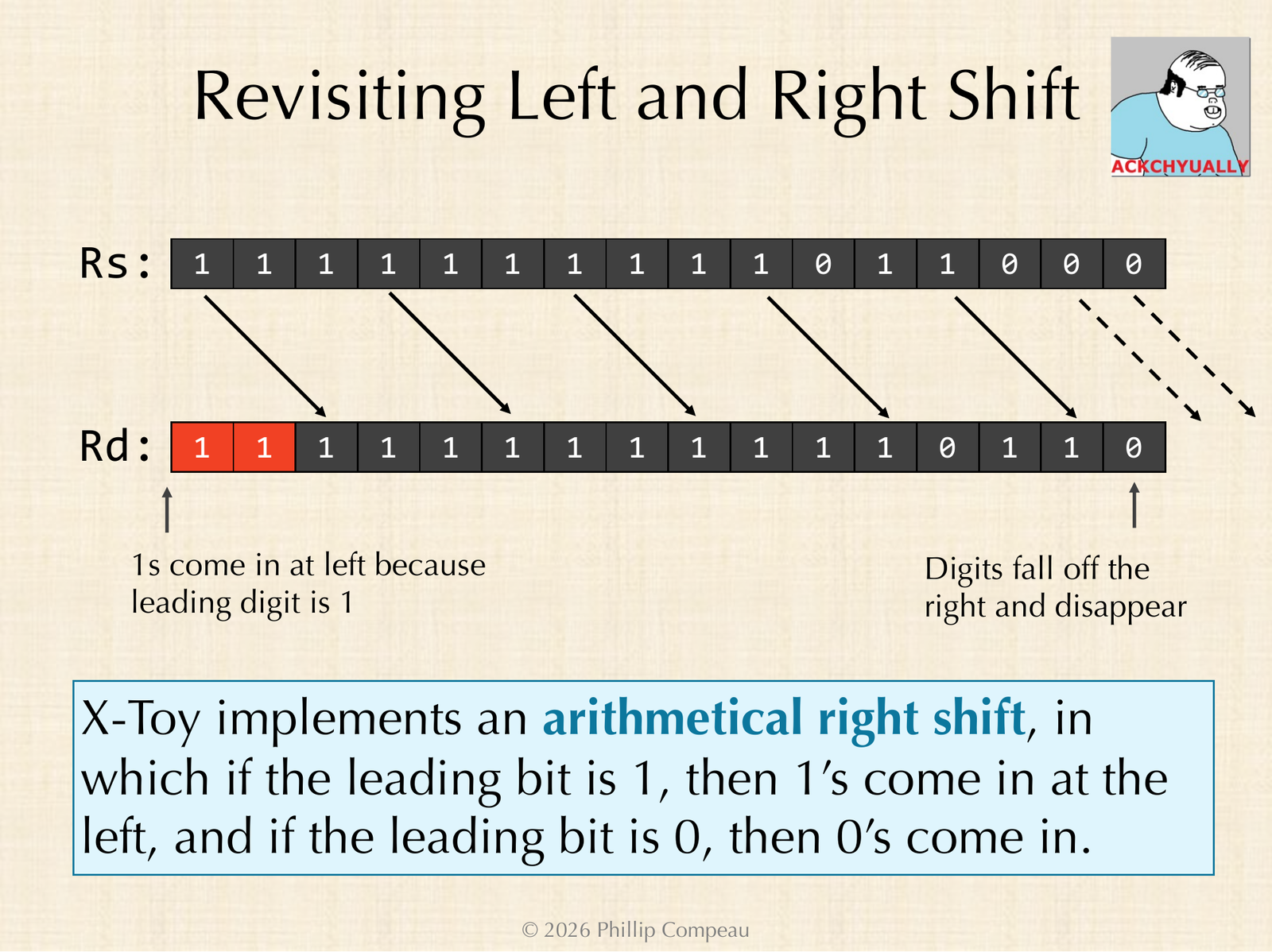
FFD8 (-40) by two bits. Because the leading bit is 1, 1s come in at the left, and the result is FFF6 (-10).The result is twelve 1s followed by 0110. The twelve 1s are three copies of F in hexadecimal, and 0110 is 4 + 2 = 6, so the result is FFF6. Plugging FFF6 into the Base Converter tells us that it is -10, which is exactly -40 divided by 4.
| Binary | Hexadecimal | Base 10 | |
|---|---|---|---|
| Rs | 1111111111011000 | FFD8 | -40 |
| Logical right shift by 2 | 0011111111110110 | 3FF6 | 16,374 |
| Arithmetic right shift by 2 (X-Toy) | 1111111111110110 | FFF6 | -10 |
So the only change that we need to make is that if the leading bit is 1, then 1s come in at the left. With that tweak, right shifting by k bits still performs integer division by 2k, whether the number is positive or negative. Conveniences like this one were worked out by electrical engineers decades ago (through standards bodies like the IEEE) so that the rest of us do not have to think too hard about them.
We can check both shifts in X-Toy with a short program that reads a word, shifts it left by two bits and prints the result, and then shifts the original word right by two bits and prints that result too. Save it as twos_complement_shifts.toy.
10: 81FF   read R[1]
11: 7202   R[2] <- 0002
12: 5312   R[3] <- R[1] << R[2]
13: 93FF   write R[3]
14: 6412   R[4] <- R[1] >> R[2]
15: 94FF   write R[4]
16: 0000   halt
When we enter FFD8 (-40), X-Toy prints FF60 (-160) and FFF6 (-10). When we enter 0028 (40), it prints 00A0 (160) and 000A (10).
input FFD8:  FF60  FFF6
input 0028:  00A0  000A
The arithmetic and logic instructions
We can now summarize all of X-Toy’s arithmetic and logic operations. Add and subtract, which we met earlier, have opcodes 1 and 2. The four operations from this lesson and the previous one, AND, XOR (X-Toy’s version of OR), left shift, and right shift, have opcodes 3, 4, 5, and 6, and they follow exactly the same syntax as add and subtract.
| Opcode | Operation | Effect |
|---|---|---|
1 | add | R[d] <- R[s] + R[t] |
2 | subtract | R[d] <- R[s] - R[t] |
3 | and | R[d] <- R[s] & R[t] |
4 | xor | R[d] <- R[s] ^ R[t] |
5 | shift left | R[d] <- R[s] << R[t] |
6 | shift right (arithmetic) | R[d] <- R[s] >> R[t] |
In every case, the first hex digit is the opcode saying which operation to perform, the second hex digit d says which register we are setting, and the third and fourth hex digits s and t say which registers we are operating on. For example, in the instruction 3228, the binary string is 0011 0010 0010 1000: the opcode 3 means AND, and we set register 2 to the AND of registers 2 and 8.
| Instruction | Opcode | d | s | t | Meaning |
|---|---|---|---|---|---|
3228 | 3 (AND) | 2 | 2 | 8 | R[2] <- R[2] & R[8] |
4228 | 4 (XOR) | 2 | 2 | 8 | R[2] <- R[2] ^ R[8] |
5228 | 5 (LSHIFT) | 2 | 2 | 8 | R[2] <- R[2] << R[8] |
6228 | 6 (RSHIFT) | 2 | 2 | 8 | R[2] <- R[2] >> R[8] |
So 3228, 4228, 5228, and 6228 all do something to registers 2 and 8 and store the result in register 2; the left and right shifts move the bits of register 2 by however many places are stored in register 8. The only thing that changes from one instruction to the next is the opcode telling X-Toy which of the operations to perform.
Looking ahead
We now know how X-Toy represents negative numbers and have a complete set of arithmetic and logic instructions. But every program we have written so far runs straight through from top to bottom, and it can only access memory addresses that are written directly into its instructions. In the next lesson, we will learn how to load from and store to an address held in a register, and how to branch so that our programs can make decisions with if and else.