Learning objectives
In this code along, we will apply what we learned in the core text about how to implement an arbitrary cellular automaton, solving the central problem of this chapter, reproduced below.
Cellular Automaton Problem
Input: An initial configuration of a cellular automaton initial_board, an integer num_gens, and a collection of rules rules for the automaton.
Output: All num_gens + 1 configurations of the automaton over num_gens generations starting with initial_board and following the rules indicated in rules.
We will then visualize our result by generating an animation of two different automata: the Game of Life automaton that we built in the previous code along, and the magnificent self-replicating automaton called Langton’s loops.
Along the way, we will see that with effective top-down design, we can generalize code that was written for a specific application, the Game of Life, into a powerful program that will be able to generate any one of the infinitude of possible cellular automata.
Code along summary
Setup
To complete this code along, you will need starter code, which can be downloaded here as a file cellular_automata.zip. Expand this file into a folder cellular_automata, and move this directory into your python/src source code folder.
You will also need modules for reading input, simulating automata, and drawing them to images. In our Python code, we will rely on the following modules for drawing and creating MP4 videos (which were part of our previous code alongs on graphics and implementing the Game of Life.):
pygame: for rendering boards into images.imageio: for writing an MP4 video of the automaton simulation.numpy: for efficient array manipulation to help with creating the MP4 video.
Some functions that will be covered below are already included as part of the starter code because, as we will see, they are identical to their analogues from our work with the Game of Life.
The directory structure of the starter code is similar to game_of_life (although the rules folder is new) and is summarized below.
boards/: a directory containing .csv files representing different initial automaton states.rules/: a directory containing.txtfiles that contain rule sets of automata.output/: initially empty directory where images and videos will be saved.datatypes.py: contains type declarations.functions.py: automaton update logic.custom_io.py: code for reading boards and rules from files.drawing.py: code for rendering boards to images.main.py: where we read parameters and run the simulation indef main().
Declaring a GameBoard type
When implementing the Game of Life, we declared a new type alias GameBoard that is equivalent to a two-dimensional array of boolean variables. When representing an arbitrary automaton, we may have more than two states, and so using just true or false values to represent the state of a cell will not suffice, and we will instead represent states using strings, which gives us maximum flexibility in how we name states. In datatypes.py, we will declare a generalized type GameBoard that is equivalent to a two-dimensional list of strings.
# GameBoard is a two-dimensional list of string variables
# representing a single generation of a Cellular Automata board.
# aliasing GameBoard to have type list[list[str]]
GameBoard = list[list[str]]
Our highest level function to simulate a cellular automaton
We first will focus on the engine of implementing automata in functions.py, and we begin with our highest level function, play_automaton(). This function takes as input an initial GameBoard object board as well as an integer num_gens representing the number of generations, a string neighborhood_type that will be equal to "Moore" or "vonNeumann", and a map of strings to strings rules that representing the rules of the automaton.
In functions.py, we start with the core engine: play_automaton(). This function takes an initial GameBoard initial_board, an integer num_gens (number of generations), a string neighborhood_type (either "Moore" or "vonNeumann"), and a dictionary rules: dict[str, str] mapping neighborhood strings to next-state strings.
We are providing play_game_of_life()play_automaton(). Because we have a well-planned top-down design, the differences between implementing the Game of Life and an arbitrary automaton will only appear in the lower levels of the function hierarchy.
Note: This pattern — writing a high-level function that calls named subroutines before those subroutines are implemented — is called structured procrastination, and reflects the principle that laziness is a virtue in programming. By delegating the hard work toupdate_board()and further toupdate_cell(), we can write and test each level of the hierarchy in isolation, without needing to hold the full implementation in mind at once.
def play_game_of_life(initial_board: GameBoard, num_gens: int) -> list[GameBoard]:
    """
    Simulate Game of Life for a given number of generations.
    Args:
        initial_board (GameBoard): The starting game board.
        num_gens (int): The number of generations to simulate.
    Returns:
        list[GameBoard]: A list of GameBoard objects of length num_gens + 1,
        representing the progression of the game from the initial board
        through each generation.
    """
    if not isinstance(initial_board, list) or len(initial_board) == 0:
        raise ValueError("initial_board must be a non-empty GameBoard (2D list of strings).")
    assert_rectangular(initial_board)
    if len(initial_board[0]) == 0:
        raise ValueError("initial_board must have at least one column.")
    boards = []
    boards.append(initial_board)

    for _ in range(num_gens):
        boards.append(update_board(boards[-1]))  # accessing the last element in boards

    return boards
def play_automaton(initial_board: GameBoard, num_gens: int, neighborhood_type: str, rules: dict[str, str]) -> list[GameBoard]:
    """
    Simulate a cellular automaton for a given number of generations.
    Args:
        initial_board (GameBoard): The starting configuration of the automaton.
        num_gens (int): The number of generations to simulate.
        neighborhood_type (str): Either "Moore" or "vonNeumann".
        rules (dict[str, str]): A mapping from neighborhood strings to next-state strings.
    Returns:
        list[GameBoard]: A list of GameBoard objects of length num_gens + 1,
        representing the automaton's progression from the initial board
        through each generation.
    """
    # parameter checks
    if not isinstance(initial_board, list) or len(initial_board) == 0:
        raise ValueError("initial_board must be a non-empty GameBoard.")
    if not isinstance(num_gens, int) or num_gens < 0:
        raise ValueError("num_gens must be a non-negative integer.")
    if neighborhood_type not in ["Moore", "vonNeumann"]:
        raise ValueError("neighborhood_type must be 'Moore' or 'vonNeumann'.")
    if not isinstance(rules, dict):
        raise ValueError("rules must be a dictionary.")
    boards = []
    boards.append(initial_board)
    for _ in range(num_gens):
        boards.append(update_board(boards[-1], neighborhood_type, rules))
    return boards
Updating a single generation of a board
Next, we turn to updating a GameBoard over a single generation. We reproduce the pseudocode for update_board() below, which shows that we will pass the hard work to a function update_cell() that updates the state of a single cell of the current board, using neighborhood_type and rules.
UpdateBoard(currentBoard, neighborhoodType, rules)
    numRows ← CountRows(currentBoard)
    numCols ← CountColumns(currentBoard)
    newBoard ← InitializeBoard(numRows, numCols)
    for every integer r between 0 and numRows – 1
        for every integer c between 0 and numCols – 1
            newBoard[r][c] ← UpdateCell(currentBoard, r, c, neighborhoodType, rules)
    return newBoard
Now that you are becoming an expert at working with two-dimensional arrays, the conversion of this pseudocode to Python below should start feeling comfortable.
def update_board(current_board: GameBoard, neighborhood_type: str, rules: dict[str, str]) -> GameBoard:
    """
    Update a GameBoard for one generation according to the given rules and neighborhood type.
    Args:
        current_board (GameBoard): The current state of the automaton.
        neighborhood_type (str): Either "Moore" or "vonNeumann".
        rules (dict[str, str]): A mapping from neighborhood strings to next-state strings.
    Returns:
        GameBoard: The new board after applying the automaton rules for one generation.
    """
    # parameter checks
    if not isinstance(current_board, list) or len(current_board) == 0:
        raise ValueError("current_board must be a non-empty GameBoard.")
    if neighborhood_type not in ["Moore", "vonNeumann"]:
        raise ValueError("neighborhood_type must be 'Moore' or 'vonNeumann'.")
    if not isinstance(rules, dict):
        raise ValueError("rules must be a dictionary.")
    # first, create a new board corresponding to the next generation. All cells will have state 0.
    num_rows = count_rows(current_board)
    num_cols = count_columns(current_board)
    new_board = initialize_board(num_rows, num_cols)
    # iterate through all cells of current_board and update each one into new_board
    for r in range(num_rows):
        for c in range(num_cols):
            new_board[r][c] = update_cell(current_board, r, c, neighborhood_type, rules)
    return new_board
Helper functions
update_board() includes four subroutines: count_rows(), count_columns(), initialize_board(), and update_cell(). The first three of these are almost identical to their counterparts when we implemented the Game of Life. We therefore provide them in addition to the assert_rectangular() subroutine as part of the starter code, reproduced below.
def initialize_board(num_rows: int, num_cols: int) -> GameBoard:
    """
    Initialize a GameBoard with the given number of rows and columns.
    Args:
        num_rows (int): Number of rows.
        num_cols (int): Number of columns.
    Returns:
        GameBoard: A num_rows x num_cols board filled with "0" values.
    """
    if not isinstance(num_rows, int) or num_rows <= 0:
        raise ValueError("num_rows must be a positive integer.")
    if not isinstance(num_cols, int) or num_cols <= 0:
        raise ValueError("num_cols must be a positive integer.")
    board: GameBoard = [] # declaring board
    for _ in range(num_rows):
        row = ["0"] * num_cols
        board.append(row)
    return board
def count_rows(board: GameBoard) -> int:
    """
    Count the number of rows in a GameBoard.
    Args:
        board (GameBoard): A 2D list of strings representing the game state.
    Returns:
        int: Number of rows in the board.
    """
    if not isinstance(board, list):
        raise ValueError("board must be a list.")
    return len(board)
def count_columns(board: GameBoard) -> int:
    """
    Count the number of columns in a GameBoard.
    Args:
        board (GameBoard): A 2D list of strings representing the game state.
    Returns:
        int: Number of columns in the board.
    Raises:
        ValueError: If the board is not rectangular.
    """
    if not isinstance(board, list) or len(board) == 0:
        raise ValueError("board must be a non-empty 2D list.")
    if len(board) == 0:
        raise ValueError("Error: no rows in GameBoard.")
    return len(board[0])
def assert_rectangular(board: GameBoard) -> None:
    """
    Check whether a GameBoard is rectangular.
    Args:
        board (GameBoard): The game board.
    Raises:
        ValueError: If the board has no rows or if its rows are not the same length.
    """
    if len(board) == 0:
        raise ValueError("Error: no rows in GameBoard.")
    first_row_length = len(board[0])

    # range over rows and make sure that they have the same length as first row
    for row in board:
        if len(row) != first_row_length:
            raise ValueError("Error: GameBoard is not rectangular.")
Updating a single cell
The final subroutine of update_board() is update_cell(). It converts the neighborhood of board[r][c] to a string using neighborhood_to_string() based on whether neighborhood_type is "Moore" or "vonNeumann". It then uses this string as a key in the rules dictionary to determine the string state of board[r][c] in the next generation.
UpdateCell(currentBoard, r, c, neighborhoodType, rules)
    neighborhood ← NeighborhoodToString(currentBoard, r, c, neighborhoodType)
    return rules[neighborhood]
When we convert update_cell() to Python, we need to ensure that rules[neighborhood] exists. If it does, we return rules[neighborhood]. Otherwise, we update the state of the cell to be 0, our default state.
def update_cell(board: GameBoard, r: int, c: int,
                neighborhood_type: str,
                rules: dict[str, str]) -> str:
    """
    Determine next-state string for cell (r, c) using rules and neighborhood type.
    Args:
        board (GameBoard): Current state of the automaton.
        r (int): Row index of the cell to update.
        c (int): Column index of the cell to update.
        neighborhood_type (str): Either "Moore" or "vonNeumann".
        rules (dict[str, str]): A mapping from neighborhood strings to next-state strings.
    Returns:
        str: next state for the cell.
    """
    # consult the neighborhood of board[r][c] and convert to a string
    neighborhood = neighborhood_to_string(board, r, c, neighborhood_type)
    # is that neighborhood in the rule set? I hope so!
    if neighborhood in rules:
        return rules[neighborhood]
    # default case: return "0"
    return "0"
Note: Another possibility is that we return some special string (say,"$") as the default state if no rule is found. The question will be how to color a cell that has such a value, since it is not a valid state. In our case, it will be easier if we simply convert a cell to “dead” (state zero) if no rule applies to it.
The nitty gritty: converting a neighborhood to a string
We are now ready to implement neighborhood_to_string(), which takes as input a GameBoard called current_board, integers r and c, and a string neighborhood_type (indicating either "Moore" or "vonNeumann"). It returns the neighborhood of current_board[r][c] as a string according to neighborhood_type.
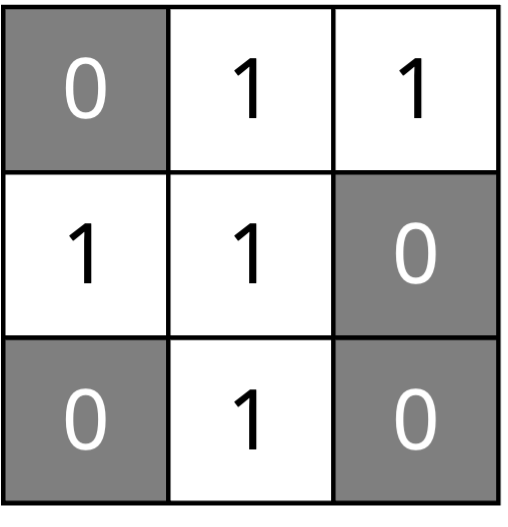
Recall that if neighborhood_type is "Moore", then the first character of the string encodes the state of current_board[r][c], and the next eight characters encode the states of the neighbors of the cell. Our convention is to read the neighbors clockwise from top left. For example, the neighborhood string of the central square in the R pentomino, reproduced below, is "101100101".
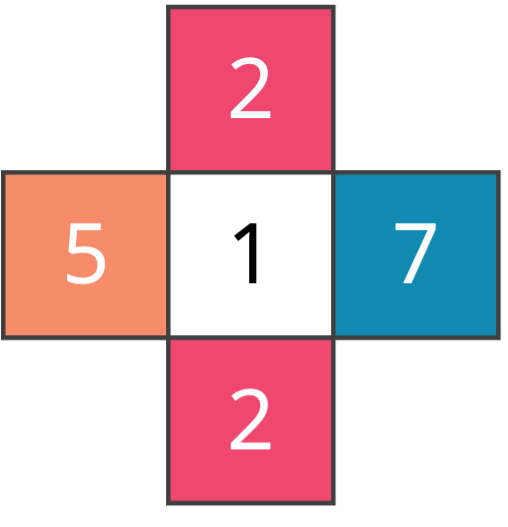
If neighborhood_type is "vonNeumann", then the neighborhood string of current_board[r][c] will consist of the cell’s state in addition to those of its four neighbors; our convention is to read the neighbors clockwise, starting with the top neighbor. For example, the neighborhood string of the board in the figure below on the right is "12725".
Note: In the Game of Life, the order in which we listed neighbors did not matter — only the count of live neighbors was relevant to the rules. For a general automaton, this is no longer the case: swapping two elements of a neighborhood string can produce a different rule lookup and a different next state. For example,"12725"and"12275"may map to completely different next states. This is why we specify a fixed ordering convention — clockwise from top-left for Moore, clockwise from top for von Neumann — and apply it consistently.
To implement this function in Python, the first thing that we will do is initialize neighborhood to current_board[r][c], which we will eventually return. Since the board stores strings, no conversion is needed.
def neighborhood_to_string(current_board: GameBoard, r: int, c: int, neighborhood_type: str) -> str:
    """
    Construct the neighborhood string for a given cell in a GameBoard.
    Args:
        current_board (GameBoard): The current game board.
        r (int): The row index of the cell.
        c (int): The column index of the cell.
        neighborhood_type (str): The type of neighborhood ("Moore" or "vonNeumann").
    Returns:
        str: A string formed of the central square followed by its neighbors
        according to the neighborhood type indicated.
    """
    # parameter checks
    if not isinstance(current_board, list) or len(current_board) == 0:
        raise ValueError("current_board must be a non-empty GameBoard.")
    assert_rectangular(current_board)
    if not isinstance(r, int) or not isinstance(c, int):
        raise ValueError("r and c must be integers.")
    if not in_field(current_board, r, c):
        raise ValueError("(r, c) must be inside the board.")
    if neighborhood_type not in ("Moore", "vonNeumann"):
        raise ValueError('neighborhood_type must be "Moore" or "vonNeumann".')
    # Initialize the neighborhood string with the current cell value
    neighborhood = current_board[r][c]
    # to fill in
    return neighborhood
Next, we initialize neighbor_cells, which is a list of ordered pairs. Each ordered pair directly encodes the absolute row and column coordinates of a neighbor cell.
def neighborhood_to_string(current_board: GameBoard, r: int, c: int, neighborhood_type: str) -> str:
    """
    Build the neighborhood string for a given cell.
    Args:
        current_board (GameBoard): The game board.
        r (int): Row index of the cell.
        c (int): Column index of the cell.
        neighborhood_type (str): Neighborhood type, e.g., "Moore" or "vonNeumann".
    Returns:
        str: The central cell's state followed by its neighbors' states,
        ordered according to the specified neighborhood type.
    """
    # parameter checks
    if not isinstance(current_board, list) or len(current_board) == 0:
        raise ValueError("current_board must be a non-empty GameBoard.")
    assert_rectangular(current_board)
    if not isinstance(r, int) or not isinstance(c, int):
        raise ValueError("r and c must be integers.")
    if not in_field(current_board, r, c):
        raise ValueError("(r, c) must be inside the board.")
    if neighborhood_type not in ("Moore", "vonNeumann"):
        raise ValueError('neighborhood_type must be "Moore" or "vonNeumann".')
    # Initialize the neighborhood string with the current cell value
    neighborhood = current_board[r][c]
    # Initialize neighbor_cells based on the neighborhood type
    neighbor_cells = []
    # to fill in
    return neighborhood
We will set neighbor_cells according to the neighborhood type. Since there are either 4 or 8 neighbor cells, we will use a list literal to do so. Each tuple directly gives the absolute row and column of a neighbor.
def neighborhood_to_string(current_board: GameBoard, r: int, c: int, neighborhood_type: str) -> str:
    """
    neighborhood_to_string takes as input a GameBoard, row and column indices,
    and a neighborhood type as a string.
    It returns a string formed of the central square followed by its neighbors
    according to the neighborhood type indicated.
    Args:
        current_board (GameBoard): The game board.
        r (int): Row index of the cell.
        c (int): Column index of the cell.
        neighborhood_type (str): Either "Moore" or "vonNeumann".
    Returns:
        str: A string encoding the central cell and its neighbors' states.
    """
    # parameter checks
    if not isinstance(current_board, list) or len(current_board) == 0:
        raise ValueError("current_board must be a non-empty GameBoard.")
    assert_rectangular(current_board)
    if not isinstance(r, int) or not isinstance(c, int):
        raise ValueError("r and c must be integers.")
    if not in_field(current_board, r, c):
        raise ValueError("(r, c) must be inside the board.")
    if neighborhood_type not in ("Moore", "vonNeumann"):
        raise ValueError('neighborhood_type must be "Moore" or "vonNeumann".')
    # initialize the neighborhood string to start with board[r][c]
    neighborhood = current_board[r][c]
    # Set neighbor_cells to the absolute coordinates of each neighbor
    if neighborhood_type == "Moore":
        neighbor_cells = [
            (r-1, c-1), (r-1, c), (r-1, c+1),
            (r, c+1),
            (r+1, c+1), (r+1, c), (r+1, c-1),
            (r, c-1),
        ]
    elif neighborhood_type == "vonNeumann":
        neighbor_cells = [(r-1, c), (r, c+1), (r+1, c), (r, c-1)]
    # to fill in
    return neighborhood
We now need only range over every element in neighbor_cells, and for each such tuple of length 2, set x equal to the row index and y equal to the column index. If (x, y) is within the boundaries of the board, then we will append its value to the neighborhood; otherwise, we will append the default value of "0".
Note: One approach to handling out-of-bounds neighbors would be to enumerate every possible border and corner configuration separately — but this leads to a large number of tedious cases. A much simpler design is theelseclause that assigns the default state"0"whenever a neighbor falls outside the board, so we never need to enumerate edge cases explicitly.
def neighborhood_to_string(current_board: GameBoard, r: int, c: int, neighborhood_type: str) -> str:
    """
    neighborhood_to_string takes as input a GameBoard, row and column indices,
    and a neighborhood type as a string.
    It returns a string formed of the central square followed by its neighbors
    according to the neighborhood type indicated.
    Args:
        current_board (GameBoard): The game board.
        r (int): Row index of the cell.
        c (int): Column index of the cell.
        neighborhood_type (str): Either "Moore" or "vonNeumann".
    Returns:
        str: A string encoding the central cell and its neighbors' states.
    """
    # parameter checks
    if not isinstance(current_board, list) or len(current_board) == 0:
        raise ValueError("current_board must be a non-empty GameBoard.")
    assert_rectangular(current_board)
    if not isinstance(r, int) or not isinstance(c, int):
        raise ValueError("r and c must be integers.")
    if not in_field(current_board, r, c):
        raise ValueError("(r, c) must be inside the board.")
    if neighborhood_type not in ("Moore", "vonNeumann"):
        raise ValueError('neighborhood_type must be "Moore" or "vonNeumann".')
    # Initialize the neighborhood string with the current cell value
    neighborhood = current_board[r][c]
    # Set neighbor_cells to the absolute coordinates of each neighbor
    if neighborhood_type == "Moore":
        neighbor_cells = [
            (r-1, c-1), (r-1, c), (r-1, c+1),
            (r, c+1),
            (r+1, c+1), (r+1, c), (r+1, c-1),
            (r, c-1),
        ]
    elif neighborhood_type == "vonNeumann":
        neighbor_cells = [(r-1, c), (r, c+1), (r+1, c), (r, c-1)]
    # Iterate over neighbor_cells to construct the neighborhood string
    for x, y in neighbor_cells:
        if in_field(current_board, x, y):
            neighborhood += current_board[x][y]
        else:  # default case
            neighborhood += "0"
    return neighborhood
Implementing neighborhood_to_string() requires us to write an in_field() subroutine function, which is identical to the one that we wrote when we implemented the Game of Life, and so we provide it in the starter code.
def in_field(board: GameBoard, i: int, j: int) -> bool:
    """
    Check if the indices (i, j) are within the bounds of the board.
    Args:
        board (GameBoard): The game board (2D list of strings).
        i (int): Row index.
        j (int): Column index.
    Returns:
        bool: True if (i, j) is inside the board, False otherwise.
    """
    # parameter checks
    if not isinstance(board, list) or len(board) == 0:
        raise ValueError("board must be a non-empty GameBoard.")
    if not isinstance(i, int) or not isinstance(j, int):
        raise ValueError("i and j must be integers.")
    if i < 0 or j < 0:
        return False
    if i >= count_rows(board) or j >= count_columns(board):
        return False
    # if we survive to here, then we are on the board
    return True
Parsing a board and a collection of rules
We next turn to writing functions in custom_io.py that will parse in data. As when implementing the Game of Life, we have a collection of initial automata in the boards directory that are represented as comma-separated integers. This time, however, we also have rule sets in the rules directory, which we will detail soon.
For now, we point out that our first function, read_board_from_file(), is identical to its counterpart from our work with the Game of Life, and we therefore provide it with the starter code.
def read_board_from_file(filename: str) -> GameBoard:
    """
    Reads a board configuration from a CSV file and returns it as a GameBoard.
    Args:
        filename (str): The path to the CSV file.
    Returns:
        GameBoard: A 2D list of strings representing the board.
    """
    if not isinstance(filename, str) or len(filename) == 0:
        raise ValueError("filename must be a non-empty string.")
    # open(filename, 'r') opens the file in read mode ('r'), returning a file object (f).
    # with ensures the file is automatically closed when the block ends — even if there’s an error.
    with open(filename, 'r') as f:
        # first, convert the whole file to a string
        giant_string = f.read()

    # trim any space at the start or end of file
    trimmed_giant_string = giant_string.strip()

    # split the long string into multiple strings, one for each line
    lines = trimmed_giant_string.splitlines()

    # lines is a list of strings, each element is each line of the file
    board = []

    # we will iterate over each line, parse the data in each line, and build the board
    for line in lines:
        line_elements = line.split(',')
        # line_elements contains a list of strings, one for each element in the row, i.e., a bunch of "0" and "1" strings
        board.append(set_row_values(line_elements))

    return board
The subroutine set_row_values() called by read_board_from_file() requires us to modify the version from the Game of Life. When we access a given string representing a single element of the board, rather than converting it to a boolean value, we simply convert it to an integer using int().
def set_row_values(line_elements: list[str]) -> list[str]:
    """
    Convert a list of state strings into a list of strings.
    Args:
        line_elements (List[str]): A list of strings, where each element
                                   represents a cell state.
    Returns:
        list[str]: A list of state strings parsed from the input strings.
    """
    if not isinstance(line_elements, list) or len(line_elements) == 0:
        raise ValueError("line_elements must be a non-empty list of strings.")
    current_row = []
    # parse the line and keep each element as a string
    for element in line_elements:
        val = element
        current_row.append(val)
    return current_row
We also need to parse rulesets, which are contained in the rules directory. For each file in this folder, a given line corresponds to a single rule. For example, in langton_loop.txt, we find the line 12725:5, as shown in the figure below.
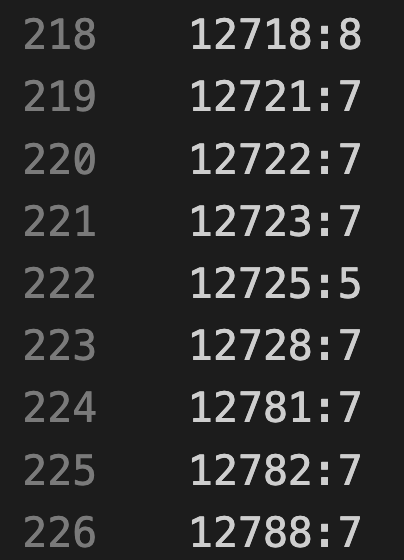
langton_loop.txt; each line consists of a rule string, followed by a colon, followed by the cell’s updated value in the next generation.This rule indicates that a cell that has state 1 and the von Neumann neighbors (in clockwise order) 2, 7, 2, and 5 will be updated as belonging to state 4 in the next generation. This rule is illustrated in the figure below.
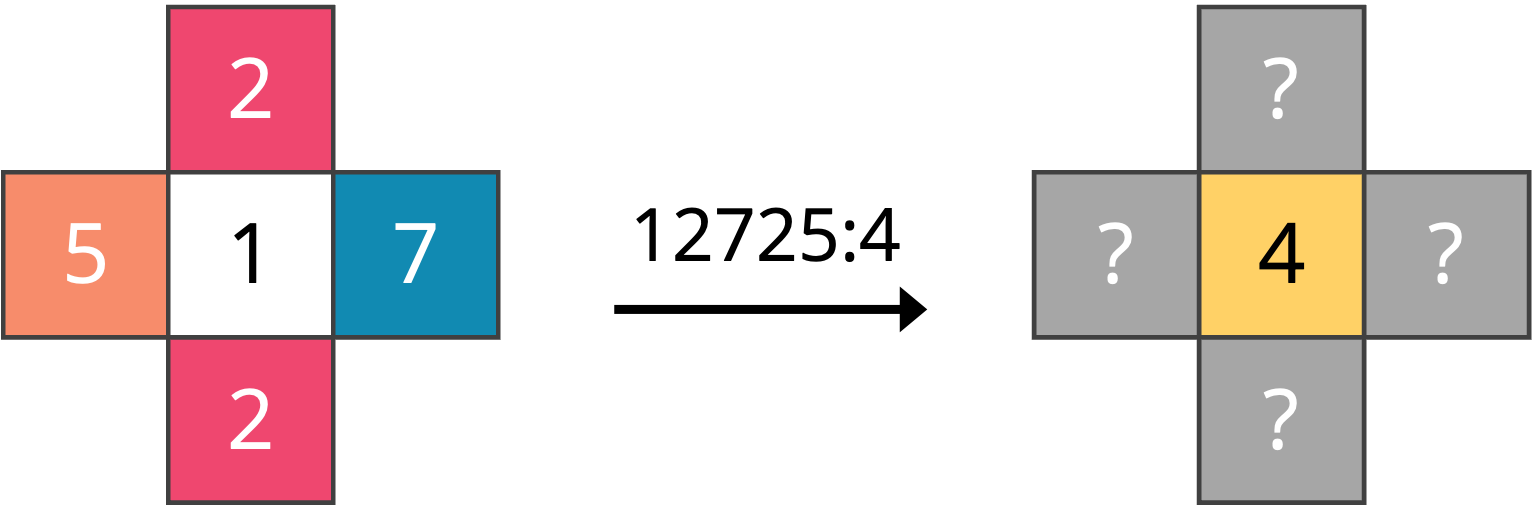
12725:5 for von Neumann neighborhoods. Each cell’s color is tied to its state and is based on the colors we will use for generating Langton loops.We will now implement read_rules_from_file(), which takes as input a string corresponding to a file name and returns a map of strings to strings rule_strings representing the rule set encoded in that file, mapping a neighborhood string to a cell’s state in the next generation. For the above figure, we will have rule_strings["12725"] = "4".
We begin by declaring rule_strings, which we will eventually return.
def read_rules_from_file(filename: str) -> dict[str, str]:
    """
    read_rules_from_file takes a filename as a string and reads the rule strings provided in this file.
    It stores the result in a dictionary mapping neighborhood strings to strings.
    Args:
        filename (str): The name of the file containing the rule strings.
    Returns:
        dict[str, str]: A dictionary where keys are neighborhood strings and values are the resulting state strings.
    """
    if not isinstance(filename, str) or len(filename) == 0:
        raise ValueError("filename must be a non-empty string.")
    # create a new dictionary (aka map) to store the rules
    rules: dict[str, str] = dict()
    # to fill in
    return rules
We next attempt to open and read the file into a single string called giant_string. As we saw in a previous code along, using the with open(filename, "r") as file: construct ensures that the file is automatically closed once the block is finished, even if an error occurs. Inside the block, we call file.read(), which reads the entire contents of the file into one long string that we assign to a variable giant_string.
def read_rules_from_file(filename: str) -> dict[str, str]:
    """
    read_rules_from_file takes a filename as a string and reads the rule strings provided in this file.
    It stores the result in a dictionary mapping neighborhood strings to strings.
    Args:
        filename (str): The name of the file containing the rule strings.
    Returns:
        dict[str, str]: A dictionary where keys are neighborhood strings and values are the resulting state strings.
    """
    if not isinstance(filename, str) or len(filename) == 0:
        raise ValueError("filename must be a non-empty string.")
    # create a new dictionary (aka map) to store the rules
    rules: dict[str, str] = dict()
    # open and read the file
    with open(filename, "r") as file:
        giant_string = file.read()
    # to fill in
    return rules
As with our work then take the file contents stored in giant_string and first trim any leading or trailing whitespace using .strip(). Next, we split this large string into a list of smaller strings, one for each line in the file, by calling .splitlines().
def read_rules_from_file(filename: str) -> dict[str, str]:
    """
    read_rules_from_file takes a filename as a string and reads the rule strings provided in this file.
    It stores the result in a dictionary mapping neighborhood strings to strings.
    Args:
        filename (str): The name of the file containing the rule strings.
    Returns:
        dict[str, str]: A dictionary where keys are neighborhood strings and values are the resulting state strings.
    """
    if not isinstance(filename, str) or len(filename) == 0:
        raise ValueError("filename must be a non-empty string.")
    # create a new dictionary (aka map) to store the rules
    rules: dict[str, str] = dict()
    # open and read the file
    with open(filename, "r") as file:
        giant_string = file.read()
    # parse out the file contents as a list of strings, one line at a time
    trimmed_giant_string = giant_string.strip()
    lines = trimmed_giant_string.splitlines()
    # to fill in
    return rules
Finally, we range over all the elements of lines. For each such element current_line, we parse the string into a list of strings parts by separating current_line at the colon. If all goes well, then parts should comprise two elements: parts[0] is the neighborhood string of the current rule, and parts[1] is a string corresponding to the updated value of the cell according to the rule. We store this latter string directly and set the current element of rules.
def read_rules_from_file(filename: str) -> dict[str, str]:
    """
    read_rules_from_file takes a filename as a string and reads the rule strings provided in this file.
    It stores the result in a dictionary mapping neighborhood strings to strings.
    Args:
        filename (str): The name of the file containing the rule strings.
    Returns:
        dict[str, str]: A dictionary where keys are neighborhood strings and values are the resulting state strings.
    """
    if not isinstance(filename, str) or len(filename) == 0:
        raise ValueError("filename must be a non-empty string.")
    # create a new dictionary (aka map) to store the rules
    rules: dict[str, str] = dict()
    # open and read the file
    with open(filename, "r") as file:
        giant_string = file.read()
    # parse out the file contents as a list of strings, one line at a time
    trimmed_giant_string = giant_string.strip()
    lines = trimmed_giant_string.splitlines()
    for current_line in lines:
        parts = current_line.split(":")
        # parts should have exactly two strings in it
        if len(parts) != 2:
            raise ValueError("Too many colons or not enough in rule.")
        # first part is the neighborhood string
        neighborhood_string = parts[0]
        # second part is the state of the cell in the next generation as a string
        new_state = parts[1]
        # add the current neighborhood and updated state to our rule dictionary (aka map)
        rules[neighborhood_string] = new_state
    return rules
The starter code also provides read_color_map_from_file(), which reads a color map from a file in the color_maps directory. Each line has the format state:color_name — for example, 2:red. The function splits each line on the colon, just as we did for rules, and stores the resulting state-to-color-name pairs in a dict[str, str].
def read_color_map_from_file(filename: str) -> dict[str, str]:
    """
    Reads a color map configuration from a txt file and returns it as a dictionary.
    Args:
        filename (str): The path to the color map file.
    Returns:
        dict[str, str]: A dictionary mapping state strings to color name strings.
        Color name values must be one of: dark_gray, white, red, green, yellow,
        orange, purple, blue, or black.
    """
    with open(filename, 'r') as f:
        giant_string = f.read()
    trimmed_giant_string = giant_string.strip()
    lines = trimmed_giant_string.splitlines()
    color_map: dict[str, str] = {}
    for line in lines:
        # each line looks like "0:dark_gray"
        parts = line.split(':')
        state = parts[0].strip()
        color = parts[1].strip()
        color_map[state] = color
    return color_map
Drawing automata
We next turn to drawing.py, which will contain code for drawing automata to images using the functions provided by pygame. Our highest level function is draw_game_boards(), which ranges over the boards in a given list of GameBoard objects and draws each of them by calling a subroutine draw_game_board(). We can safely copy over this function from our work with the Game of Life, which is why it is present in the starter code.
def draw_game_boards(boards: list[GameBoard], cell_width: int) -> list[pygame.Surface]:
    """
    Convert a list of GameBoard objects into a list of Pygame Surface images.
    Args:
        boards (list[GameBoard]): A non-empty list of rectangular GameBoard objects.
        cell_width (int): The width (in pixels) of each cell when drawn.
    Returns:
        list[pygame.Surface]: A list of Pygame Surfaces, one for each GameBoard,
        with cells drawn using the given cell size.
    """
    # --- minimal parameter checks ---
    if not isinstance(boards, list) or len(boards) == 0:
        raise ValueError("boards must be a non-empty list of GameBoard objects.")
    if not isinstance(cell_width, int) or cell_width <= 0:
        raise ValueError("cell_width must be a positive integer.")
    result: list[pygame.Surface] = []
    for board in boards:
        result.append(draw_game_board(board, cell_width))
    return result
The draw_game_board() function will be quite different to its Game of Life analogue, since we are drawing an arbitrary automaton that will be able to take several different states instead of just two. By inspection of the Game of Life files in the boards folder, you can see that we use 0 to represent false and 1 to represent true. Accordingly, we want to make sure that we preserve the Game of Life color coding when we extend it to other automata.
The color coding that we will use is shown in the table below, which associates state numbers to the RGB codes of the colors that we will assign to these states. We also color the background of each row to show the color that we will use.
| State | RGB codes |
|---|---|
| 0 | (60, 60, 60) |
| 1 | (255, 255, 255) |
| 2 | (239, 71, 111) |
| 3 | (6, 214, 160) |
| 4 | (255, 255, 0) |
| 5 | (255, 165, 0) |
| 6 | (160, 32, 240) |
| 7 | (17, 138, 178) |
| 8 | (0, 0, 0) |
We will now write draw_game_board(). We begin by creating the surface to have the appropriate height and width. We will eventually return this pygame.Surface object.
def draw_game_board(current_board: GameBoard, cell_width: int) -> pygame.Surface:
    """
    Draw a rectangular GameBoard onto a new Pygame Surface.
    Args:
        current_board (GameBoard): The game board to be drawn.
        cell_width (int): The width and height in pixels of each cell.
    Returns:
        pygame.Surface: A Pygame Surface object representing the visual rendering
        of the given GameBoard.
    """
    # parameter checks
    if not isinstance(current_board, list) or len(current_board) == 0:
        raise ValueError("current_board must be a non-empty GameBoard.")
    if not isinstance(cell_width, int) or cell_width <= 0:
        raise ValueError("cell_width must be a positive integer.")
    # declare surface
    width = count_columns(current_board) * cell_width
    height = count_rows(current_board) * cell_width
    surface = pygame.Surface((width, height))
    # to fill in
    return surface
Next, we declare our colors as a collection of RGB tuples, and we set the board’s background as dark gray.
def draw_game_board(current_board: GameBoard, cell_width: int) -> pygame.Surface:
    """
    Draw a rectangular GameBoard onto a new Pygame Surface.
    Args:
        current_board (GameBoard): The game board to be drawn.
        cell_width (int): The width and height in pixels of each cell.
    Returns:
        pygame.Surface: A Pygame Surface object representing the visual rendering
        of the given GameBoard.
    """
    # parameter checks
    if not isinstance(current_board, list) or len(current_board) == 0:
        raise ValueError("current_board must be a non-empty GameBoard.")
    if not isinstance(cell_width, int) or cell_width <= 0:
        raise ValueError("cell_width must be a positive integer.")
    # declare surface
    width = count_columns(current_board) * cell_width
    height = count_rows(current_board) * cell_width
    surface = pygame.Surface((width, height))
    dark_gray = (60, 60, 60)
    white = (255, 255, 255)
    red = (239, 71, 111)
    green = (6, 214, 160)
    yellow = (255, 255, 0)
    orange = (255, 165, 0)
    purple = (160, 32, 240)
    blue = (17, 138, 178)
    black = (0, 0, 0)
    # set the fill color to dark gray
    surface.fill(dark_gray)
    # to fill in
    return surface
We then range over all cells of the board, setting the fill color based on the state assigned to board[i][j]
def draw_game_board(current_board: GameBoard, cell_width: int) -> pygame.Surface:
    """
    Draw a rectangular GameBoard onto a new Pygame Surface.
    Args:
        current_board (GameBoard): The game board to be drawn.
        cell_width (int): The width and height in pixels of each cell.
    Returns:
        pygame.Surface: A Pygame Surface object representing the visual rendering
        of the given GameBoard.
    """
    # parameter checks
    if not isinstance(current_board, list) or len(current_board) == 0:
        raise ValueError("current_board must be a non-empty GameBoard.")
    if not isinstance(cell_width, int) or cell_width <= 0:
        raise ValueError("cell_width must be a positive integer.")
    # declare surface
    width = count_columns(current_board) * cell_width
    height = count_rows(current_board) * cell_width
    surface = pygame.Surface((width, height))
    dark_gray = (60, 60, 60)
    white = (255, 255, 255)
    red = (239, 71, 111)
    green = (6, 214, 160)
    yellow = (255, 255, 0)
    orange = (255, 165, 0)
    purple = (160, 32, 240)
    blue = (17, 138, 178)
    black = (0, 0, 0)
    # set the fill color to dark gray
    surface.fill(dark_gray)
    color_map = {
        "0": dark_gray,
        "1": white,
        "2": red,
        "3": green,
        "4": yellow,
        "5": orange,
        "6": purple,
        "7": blue,
        "8": black,
    }
    # fill in...
    return surface
Note: The astute reader may notice inlangton_loop.txtthat there are nine different states, represented by the integers 0 to 8, inclusively. This fact is seemingly contradictory to the statement from the core text that Langton’s loops have eight states. Our automaton has an additional cell because Langton originally had cells within his self-replicator that had the same state as the default (dead) cells in the background. We would like these cells to be visible against the background, and so we separated these cells out as a ninth state.
Finally, we draw the circle so that its center is in the middle of the cell and its radius is equal to half of cell_width. This code is the same as when we drew a Game of Life board. In this case, because the canvas’s background has the color of the default zero value, we only need to generate a draw a circle if its state is nonzero.
def draw_game_board(current_board: GameBoard, cell_width: int) -> pygame.Surface:
    """
    Draw a rectangular GameBoard onto a new Pygame Surface.
    Args:
        current_board (GameBoard): The game board to be drawn.
        cell_width (int): The width and height in pixels of each cell.
    Returns:
        pygame.Surface: A Pygame Surface object representing the visual rendering
        of the given GameBoard.
    """
    # parameter checks
    if not isinstance(current_board, list) or len(current_board) == 0:
        raise ValueError("current_board must be a non-empty GameBoard.")
    if not isinstance(cell_width, int) or cell_width <= 0:
        raise ValueError("cell_width must be a positive integer.")
    # declare surface
    width = count_columns(current_board) * cell_width
    height = count_rows(current_board) * cell_width
    surface = pygame.Surface((width, height))
    dark_gray = (60, 60, 60)
    white = (255, 255, 255)
    red = (239, 71, 111)
    green = (6, 214, 160)
    yellow = (255, 255, 0)
    orange = (255, 165, 0)
    purple = (160, 32, 240)
    blue = (17, 138, 178)
    black = (0, 0, 0)
    # set the fill color to dark gray
    surface.fill(dark_gray)
    color_map = {
        "0": dark_gray,
        "1": white,
        "2": red,
        "3": green,
        "4": yellow,
        "5": orange,
        "6": purple,
        "7": blue,
        "8": black,
    }
    scaling_factor = 0.8  # so that adjacent cells don't touch
    radius = scaling_factor * cell_width / 2
    for i in range(len(current_board)):
        for j in range(len(current_board[i])):
            val = current_board[i][j]
            # ensure that the cell's state is between 0 and 8, inclusively
            if not (val in color_map):
                raise ValueError("Error: Out of range value " + str(val) + " in board when drawing.")

            # we know the fill color, so let's draw the cell as a circle
            if val != "0":
                # set the circle's center
                x = j * cell_width + cell_width // 2
                y = i * cell_width + cell_width // 2

                # draw circle and fill it in
                pygame.draw.circle(surface, color_map[val], (x, y), int(radius))
    return surface
Taking command line parameters
We are now ready to run our simulation in main.py. We begin by taking in six command-line arguments via sys.argv:
- (String) The neighborhood type (“vonNeumann” or “Moore”).
- (String) The location of the rule set.
- (String) The file location of the initial board file.
- (String) The file location where we should write the MP4 video of the automaton.
- (Integer) The width in pixels of each cell.
- (Integer) The number of generations to run our simulation.
After parsing these arguments, we will print a message to the console that they have been read successfully. Remember that if any parameter fails to parse, Python will provide an error for us. We provide the following code in def main() as part of the starter code.
def main():
    print("Cellular automata!")
    if len(sys.argv) != 7:
        raise ValueError(
            "Usage: python main.py neighborhood_type rule_file initial_board_file output_file cell_width num_gens"
        )
    neighborhood_type = sys.argv[1]  # "vonNeumann" or "Moore"
    rule_file = sys.argv[2]  # where are rule strings found?
    initial_board_file = sys.argv[3]  # my starting GameBoard file name
    output_file = sys.argv[4]  # where to draw the final MP4 video boards
    cell_width = int(sys.argv[5])  # how many pixels wide should each cell be?
    num_gens = int(sys.argv[6])  # how many generations to play the automaton?
    print("Parameters read in successfully!")
Note: Technically, reading in a value of neighborhood is redundant, since we could infer whether we are considering a von Neumann or Moore neighborhood based on the length of rules in the rule set.
Next, we will call read_rules_from_file() and read_board_from_file() to read in the rule set and the initial board, again printing a message if we are successful.
def main():
    print("Cellular automata!")

    # ...
    rules = read_rules_from_file(rule_file) # dictionary of strings to strings representing the rules
    print("Rules read. Reading in board.")
    initial_board = read_board_from_file(initial_board_file)
    print("Board read in successfully. Ready to simulate the automaton.")
    # to fill in...
Finally, we call play_automaton() to run the simulation, draw_game_boards() on the resulting list of GameBoard objects, and imageio.get_writer() to convert the resulting images to an MP4 video. We add pygame.quit() to shut down all pygame modules.
def main():
    print("Cellular automata!")

    # ...
    pygame.init()
    boards = play_automaton(initial_board, num_gens, neighborhood_type, rules)
    print("Drawing automata generations to surfaces.")
    surfaces = draw_game_boards(boards, cell_width)
    print("Converting surfaces to .mp4 video.")
    video_path = f"{output_file}.mp4"
    writer = imageio.get_writer(video_path, fps=10, codec='libx264', quality=8)
    for surface in surfaces:
        frame = pygame_surface_to_numpy(surface)
        writer.append_data(frame)
    writer.close()

    pygame.quit()
pygame_surface_to_numpy(surface) just turns the Pygame screen (a Surface) into a NumPy image so we can save it as video. Pygame uses array indexing for its axes, while NumPy uses graphics indexing, and so as we saw in the previous code along, we need to switch the axes.
def pygame_surface_to_numpy(surface: pygame.Surface) -> numpy.ndarray:
    """
    Convert a Pygame Surface to a NumPy RGB image array.
    Returns:
        numpy.ndarray: The frame as (height, width, 3) uint8 RGB.
    """
    # get a numpy array associated with the surface and swap its axes
    return pygame.surfarray.array3d(surface).swapaxes(0, 1)
Running our generalized cellular automaton
It is time to run the simulation.
If you followed the previous code along, you should already have installed the three modules that we will need. If not, run the following command in a command-line terminal (replace pip3 with pip if you are using a Windows machine).
pip3 install pygame "imageio[ffmpeg]" numpy
STOP: Let’s check to make sure that our code is working correctly by ensuring that it can still replicate the Game of Life. To do so, navigate into yourpython/src/cellular_automatadirectory and execute the command below on macOS/Linux, replacingpython3withpythonif you are using a Windows machine. The result will be to generate the Gosper gun.
python3 main.py Moore rules/gol_rules.txt boards/gosper_gun.csv output/gosper_gun 20 400
Now that we can run the Game of Life, let’s run the first 50 generations of Langton’s loop by executing the following command (replace python3 with python on a Windows machine):
python3 main.py vonNeumann rules/langton_loop.txt boards/langton_loop.csv output/langton_loop 20 50
If everything is in order, then you will see the MP4 appear at output/langton_loop.mp4. The loops are pretty, but we have not run the simulation for enough generations to observe self-replication. To do so, let’s increase the number of generations from 50 to 900 by executing the following command, which may take a minute or two to complete.
python3 main.py vonNeumann rules/langton_loop.txt boards/langton_loop.csv output/langton_loop 20 900
Note: If your computer struggles to generate such a large MP4, consider lowering thecell_widthcommand-line argument to 5 or 10.
Note: We set the parameters in main.py in the Sandbox above since we don’t run it with a Bash script. The code above runs for 50 generations and may need to be ran locally to simulate 900 generations.
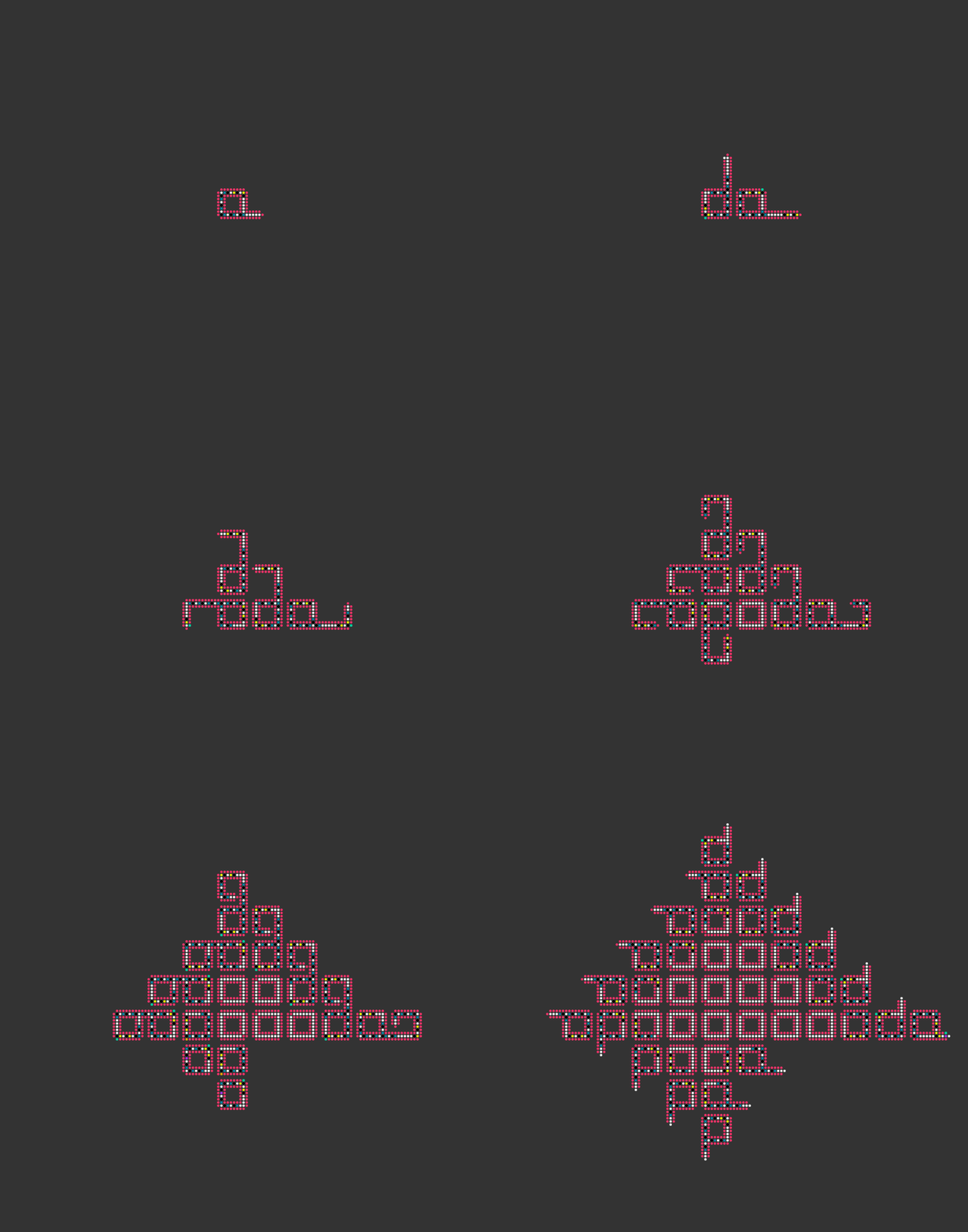
You will now witness the radiant splendor of the self-replicating Langton loops, shown below. Like us, they are born, live frantically, reproduce, and die.
Other automata in the starter code
The power of our framework lies in its generality: the same engine drives every automaton, with behavior determined entirely by the rule, board, and color map files. The starter code’s rules/, boards/, and color_maps/ directories include several additional automata worth exploring.
Rock-paper-scissors. Three states start in separate corners of the board and spread outward. When two states meet, they interact according to the circular rule: rock beats scissors, scissors beats paper, paper beats rock. The result is a striking, ever-shifting pattern of swirling colored regions. Try it with rules/rps_corners.txt and boards/rps_corners.csv.
Crystal growth. Based on a real research paper, this automaton simulates the growth of a crystal structure from a small seed. Try it with rules/crystal_growth.txt and boards/crystal_growth_1.csv.
BML traffic. A foundational traffic model that earned thousands of citations when it was published about thirty years ago. Particles attempt to move up or to the right; when they encounter each other, they must wait. Try it with rules/bml_traffic.txt and boards/bml_traffic.csv.
Predator-prey. Predators eat prey, but prey can propagate and swim away, producing waves and bands of activity that evolve over time. This model is related to the practice exercises for this chapter. Try it with rules/predator_prey.txt and boards/predator_prey.csv.
Langton’s ant. An ant on a grid follows two simple rules: on a white cell, turn 90° clockwise, flip the cell to black, and move forward; on a black cell, turn 90° counter-clockwise, flip the cell to white, and move forward. For roughly the first 10,000 steps the ant traces what appears to be a random path, but then abruptly begins repeating a short cycle of about 100 steps that carries it diagonally off to infinity — a striking example of deterministic rules producing seemingly unpredictable behavior. Try it with rules/langtons_ant.txt and boards/langtons_ant.csv.
Time to practice!
After you have the chance to check your work below, you are ready to apply what you have learned to the chapter’s exercises. Or, you can carry on to the next chapter, where we will learn about how generating random numbers can help us simulate a presidential election.
Check your work from the code along
We provide autograders in the window below (or via a direct link) allowing you to check your work for the following functions:
neighborhood_to_string()update_cell()update_board()play_automaton()