Code along video
Although we strongly suggest coding along with us by following the video above, you can find completed code from the code along in our course code repository.
Learning objectives
In this lesson, we will start the process of simulating an election from polling data that we discussed in the core text by learning how to read this polling data from a file. We will apply our work with parsing to two tasks:
- Reading a file containing electoral college votes into a dictionary of strings to integers that associates each state to its number of electoral votes.
- Reading a file containing polling data into a dictionary of strings to integers that associates each state to a candidate’s polling percentage in that state.
Although these tasks are specific, once we can read data from files, we will obtain a vital transferable skill that will give us confidence to build larger projects involving larger files.
Code along summary
Setup
We are providing starter code and data in the form of a compressed folder. Download this file, expand its contents into a folder election, and move this folder into your python/src source code directory.
The election directory contains the following two Python files and represents our first example of having multiple such files in the same directory. As our programs grow, we will divide our code into multiple files based on accomplishing different tasks.
- a
main.pyfile, where we will place our code for running the election simulator in the next code along; - an
election_io.pyfile, where we will place code in this code along for parsing data from files.
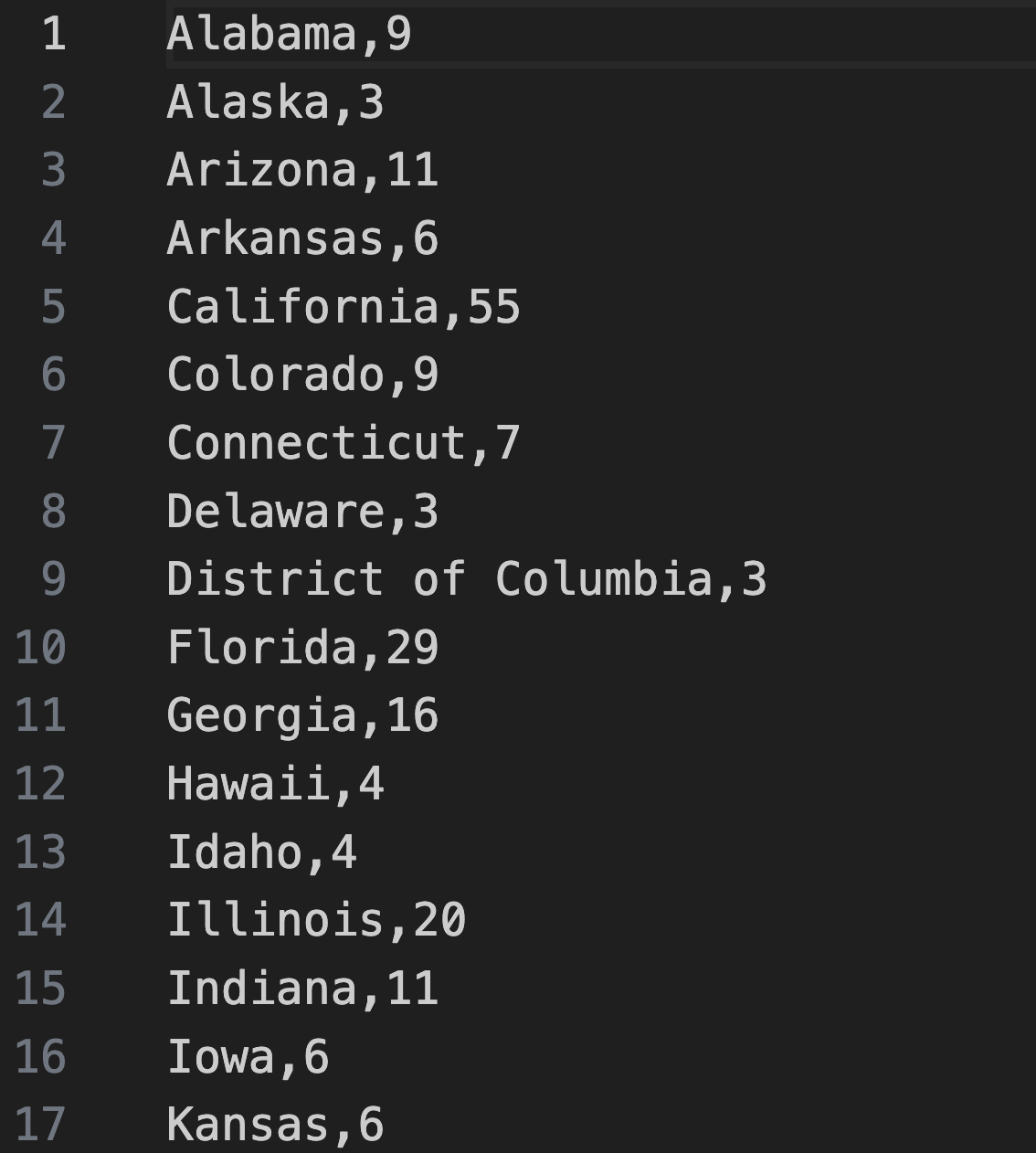
It also contains a data directory, which contains useful data for simulating the 2016 US presidential election in the form of four files. The electoralVotes.csv file contains electoral votes for all states; each line contains a state name, followed by a comma, followed by its number of electoral votes, as shown in the figure below.
Note: The.csvsuffix in this file stands for “comma separated values”, indicating that the data in the file are separated by commas.
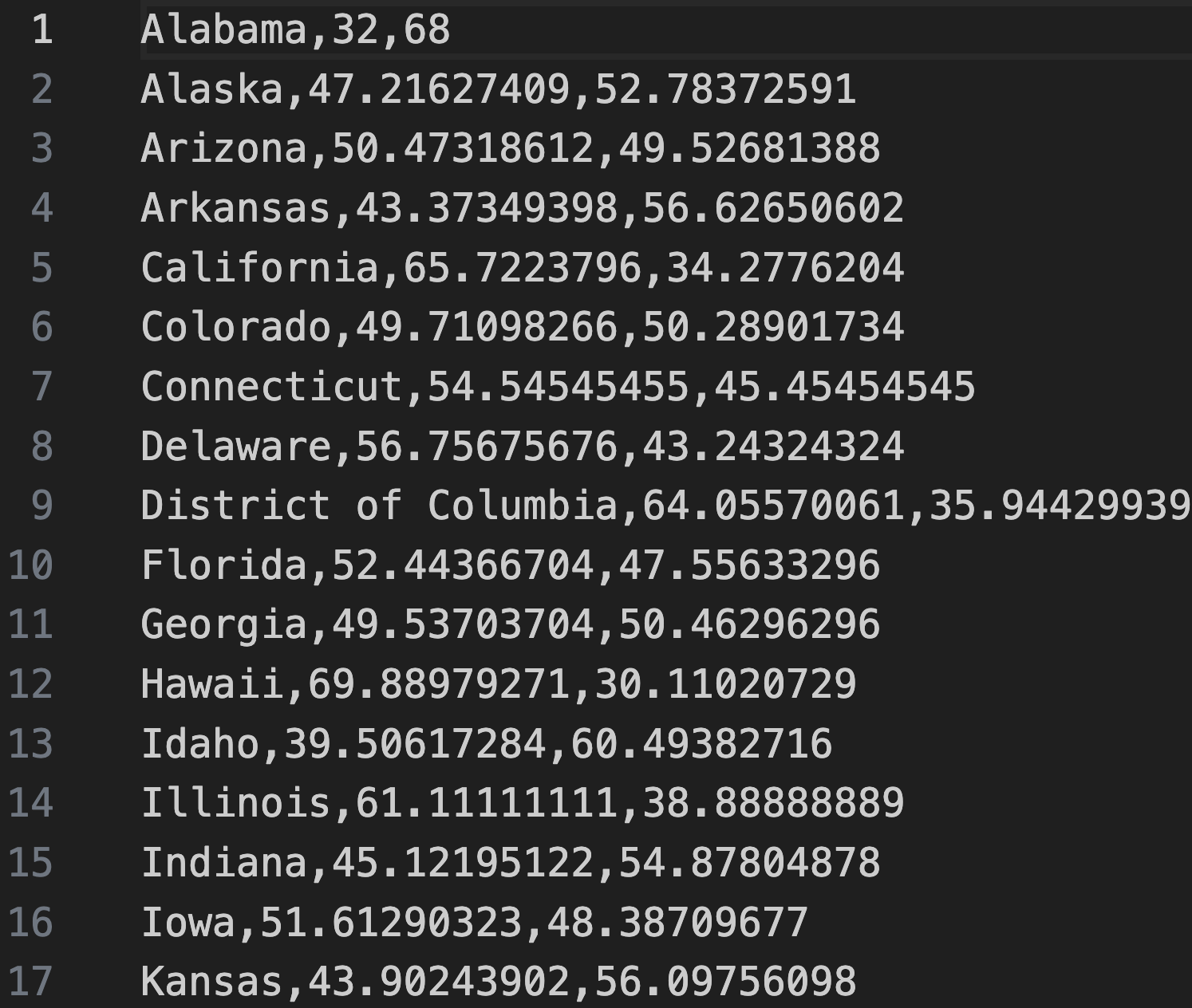
The remaining three text files contain polling data; each line of a file contains a state name, followed by the polling percentage for candidate 1 (Clinton), followed by the polling percentage for candidate 2 (Trump). The polling data in these files was sampled at different times before the 2016 election as described below.
earlyPolls.csv: contains polls from summer 2016.conventions.csv: contains polls from around the Republican and Democratic National Conventions in mid- and late July 2016.debates.csv: contains polls from around the presidential debates, in late September through mid-October 2016.
For example, the figure below shows a screenshot from earlyPolls.csv.
We encourage you to explore these files before starting the code along, but don’t change anything!
Reading Electoral College votes from file
To build our election simulator, we will need two functions for reading data from a file that we will place in election_io.py. We focus first on reading the data in electoralVotes.csv, whose format is shown in a previous figure.
Our function for parsing the electoral vote data, read_electoral_votes(), takes as input a string filename. It returns a dictionary of strings to unsigned integers that we have been calling electoral_votes and that maps a state’s name to its number of Electoral College votes. We first create this dictionary, which we will eventually return.
def read_electoral_votes(filename: str) -> dict[str, int]:
    """
    Processes the number of electoral votes for each state.
    Parameters:
        filename (str): A filename string.
    Returns:
        dict[str, int]: A dictionary that associates each state name (string)
        to an integer corresponding to its number of Electoral College votes.
    """
    if len(filename) == 0 or not isinstance(filename, str):
        raise ValueError("filename must be a non-empty string.")
    electoral_votes: dict[str, int] = {}
    # to fill in
    return electoral_votes
Note in the above code that we also check whether filename is an empty string, or if filename is not a string, raising a ValueError in either case. The latter check allows us to introduce the isinstance() function, which takes as input a variable name and a type (in this case, str); it returns True if the variable has a value of that type, and False otherwise.
Next, we read in the file using the command open() to obtain a file object, and then process file using a function csv.reader() from the "csv" module imported at the top of election_io.py, which will provide functions for working with data stored in CSV files. Similar to the urllib.request.urlopen() function that we introduced in the previous chapter, csv.reader() returns a list that we call lines, each element of which corresponds to a line in the file.
import csv
def read_electoral_votes(filename: str) -> dict[str, int]:
    """
    Processes the number of electoral votes for each state.
    Parameters:
    - filename (str): A filename string.
    Returns:
    - dict[str, int]: A dictionary that associates each state name (string)
      to an integer corresponding to its number of Electoral College votes.
    """
    if len(filename) == 0 or not isinstance(filename, str):
        raise ValueError("filename must be a non-empty string.")
    electoral_votes: dict[str, int] = {}
    # read in the file contents
    with open(filename, 'r') as file:
        lines = csv.reader(file)
        # to fill in
    return electoral_votes
Furthermore, each element of lines is itself a list, a concept that we will explore in the next chapter when we discuss two- and multi-dimensional arrays. In general, this list contains a collection of strings, where each string corresponds to an element of that line between commas.
In this particular case, we know that each line consists of only the state name, followed by a comma, followed by the number of electoral votes. As a result, we will range over lines and parse each element line of this list, which will contain two elements:line[0] is a string containing a state name, which will be a key of electoral_votes; line[1], is a string representing the number of electoral votes, which we will convert into an integer num_votes using the int() function.
def read_electoral_votes(filename: str) -> dict[str, int]:
    """
    Processes the number of electoral votes for each state.
    Parameters:
    - filename (str): A filename string.
    Returns:
    - dict[str, int]: A dictionary that associates each state name (string)
      to an integer corresponding to its number of Electoral College votes.
    """
    if len(filename) == 0 or not isinstance(filename, str):
        raise ValueError("filename must be a non-empty string.")
    electoral_votes: dict[str, int] = {}
    # read in the file contents
    with open(filename, 'r') as file:
        lines = csv.reader(file)
        # range over lines, parse each line, and add values to our dictionary
        for line in lines:
            # line has two items: the state name and the number of electoral votes (as a string)
            state_name = line[0]
            # parse the number of electoral votes
            num_votes = int(line[1])
            # to fill in
    return electoral_votes
All that remains is to assign votes to electoral_votes[state_name].
import csv
def read_electoral_votes(filename: str) -> dict[str, int]:
    """
    Processes the number of electoral votes for each state.
    Parameters:
    - filename (str): A filename string.
    Returns:
    - dict[str, int]: A dictionary that associates each state name (string)
      to an integer corresponding to its number of Electoral College votes.
    """
    if len(filename) == 0 or not isinstance(filename, str):
        raise ValueError("filename must be a non-empty string.")
    electoral_votes: dict[str, int] = {}
    # read in the file contents
    with open(filename, 'r') as file:
        lines = csv.reader(file)
        # range over lines, parse each line, and add values to our dictionary
        for line in lines:
            # line has two items: the state name and the number of electoral votes (as a string)
            state_name = line[0]
            # parse the number of electoral votes
            num_votes = int(line[1])
            # add to dictionary
            electoral_votes[state_name] = num_votes
    return electoral_votes
Reading polling data from file
The second function we will write, ReadPollingData(), also takes as input a string filename. It returns a dictionary of strings to decimals that we have been calling polls, and that maps a state’s name to the current polling percentage for candidate 1.
Note: Because we are assuming only a two-candidate race, we can access the polling percentage for candidate 2 by subtracting candidate 1’s polling percentage from 1.
Most of this function proceeds similarly to read_electoral_votes(); we open the file and read it in as a list lines, where each element corresponds to a line of the file.
def read_polling_data(filename: str) -> dict[str, float]:
    """
    Parses polling percentages from a file.
    Parameters:
    - filename (str): A filename string.
    Returns:
    - dict[str, float]: A dictionary of state names (strings) to floats
      corresponding to the percentages for candidate 1.
    """
    if len(filename) == 0 or not isinstance(filename, str):
        raise ValueError("filename must be a non-empty string.")
    candidate_1_percentages: dict[str, float] = {}
    with open(filename, 'r') as file:
        lines = csv.reader(file)
        # range over each line of the file and parse in the data
        for line in lines:
            state_name = line[0]
            percentage_1 = float(line[1])
            # to fill in
    return candidate_1_percentages
The difference arises because each line in the polling data files has three elements instead of two (see figure below), corresponding to the state name and the polling percentages for both candidates. However, as mentioned previously, we only need to read in the percentage for candidate 1, so the only difference with read_electoral_votes() is that we need to parse the second value in each row as a decimal; we then divide this value, represented as a percentage, by 100.
def read_polling_data(filename: str) -> dict[str, float]:
    """
    Parses polling percentages from a file.
    Parameters:
    - filename (str): A filename string.
    Returns:
    - dict[str, float]: A dictionary of state names (strings) to floats
      corresponding to the percentages for candidate 1.
    """
    if len(filename) == 0 or not isinstance(filename, str):
        raise ValueError("filename must be a non-empty string.")
    candidate_1_percentages: dict[str, float] = {}
    with open(filename, 'r') as file:
        lines = csv.reader(file)
        # range over each line of the file and parse in the data
        for line in lines:
            # line has three items (state name and two percentages)
            state_name = line[0]
            percentage_1 = float(line[1])
            # normalize percentage (divide by 100) and set the appropriate dictionary value
            candidate_1_percentages[state_name] = percentage_1 / 100.0
    return candidate_1_percentages
Ensuring that our parsing code works
In the next code along, we will write code in main.py that, after reading in the data using the functions that we have written, will run a Monte Carlo simulation of multiple elections using this polling data.
First, because the two functions that we want to call (read_polling_data() and read_polling_data()) exist in a different file (election_io.py) within the same directory as main.py, we need to tell Python to import them. We could place import election_io at the top of our file, in which case we would need to call our functions using election_io as a prefix (e.g., election_io.read_electoral_votes()). Instead, we will import the functions that we need directly, as shown below, so that we can call them without the prefix.
from election_io import read_electoral_votes, read_polling_data
def main():
    print("Simulating the 2016 US Presidential election.")
We will now ensure that our code is behaving correctly. In main.py, we will declare two strings to store the file names of our electoral votes and polling data. Because main.py resides in the election folder, and we need to access the data subdirectory, we will need to add the suffix data/ before our desired file name.
After reading in the data into the electoral_votes and candidate1_percentages
from election_io import read_electoral_votes, read_polling_data
def main():
    print("Simulating the 2016 US Presidential election.")
    electoral_vote_file = "data/electoralVotes.csv"
    poll_file = "data/earlyPolls.csv"
    electoral_votes = read_electoral_votes(electoral_vote_file)
    polls = read_polling_data(poll_file)
    print(electoral_votes)
    print(polls)
STOP: In a new terminal window, navigate into our directory usingcd python/src/election. Then run the code by executingpython3 main.py(macOS/Linux) orpython main.py(Python).
The result of printing the dictionaries is not pretty, but it tells us that the code is working. Delete the two print statements, and you will be ready for our next code along!
Looking ahead
In the next code along, we will write code in main.py that, after reading in the data using the functions that we have written, will run a Monte Carlo simulation of multiple elections using this polling data.